---
updatedAt: 2025-12-04T17:37:23.000Z
agentTools:
projectIndex: https://arthur-platform.readme.io/llms.txt
---
# Getting Started with Monitoring CrewAI Agents
CrewAI simplifies the process of building agents, but developing testing and monitoring capabilities for these agents can be challenging. Arthur AI solves this problem by allowing you to monitor CrewAI agents with minimal code implementation.
## Pre-requisites
1. Crew AI agent (Quickstart Guide)
2. Arthur Engine Setup (Quickstart Guide)
## Step 1: Setup a new “agentic” model on Arthur Platform
Go to platform.arthur.ai, and choose the desired project in your workspace.
Select “+ Add Model” → “Agentic Model” type → Name your model and select your Arthur Engine → Next → Submit
Once the model is created, navigate to the dropdown on the top right `Model Management` → `API Key`
Copy the values and paste them in the `.env` file of your CrewAI Agent accordingly:
```text .env
....
ARTHUR_ENGINE_API_KEY=your_api_key
ARTHUR_TASK_ID=your_model_task_id
ARTHUR_ENGINE_BASE_URL=your_arthur_engine_base_url # most likely is http://localhost:3030
```
## Step 2: Install packages
To enable monitoring of your agents, we use the OpenInference standard. Thus we need to install the `openinference-instrumentation-crewai` package. In your agent directory (Usually `/src/`), run:
```Text terminal
uv add openinference-instrumentation-crewai
```
## Step 3: Setup tracing in your codebase
Create a new file `tracing.py` in your `/src/` with the following code
```python tracing.py
# Required imports for OpenTelemetry tracing and CrewAI instrumentation
from dotenv import load_dotenv
import os
from opentelemetry.sdk.trace import TracerProvider
from opentelemetry.sdk.resources import Resource
from openinference.instrumentation.crewai import CrewAIInstrumentor
from opentelemetry.exporter.otlp.proto.http.trace_exporter import OTLPSpanExporter
from opentelemetry.sdk.trace.export import SimpleSpanProcessor
# Load environment variables from .env file
load_dotenv()
def setup_arthur_tracing():
"""Set up OpenInference tracing with Arthur endpoint for CrewAI applications."""
try:
# Step 1: Get required environment variables
arthur_engine_base_url = os.getenv("ARTHUR_ENGINE_BASE_URL")
bearer_token = os.getenv("ARTHUR_ENGINE_API_KEY")
arthur_task_id = os.getenv("ARTHUR_TASK_ID")
# Validate required environment variables are set
if not arthur_engine_base_url or not bearer_token or not arthur_task_id:
print("Skipping tracing set up. ARTHUR_ENGINE_BASE_URL, ARTHUR_ENGINE_API_KEY, and ARTHUR_TASK_ID must be set in .env")
return
# Step 2: Create OTLP exporter to send traces to Arthur
otlp_endpoint = f"{arthur_engine_base_url}/v1/traces"
headers = {"Authorization": f"Bearer {bearer_token}"}
otlp_exporter = OTLPSpanExporter(
endpoint=otlp_endpoint,
headers=headers
)
# Step 3: Create OpenTelemetry resource with Arthur metadata
resource = Resource.create({
"arthur.task": arthur_task_id, # Links traces to your Arthur task
"service.name": "your_service_name" # Identifies your service in Arthur
})
# Step 4: Set up the OpenTelemetry tracer provider
trace_provider = TracerProvider(resource=resource)
# Step 5: Configure the OTLP span exporter (duplicate - can be removed)
otlp_span_exporter = OTLPSpanExporter(
endpoint=f"{arthur_engine_base_url}/v1/traces",
headers={
"Authorization": f"Bearer {bearer_token}"
}
)
# Step 6: Add span processor to send traces to Arthur
trace_provider.add_span_processor(SimpleSpanProcessor(otlp_span_exporter))
# Step 7: Instrument CrewAI to automatically capture traces
CrewAIInstrumentor().instrument(tracer_provider=trace_provider)
except Exception as e:
print("Error setting up Arthur tracing", e)
# Initialize tracing when this module is imported
setup_arthur_tracing()
```
Add this import statement to the top of your `main.py` file so that we can import our tracing code.
```python main.py
from . import tracing
....
```
## Step 3: Verify traces on Arthur Platform
Run your agent with the Crew AI run command
```Text terminal
crewai run
```
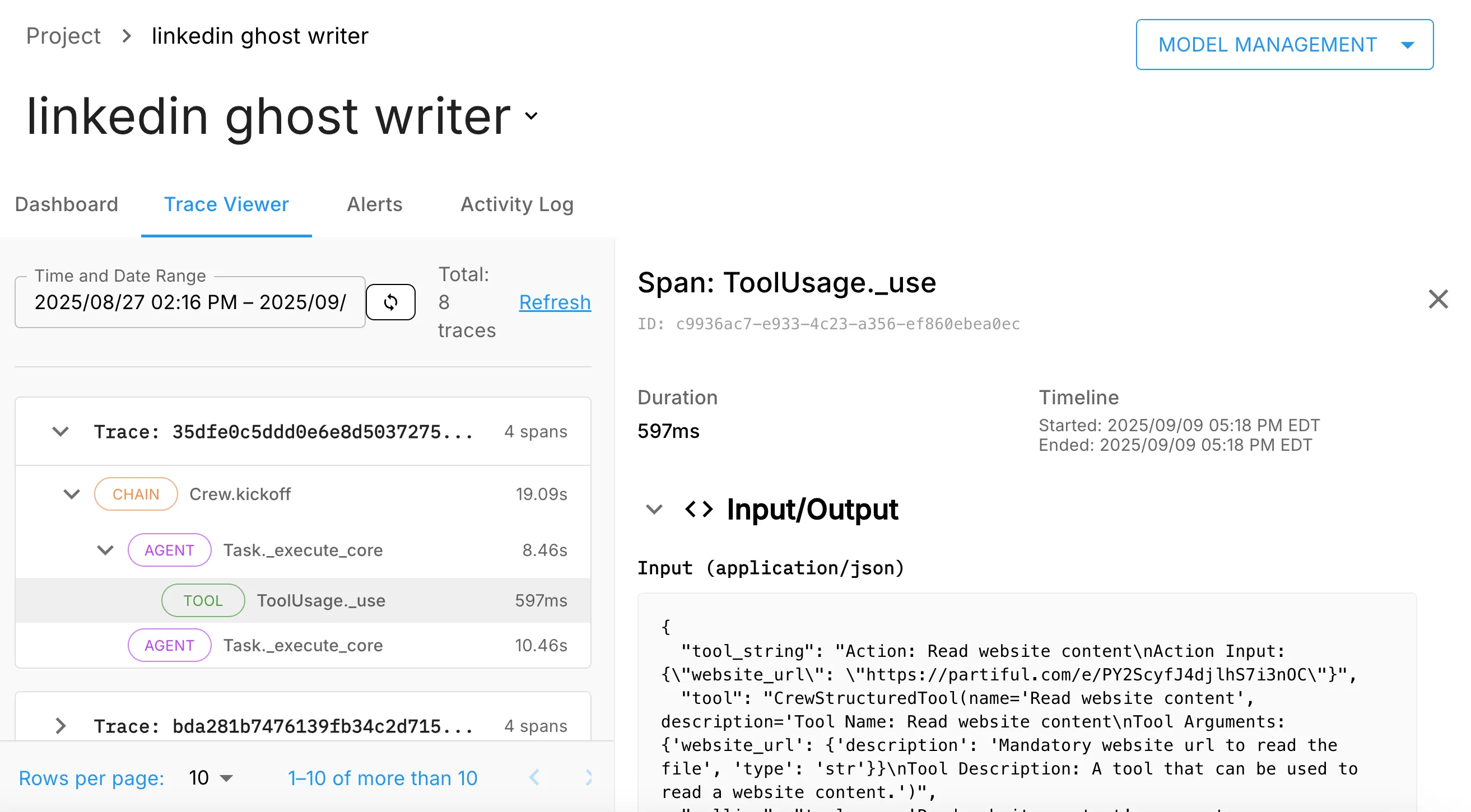
Once your agent is completed its run, head over to the Arthur Platform and navigate to your model you created and select the “**Trace Viewer**” tab and click on “**Refresh**” link on the right hand side to pull in the latest traces. You should see something similar to this: