
Agent Discovery
Automatically scan your infrastructure to find unregistered AI agents running outside your governance controls, then register or mute them.
Overview
You can't govern what you can't see. As AI adoption accelerates across enterprise teams, individual groups and vendors routinely deploy agents that never get registered with a central governance platform — a phenomenon known as shadow AI. These unregistered agents may be calling production LLMs, handling sensitive customer data, or invoking critical business tools with zero monitoring, policy coverage, or audit trail.
Agent Discovery answers the question: How do I find AI agents running in my infrastructure that are not registered or monitored in Arthur?
Arthur automatically scans infrastructure that has been connected to your Arthur workspace (such as GCP projects or AWS accounts) and surfaces every unregistered agent it detects within that connected infrastructure. Agents running outside of Arthur-connected infrastructure are not visible to Agent Discovery. For each discovered agent, you can inspect exactly what tools it calls, which sub-agents it invokes, and which LLMs it uses — all before deciding what to do with it. Once you understand an agent's behavior, you have two options:
- Register — bring the agent into full Arthur monitoring, policy enforcement, and alerting.
- Mute — acknowledge the agent and suppress future discovery alerts for it.
How Agent Discovery Works
Arthur's Agent Discovery feature operates as a continuous polling loop that scans cloud infrastructure connected to your Arthur workspace for agent activity. It only surfaces agents within that connected infrastructure — Arthur has no visibility into environments that have not been integrated with it. Here is what happens under the hood::
flowchart TD
    A[Arthur-Connected Infrastructure] -->|Polling cycle| B[Arthur Discovery Engine]
    B --> C{Agent already registered?}
    C -->|Yes| D[Skip - already monitored]
    C -->|No| E[Surface in Discovered Agents tab]
    E --> F{Team action}
    F -->|Register| G[Full Arthur Monitoring]
    F -->|Mute| H[Muted Agents tab]
Key behaviors:
- Automatic scanning — Arthur polls your infrastructure on a regular cadence. No manual intervention is required for routine discovery.
- Incremental detection — Only agents not already registered in Arthur appear in the Discovered Agents tab. Agents you have already registered are excluded from the list.
- Rich metadata — For each discovered agent, Arthur captures its infrastructure source (e.g., GCP project ID), the tools it calls, any sub-agents it orchestrates, and the LLMs it uses.
- Manual trigger — You can force an immediate full discovery cycle at any time using the API (see Scan Your Infrastructure).
Note: Agent Discovery requires that your cloud infrastructure is connected to Arthur. Contact your Arthur administrator if you do not see any discovered agents and expect to.
Scan Your Infrastructure
Arthur runs discovery automatically on a scheduled cadence. However, you can manually trigger a full discovery and polling cycle at any time — for example, after deploying new agents or connecting a new cloud project.
Trigger a Full Discovery Cycle
Use the POST /api/v1/agent-polling/execute-all endpoint to immediately discover new agents across all connected infrastructure and enqueue trace-fetch jobs for all eligible tasks.
import requests

ARTHUR_BASE_URL = "https://your-arthur-instance.com"
API_TOKEN = "your-api-token"

response = requests.post(
    f"{ARTHUR_BASE_URL}/api/v1/agent-polling/execute-all",
    headers={"Authorization": f"Bearer {API_TOKEN}"},
    params={
        "wait_for_completion": True,   # Block until all polling jobs finish
        "timeout": 120                 # Seconds to wait before returning
    }
)

print(response.status_code)
print(response.json())
const ARTHUR_BASE_URL = "https://your-arthur-instance.com";
const API_TOKEN = "your-api-token";
const params = new URLSearchParams({
wait_for_completion: "true",
timeout: "120",
});
const response = await fetch(
`${ARTHUR_BASE_URL}/api/v1/agent-polling/execute-all?${params}`,
{
method: "POST",
headers: {
Authorization: `Bearer ${API_TOKEN}`,
"Content-Type": "application/json",
},
}
);
const data = await response.json();
console.log(data);curl -X POST "https://your-arthur-instance.com/api/v1/agent-polling/execute-all?wait_for_completion=true&timeout=120" \
-H "Authorization: Bearer your-api-token"Query parameters:
| Parameter | Type | Description |
|---|---|---|
wait_for_completion | boolean | If true, the request blocks until all polling jobs finish. Defaults to false. |
timeout | integer | Maximum seconds to wait when wait_for_completion is true. |
Trigger Polling for a Specific Task
If you want to force a poll for a single known task rather than the full infrastructure, use the task-scoped endpoint:
import requests

ARTHUR_BASE_URL = "https://your-arthur-instance.com"
API_TOKEN = "your-api-token"
TASK_ID = "your-task-id"

response = requests.post(
    f"{ARTHUR_BASE_URL}/api/v1/tasks/{TASK_ID}/agent-polling/execute",
    headers={"Authorization": f"Bearer {API_TOKEN}"}
)

print(response.status_code)
print(response.json())
const ARTHUR_BASE_URL = "https://your-arthur-instance.com";
const API_TOKEN = "your-api-token";
const TASK_ID = "your-task-id";
const response = await fetch(
`${ARTHUR_BASE_URL}/api/v1/tasks/${TASK_ID}/agent-polling/execute`,
{
method: "POST",
headers: {
Authorization: `Bearer ${API_TOKEN}`,
},
}
);
const data = await response.json();
console.log(data);curl -X POST "https://your-arthur-instance.com/api/v1/tasks/your-task-id/agent-polling/execute" \
-H "Authorization: Bearer your-api-token"Tip: This endpoint does not require the task to be in any particular state. Admins can use it to force an immediate poll outside the normal loop cadence.
Review Discovered Agents
After a discovery cycle completes, navigate to Governance → Agent Discovery in the Arthur platform sidebar. The page opens on the Discovered Agents tab, which lists every unregistered agent Arthur has detected. Use SCAN FOR AGENTS to trigger an immediate scan.
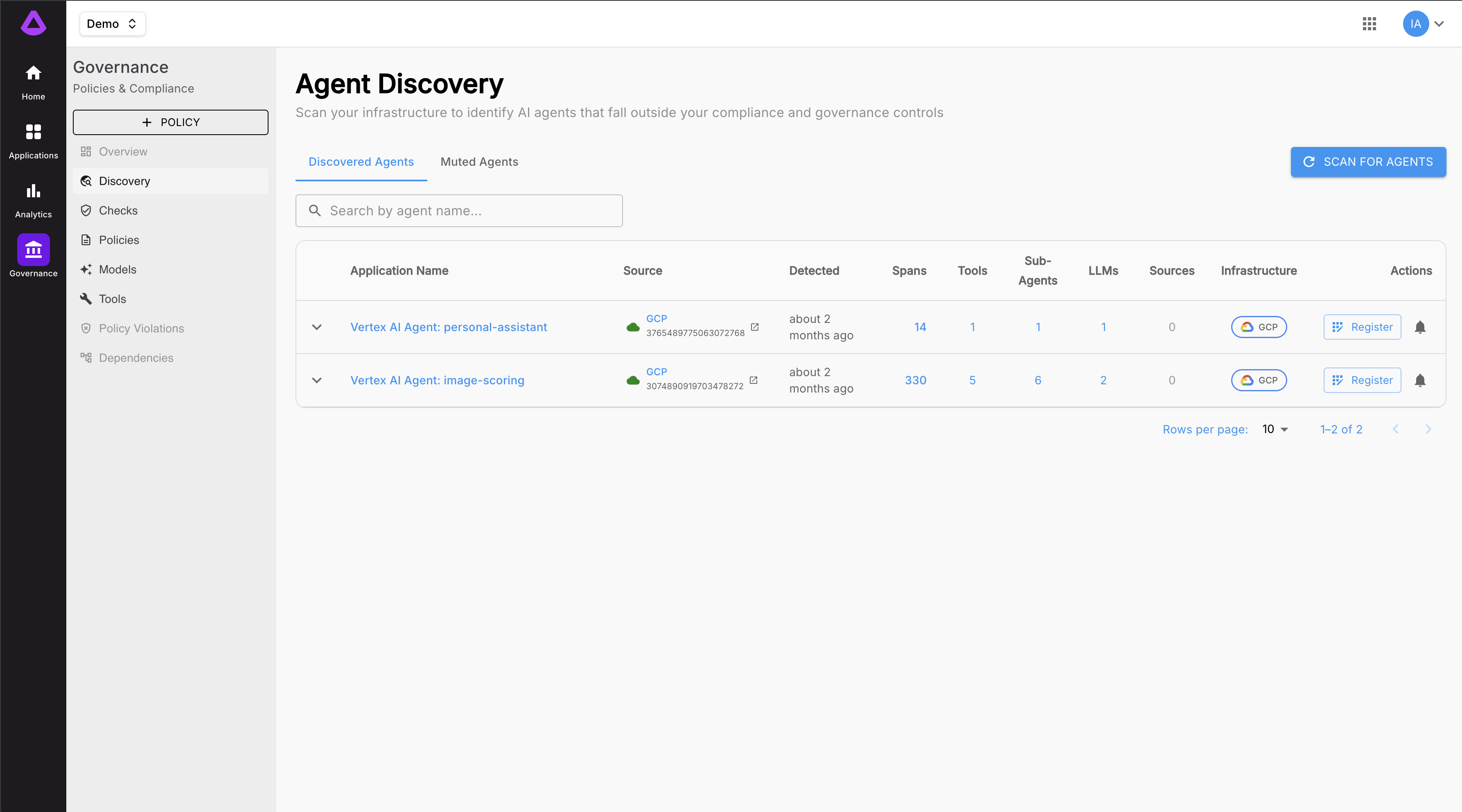
Each row in the table shows:
| Column | Description |
|---|---|
| Application Name | The agent identifier Arthur detected. Labeled "Unregistered Agent: name". Click to expand and see tools and sub-agents. |
| Source | How the agent was detected — e.g., Manual. |
| Detected | When the agent was first discovered. |
| Spans | Number of spans recorded for this agent. |
| Tools | Count of tools the agent calls. Expand the row to see each tool name and its arguments. |
| Sub-Agents | Count of sub-agents this agent orchestrates. Expand the row to see each sub-agent name. |
| LLMs | Count of LLM models the agent uses. |
| Sources | Count of data sources used. |
| Infrastructure | The cloud provider where the agent was detected (e.g., AWS). |
| Actions | Register to bring the agent into full Arthur monitoring, or the bell icon to Mute it. |
You can also retrieve unregistered agents programmatically:
import requests

ARTHUR_BASE_URL = "https://your-arthur-instance.com"
API_TOKEN = "your-api-token"
WORKSPACE_ID = "your-workspace-id"

response = requests.get(
    f"{ARTHUR_BASE_URL}/api/v1/workspaces/{WORKSPACE_ID}/agents/unregistered",
    headers={"Authorization": f"Bearer {API_TOKEN}"}
)

agents = response.json()
for agent in agents:
    print(agent)
const ARTHUR_BASE_URL = "https://your-arthur-instance.com";
const API_TOKEN = "your-api-token";
const WORKSPACE_ID = "your-workspace-id";
const response = await fetch(
`${ARTHUR_BASE_URL}/api/v1/workspaces/${WORKSPACE_ID}/agents/unregistered`,
{
headers: {
Authorization: `Bearer ${API_TOKEN}`,
},
}
);
const agents = await response.json();
console.log(agents);curl -X GET "https://your-arthur-instance.com/api/v1/workspaces/your-workspace-id/agents/unregistered" \
-H "Authorization: Bearer your-api-token"Agent Detail — Tools, Sub-Agents, and LLMs
Before you register or mute an agent, Arthur lets you inspect its behavior in detail. Click anywhere on an agent row to expand it and reveal the full breakdown of what that agent is doing in your infrastructure.
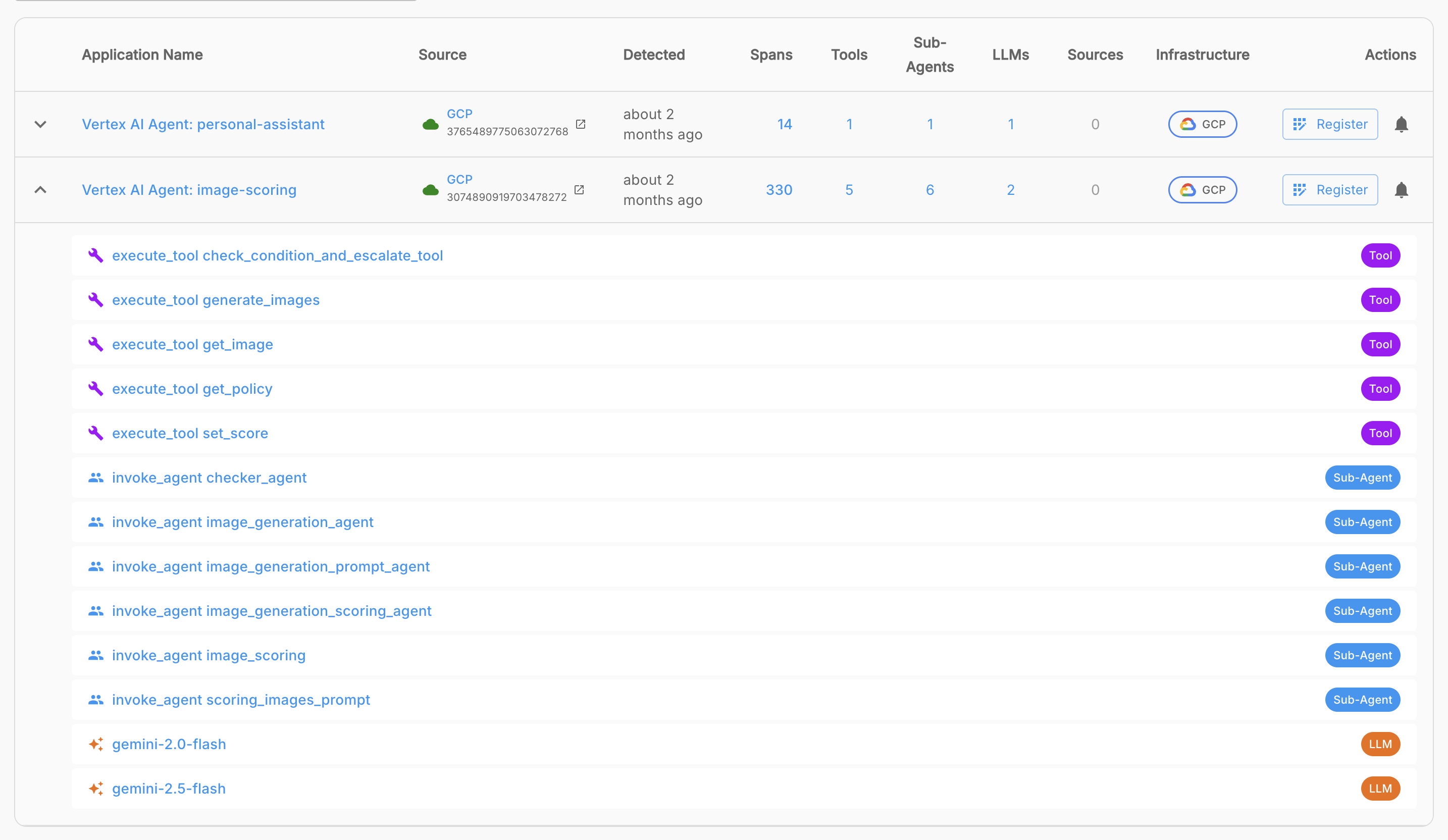
The expanded row displays three categories of labeled badges:
Tool Badges
Each Tool badge represents a distinct tool or function the agent calls. This might include internal APIs, database connectors, web search tools, code execution environments, or third-party service integrations. Reviewing tools helps you assess the agent's blast radius — what systems it can affect.
Sub-Agent Badges
Each Sub-Agent badge represents another agent that this agent orchestrates or delegates tasks to. Multi-agent architectures can create complex chains of responsibility. Seeing sub-agents helps you understand whether registering this agent also means you need to register its dependencies.
LLM Badges
Each LLM badge identifies a specific language model the agent is using (e.g., gemini-1.5-pro, gpt-4o). This is critical for cost attribution, data residency compliance, and ensuring that only approved models are in use.
Best practice: Always expand an agent row and review its tools, sub-agents, and LLMs before deciding whether to register or mute. An agent calling a sensitive internal database tool or an unapproved LLM warrants immediate registration and policy review — not muting.
Register an Agent for Monitoring
Registering an agent brings it into full Arthur governance: traces are collected, policies are enforced, alerts fire on violations, and the agent appears in your workspace's registered agent inventory.
Register via the UI
- On the Discovered Agents tab, locate the agent you want to register.
- Optionally expand the row to review its tools, sub-agents, and LLMs.
- Click the Register button on the right side of the agent row.
- Arthur registers the agent and moves it out of the Discovered Agents list. It now appears under your registered agents.
Register via API
You can also upsert agents programmatically using the PUT /api/v1/workspaces/{workspace_id}/agents endpoint:
import requests

ARTHUR_BASE_URL = "https://your-arthur-instance.com"
API_TOKEN = "your-api-token"
WORKSPACE_ID = "your-workspace-id"

payload = {
    "agents": [
        {
            "agent_id": "discovered-agent-id",
            "name": "My Discovered Agent",
            # Include any additional fields required by your Arthur configuration
        }
    ]
}

response = requests.put(
    f"{ARTHUR_BASE_URL}/api/v1/workspaces/{WORKSPACE_ID}/agents",
    headers={
        "Authorization": f"Bearer {API_TOKEN}",
        "Content-Type": "application/json"
    },
    json=payload
)

print(response.status_code)
print(response.json())
const ARTHUR_BASE_URL = "https://your-arthur-instance.com";
const API_TOKEN = "your-api-token";
const WORKSPACE_ID = "your-workspace-id";
const payload = {
agents: [
{
agent_id: "discovered-agent-id",
name: "My Discovered Agent",
},
],
};
const response = await fetch(
`${ARTHUR_BASE_URL}/api/v1/workspaces/${WORKSPACE_ID}/agents`,
{
method: "PUT",
headers: {
Authorization: `Bearer ${API_TOKEN}`,
"Content-Type": "application/json",
},
body: JSON.stringify(payload),
}
);
const data = await response.json();
console.log(data);curl -X PUT "https://your-arthur-instance.com/api/v1/workspaces/your-workspace-id/agents" \
-H "Authorization: Bearer your-api-token" \
-H "Content-Type: application/json" \
-d '{
"agents": [
{
"agent_id": "discovered-agent-id",
"name": "My Discovered Agent"
}
]
}'After registration, you can verify the agent appears in your workspace's registered agent list:
import requests

ARTHUR_BASE_URL = "https://your-arthur-instance.com"
API_TOKEN = "your-api-token"
WORKSPACE_ID = "your-workspace-id"

response = requests.get(
    f"{ARTHUR_BASE_URL}/api/v1/workspaces/{WORKSPACE_ID}/agents/registered",
    headers={"Authorization": f"Bearer {API_TOKEN}"}
)

print(response.json())
const response = await fetch(
`${ARTHUR_BASE_URL}/api/v1/workspaces/${WORKSPACE_ID}/agents/registered`,
{
headers: { Authorization: `Bearer ${API_TOKEN}` },
}
);
console.log(await response.json());curl -X GET "https://your-arthur-instance.com/api/v1/workspaces/your-workspace-id/agents/registered" \
-H "Authorization: Bearer your-api-token"Mute an Agent
Sometimes Arthur surfaces an agent you already know about but aren't ready to register yet — for example, an agent still in development or one you're intentionally onboarding later. Muting lets you acknowledge it and clear it from the active discovery list without registering it.
Important: Muting is not the same as approving. A muted agent is still unregistered and unmonitored. Use muting only for agents you have consciously reviewed and determined do not require Arthur governance.
Mute via the UI
- On the Discovered Agents tab, locate the agent you want to mute.
- Optionally expand the row to review its tools, sub-agents, and LLMs.
- Click the bell icon (Mute) on the right side of the agent row.
- Arthur moves the agent to the Muted Agents tab and suppresses future discovery alerts for it.
Mute via API
You can update an unregistered agent's status (including muting it) using the PATCH /api/v1/agents/unregistered/{agent_id} endpoint:
import requests

ARTHUR_BASE_URL = "https://your-arthur-instance.com"
API_TOKEN = "your-api-token"
AGENT_ID = "unregistered-agent-id"

response = requests.patch(
    f"{ARTHUR_BASE_URL}/api/v1/agents/unregistered/{AGENT_ID}",
    headers={
        "Authorization": f"Bearer {API_TOKEN}",
        "Content-Type": "application/json"
    },
    json={"muted": True}
)

print(response.status_code)
print(response.json())
const ARTHUR_BASE_URL = "https://your-arthur-instance.com";
const API_TOKEN = "your-api-token";
const AGENT_ID = "unregistered-agent-id";
const response = await fetch(
`${ARTHUR_BASE_URL}/api/v1/agents/unregistered/${AGENT_ID}`,
{
method: "PATCH",
headers: {
Authorization: `Bearer ${API_TOKEN}`,
"Content-Type": "application/json",
},
body: JSON.stringify({ muted: true }),
}
);
const data = await response.json();
console.log(data);curl -X PATCH "https://your-arthur-instance.com/api/v1/agents/unregistered/unregistered-agent-id" \
-H "Authorization: Bearer your-api-token" \
-H "Content-Type: application/json" \
-d '{"muted": true}'Muted Agents
The Muted Agents tab is the second tab on the Agent Discovery page. It shows all agents you have previously muted — giving you a complete record of acknowledged-but-unmonitored agents in your infrastructure.
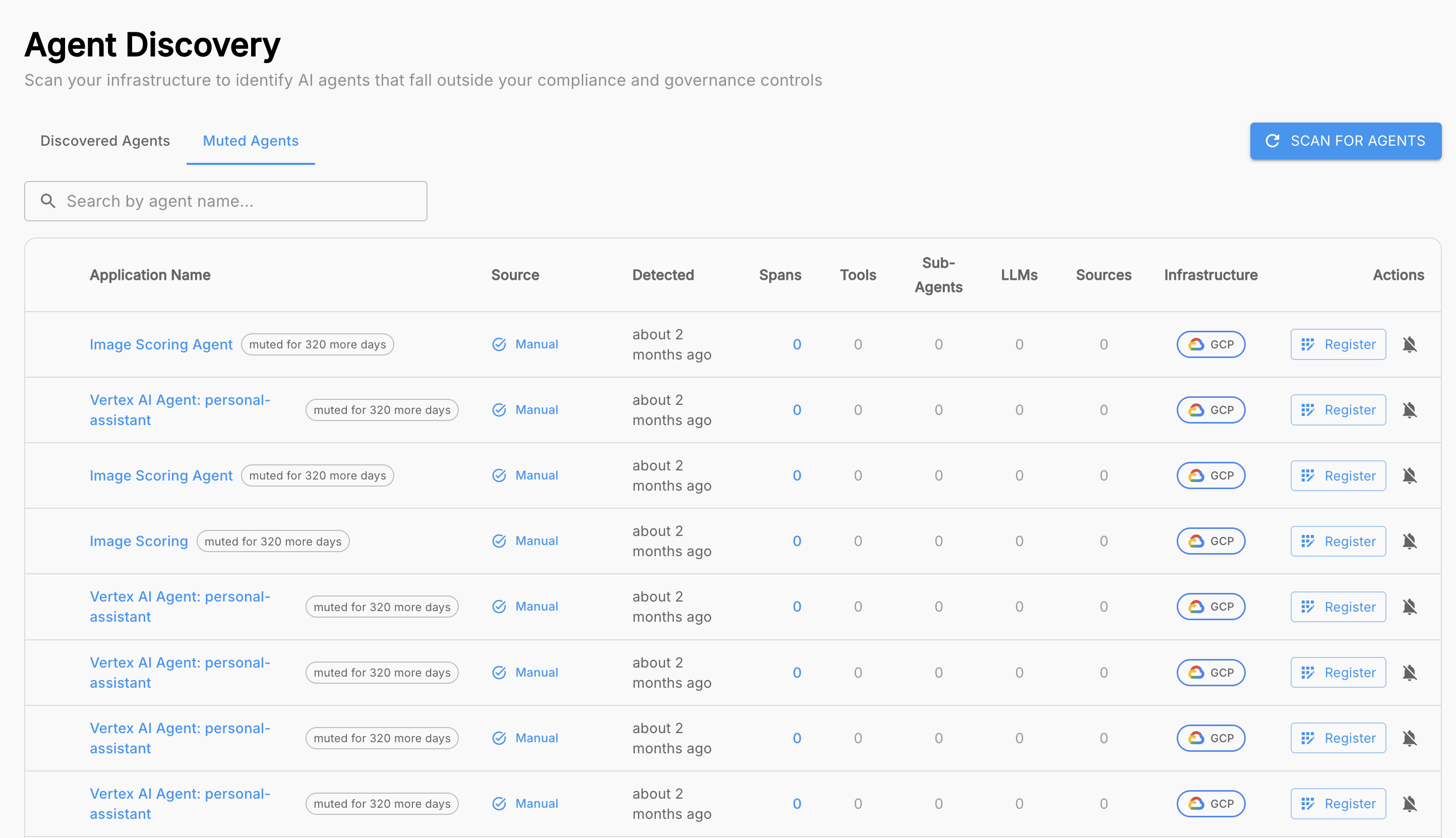
From the Muted Agents tab you can:
- Review the full list of muted agents, including their infrastructure source and component badges (tools, sub-agents, LLMs).
- Unmute and Register — if your governance requirements change, you can bring a previously muted agent back into full monitoring at any time.
Compliance tip: Regularly audit your Muted Agents list as part of your AI governance review cycle. An agent that was low-risk when first muted may have since gained new tools, started calling production LLMs, or begun handling sensitive data.
Next Steps
Now that you understand how to discover, inspect, and act on unregistered agents, here is where to go next:
| Goal | Where to go |
|---|---|
| Set up policies for newly registered agents | Polices & Governance |
| Configure alerts for agent behavior violations | Alerts & Alert Rules |
| Explore all tools under governance across your workspace | Governance -> Tools |
| Manage registered agents programmatically | Governance -> Discovery |
Agent Discovery is your first line of defense against shadow AI within your Arthur-connected infrastructure. By combining automated scanning of connected environments with a clear register-or-mute workflow and deep per-agent inspection, Arthur gives your team the visibility needed to enforce consistent governance across every AI agent running in infrastructure integrated with Arthur — whether it was built by your team or discovered in the wild.
Updated 5 months ago