
Arthur + LangChain
How does a developer instrument a LangChain application with Arthur in under 10 minutes? You install the Arthur Observability SDK with the LangChain extra, initialize the Arthur client with your credentials and task ID, call instrument_langchain(), and every LLM call your LangChain application makes is automatically traced and sent to Arthur for observability and evaluation — no changes to your LangChain code required.
Overview
LangChain is a popular framework for building applications with LLMs through composable chains, agents, and tools. Arthur's LangChain integration uses OpenInference auto-instrumentation to capture every chain invocation, agent step, tool call, retriever query, and LLM request. Once instrumented, you get full visibility into:
- Prompts and completions — every message sent and received
- Chain and agent structure — the full tree of components and their inputs/outputs
- Model parameters — model name, temperature, token counts
- Latency and errors — per-call timing and failure tracking
- Session and user context — group traces by conversation or end-user
sequenceDiagram
    participant App as Your Application
    participant SDK as Arthur SDK
    participant LC as LangChain
    participant Engine as Arthur GenAI Engine

    App->>SDK: arthur.instrument_langchain()
    Note over SDK: Auto-instrumentation enabled
    App->>LC: llm.invoke(...) / chain.invoke(...)
    LC-->>App: Response
    SDK->>Engine: Trace (spans, attributes)
    Note over Engine: Traces visible in dashboard
Prerequisites:
- Python 3.10+
- An Arthur GenAI Engine instance (cloud or local)
- An Arthur API key — see API Keys to create one
Installation
Install the Arthur Observability SDK with the langchain extra:
pip install "arthur-observability-sdk[langchain]"This pulls in the OpenInference LangChain instrumentor and all required OpenTelemetry dependencies.
Initialize Arthur
Create an Arthur instance with your API key, the base URL of your Arthur GenAI Engine, and the task ID that traces should be associated with.
from arthur_observability_sdk import Arthur

arthur = Arthur(
    api_key="your-api-key",        # or set ARTHUR_API_KEY env var
    base_url="https://your-arthur-engine-instance",  # or set ARTHUR_BASE_URL env var
    task_id="<your-task-uuid>",    # Arthur task UUID
    service_name="my-langchain-app",
)| Parameter | Description |
|---|---|
api_key | Your Arthur Engine API key. Falls back to ARTHUR_API_KEY env var. |
base_url | Base URL of your Arthur GenAI Engine. Falls back to ARTHUR_BASE_URL env var, then http://localhost:3030. |
task_id | Arthur task UUID for associating traces with a specific task. |
service_name | OpenTelemetry service.name resource attribute. Used to identify your application in the Arthur dashboard. Creates a new task based on service_name if task_id isn't specified. |
At least one oftask_idorservice_namemust be provided. A new task with theservice_namewill be created iftask_idis not specified.
Use environment variables for secrets. SetARTHUR_API_KEYandARTHUR_BASE_URLas environment variables (e.g., in a.envfile) rather than hardcoding them in your application.
Instrument LangChain
With the Arthur instance created, use arthur.instrument_langchain() to instrument all LangChain components — LLMs, chat models, chains, and agents.
Under the hood, the SDK:
- Loads the OpenInference LangChain instrumentor.
- Passes the SDK's
TracerProviderso all spans are exported to your Arthur Engine instance via OTLP. - Automatically captures inputs, outputs, token counts, model parameters, and latency for every LangChain operation.
Now use LangChain exactly as you normally would:
from langchain_openai import ChatOpenAI
from langchain_core.messages import HumanMessage
from arthur_observability_sdk import Arthur

arthur = Arthur(
    api_key="your-api-key",        # or set ARTHUR_API_KEY env var
    base_url="https://your-arthur-engine-instance",  # or set ARTHUR_BASE_URL env var
    task_id="<your-task-uuid>",    # Arthur task UUID
    service_name="my-langchain-app",
)
arthur.instrument_langchain()

llm = ChatOpenAI(model="gpt-5-mini")

response = llm.invoke([HumanMessage(content="What is observability?")])
print(response.content)

# Flushes any pending trace spans to the Arthur Engine before the process exits
arthur.shutdown()
Key points:
instrument_langchain()patches LangChain globally — you do not need to wrap individual chains or agents.- Every chain, agent, tool, retriever, and LLM call is automatically traced with the full parent-child span hierarchy.
- Call
arthur.shutdown()when your application exits to flush any remaining traces.
Add Session and User Context
To group traces by conversation session or end user, wrap your LangChain calls with arthur.attributes(). This attaches session_id and user_id as OpenInference context attributes to every span created within the block.
with arthur.attributes(session_id="sess-1", user_id="user-42"):
    response = llm.invoke([HumanMessage(content="Hello!")])
This is especially useful for:
- Multi-turn conversations — trace an entire chat session end-to-end
- Per-user analytics — understand how individual users interact with your application
- Debugging — filter traces in the Arthur dashboard by session or user
You can nest or change context across different blocks:
# First user's session
with arthur.attributes(session_id="sess-1", user_id="user-42"):
    response = llm.invoke([HumanMessage(content="Hello!")])

# Second user's session
with arthur.attributes(session_id="sess-2", user_id="user-99"):
    response = llm.invoke([HumanMessage(content="What's the weather?")])
Verify in Arthur
After running your instrumented application, traces appear in the Arthur GenAI Engine within seconds.
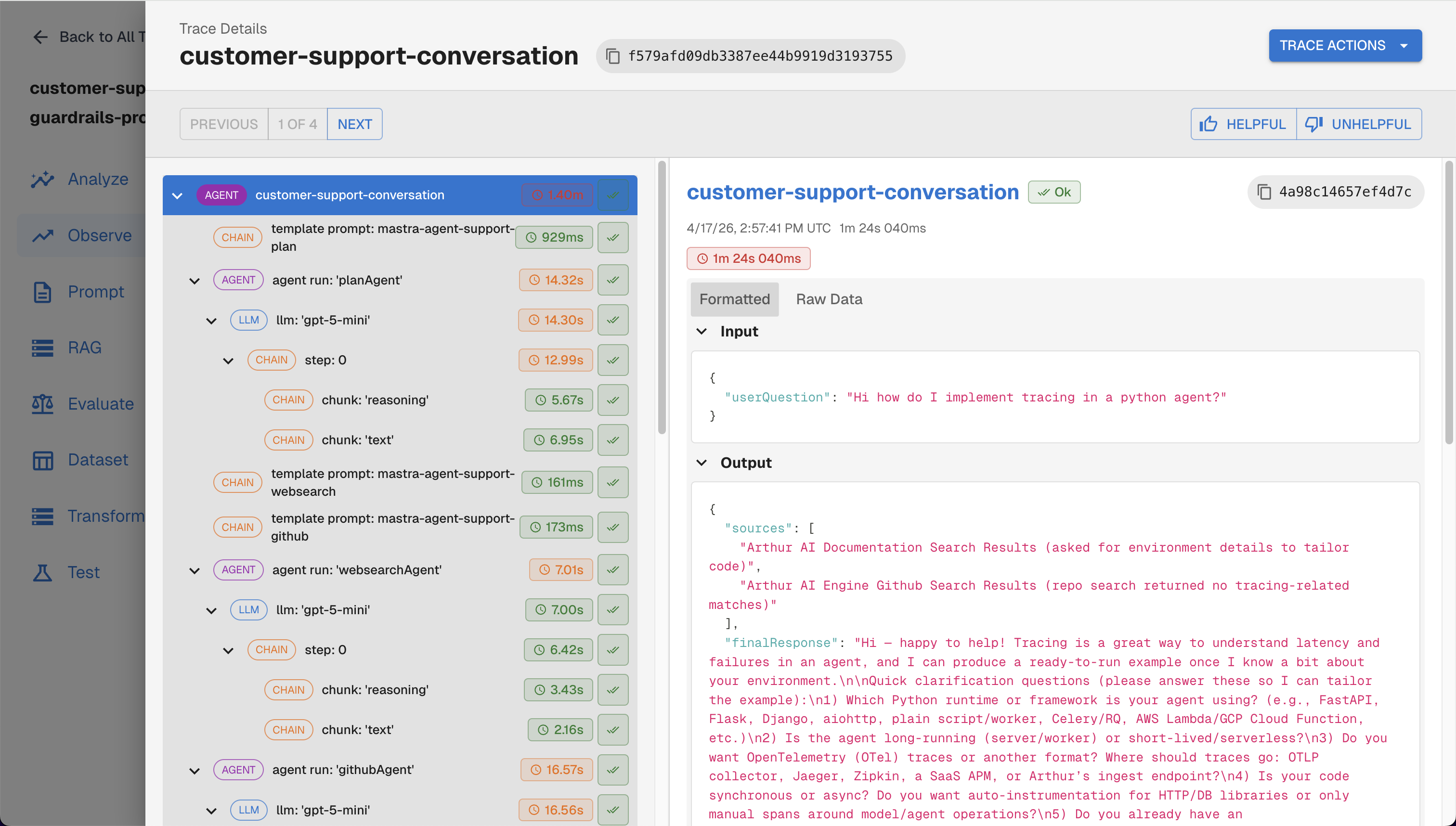
Traces viewed on the Arthur Engine UI
What to look for in the dashboard:
- Trace list — each
invoke()call appears as a trace with the full chain/agent span tree - Session grouping — if you used
arthur.attributes(session_id=...), traces are grouped by session - User filtering — filter by
user_idto see a specific user's interactions - Token usage — prompt and completion token counts are captured automatically
You can also query traces programmatically:
curl -X GET "${ARTHUR_BASE_URL}/api/v1/traces?task_ids=${ARTHUR_TASK_ID}" \
  -H "Authorization: Bearer ${ARTHUR_API_KEY}"
Troubleshooting
| Symptom | Fix |
|---|---|
| No traces appearing | Confirm ARTHUR_API_KEY and ARTHUR_BASE_URL are set correctly and the Arthur Engine is reachable. |
| No traces appearing | Verify the task_id or service_name exists in your Arthur Engine instance. |
| Traces delayed | Traces are exported asynchronously via BatchSpanProcessor; allow a few seconds, or call arthur.shutdown() to flush. |
ImportError on instrument | Run pip install "arthur-observability-sdk[langchain]" to install the required extra. |
Next Steps
Now that your LangChain application is instrumented and sending traces to Arthur, explore these capabilities:
- Prompt Management — use
arthur.get_prompt()to fetch versioned prompts from Arthur Engine and track which prompt version produced each trace - Continuous Evaluations — set up automated quality evaluations that run against your incoming traces
- Agentic Experiments — if you're building LangChain agents, run structured experiments to evaluate agent behavior across test cases
- Read our Best Practices for Building Agents Blog Series — observability and tracing fundamentals for building production agents
- Other Integrations — Arthur supports OpenAI, Anthropic, Bedrock, and other frameworks using the same
Arthurclient pattern
flowchart LR
    A[Instrument LangChain] --> B[View Traces]
    B --> C[Add Evaluations]
    B --> D[Manage Prompts]
    C --> E[Set Up Continuous Evals]
    D --> F[A/B Test Prompts]
    E --> G[Production Monitoring]
    F --> G
Updated 5 months ago