
Continuous Evals
Overview
How do you configure continuous evaluations so your application's live outputs are automatically scored over time? You define an eval once — selecting an evaluator, a target task, and a transform that maps trace attributes to evaluator inputs — and Arthur handles the rest. Every new trace your LLM application produces is automatically scored, surfaced in the dashboard, and available via API. No manual re-runs, no sampling scripts, no silent degradation.
LLM applications fail quietly. A prompt template change, a model version bump, or a gradual shift in user inputs can erode output quality without triggering any obvious error. Continuous evals give you a persistent quality signal: Arthur scores every new trace against the evaluators you care about, so you see trends before they become incidents.
This page walks you through the full journey: understanding how continuous evals work, discovering which evaluators are available, creating your first eval, and interpreting the results.
How Continuous Evals Work
When you create a continuous eval, you bind a transform to an evaluator. Arthur then scores every new trace logged to that task on a rolling basis.
sequenceDiagram
    participant App as Your LLM App
    participant Arthur as Arthur Platform
    participant T as Transform
    participant Eval as Evaluator Engine
    participant DB as Results Store

    App->>Arthur: Trace arrives (spans + attributes)
    Arthur->>T: Extract variables via transform
    T->>Eval: Pass extracted variables to evaluator
    Eval->>Eval: Score output (LLM judge or ML model)
    Eval->>DB: Write result (pass/fail + reasoning)
    DB->>Arthur: Aggregate into dashboard
    Arthur-->>App: Expose results via API / alerts
Key concepts:
| Concept | Description |
|---|---|
| Evaluator | A scoring function (LLM-as-a-judge). Produces a pass/fail result with reasoning. |
| Transform | Maps span attributes in a trace to the named variables an evaluator expects. Required for every continuous eval. |
| Continuous Eval | A persistent configuration that applies an evaluator to all new traces for a given task. |
| Trace | A single execution of your LLM application, containing one or more spans. |
| Result | The evaluator's output for a single trace: a pass (1) or fail (0) score and a reasoning description. |
Prerequisites
Before creating a continuous eval, confirm the following:
- A task is configured in Arthur and traces are actively flowing in. If you haven't set up tracing yet, see the Tracing setup guide.
- A transform is configured for the task — transforms map span attributes to the variables your evaluator expects. If you haven't created one yet, see the Transforms guide. Every continuous eval requires a transform.
- Your
task_idis available — visible in the platform URL when viewing a task, or via the Tasks API. - Your API credentials are available. All examples below use a
Bearertoken. Retrieve yours from the Arthur dashboard under Settings → API Keys.
Discover Available Evaluators
Before creating a continuous eval, identify which evaluator you want to use and note its name and version. Arthur provides built-in LLM evaluators and ML evaluators, and supports custom LLM evaluators you create yourself. For details on creating custom evaluators and the full list of built-in templates, see LLM Evaluators.
View evaluators in the UI
- Navigate to your task in the Arthur platform.
- In the task sidebar, click Evaluate (under the Evals section).
- Select the Evaluators tab (default view).
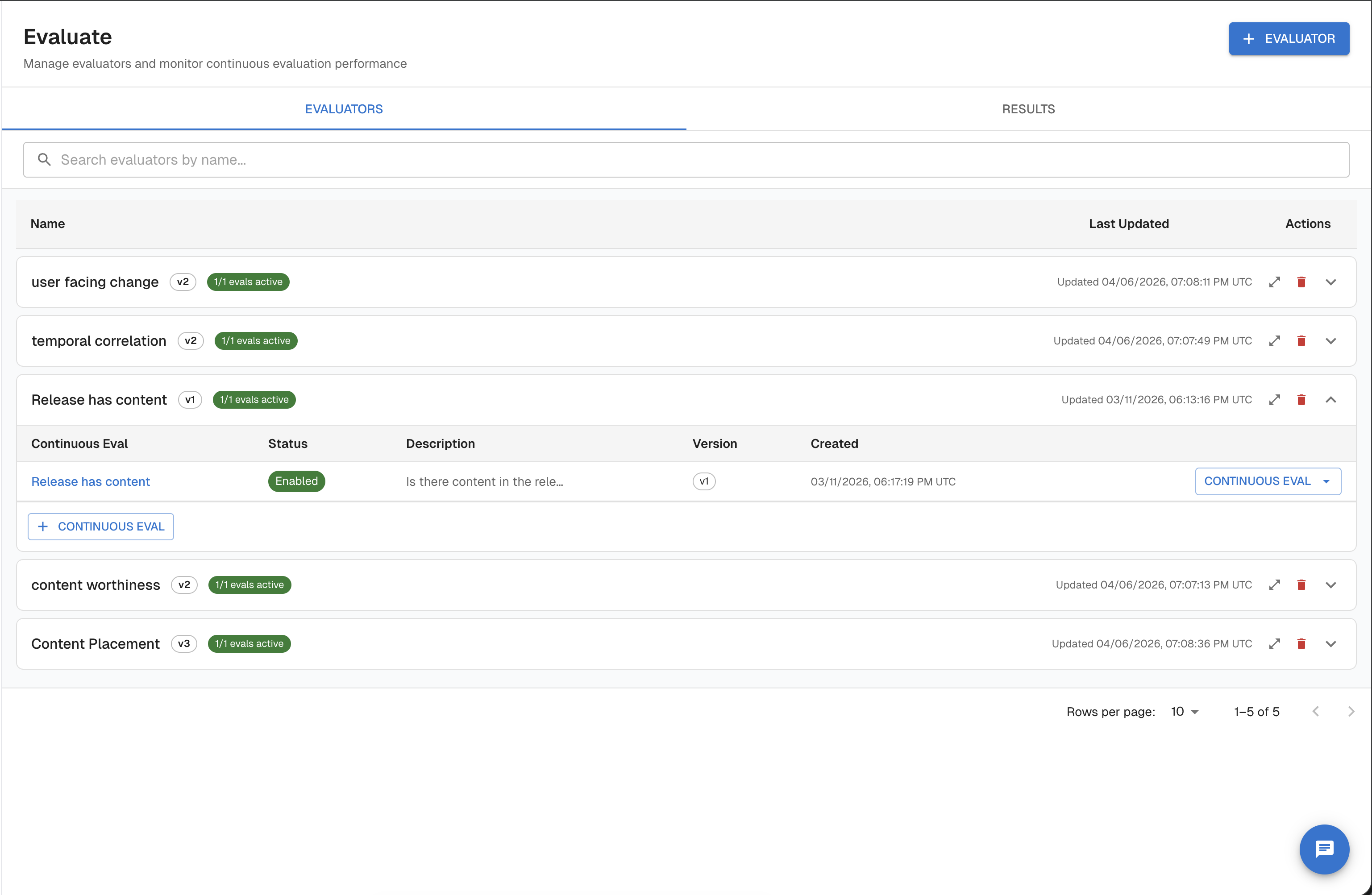
This page lists all available evaluators for the task, including built-in templates and any custom evaluators you've created. Click an evaluator to see its prompt template, required variables, and version history.
List evaluators via API
import requests

ARTHUR_API_URL = "https://your-arthur-engine.com"
API_KEY = "your-api-key"
TASK_ID = "your-task-id"

headers = {"Authorization": f"Bearer {API_KEY}"}

# List available LLM evaluators
response = requests.get(
    f"{ARTHUR_API_URL}/api/v1/tasks/{TASK_ID}/llm_evals",
    headers=headers,
    params={"page_size": 50},
)
response.raise_for_status()
llm_evals = response.json()
for ev in llm_evals.get("llm_metadata", []):
    print(f"{ev['name']}  (versions: {ev['versions']})")

# List available ML evaluators
response = requests.get(
    f"{ARTHUR_API_URL}/api/v2/tasks/{TASK_ID}/ml_evals",
    headers=headers,
)
response.raise_for_status()
ml_evals = response.json()
for ev in ml_evals.get("ml_metadata", []):
    print(f"{ev['name']}  (versions: {ev['versions']})")
const ARTHUR_API_URL = "https://your-arthur-instance.com";
const API_KEY = "your-api-key";
const TASK_ID = "your-task-id";
const headers = { Authorization: `Bearer ${API_KEY}` };
// List LLM evaluators
const llmRes = await fetch(
`${ARTHUR_API_URL}/api/v1/tasks/${TASK_ID}/llm_evals?page_size=50`,
{ headers }
);
const llmEvals = await llmRes.json();
llmEvals.llm_metadata.forEach((ev) =>
console.log(`${ev.name} (versions: ${ev.versions})`)
);
// List ML evaluators
const mlRes = await fetch(
`${ARTHUR_API_URL}/api/v2/tasks/${TASK_ID}/ml_evals`,
{ headers }
);
const mlEvals = await mlRes.json();
mlEvals.ml_metadata.forEach((ev) =>
console.log(`${ev.name} (versions: ${ev.versions})`)
);# LLM evaluators
curl "https://your-arthur-instance.com/api/v1/tasks/{task_id}/llm_evals?page_size=50" \
-H "Authorization: Bearer your-api-key"
# ML evaluators
curl "https://your-arthur-instance.com/api/v2/tasks/{task_id}/ml_evals" \
-H "Authorization: Bearer your-api-key"Note the evaluator name and latest version number — you'll need both when creating a continuous eval.
Quickstart: Evaluate Traces Like This
The fastest way to create a continuous eval is directly from a trace — no need to navigate between the Evaluators, Transforms, and Continuous Evaluations pages separately.
- Open any trace in the Arthur platform and click TRACE ACTIONS (top right) → Evaluate Traces Like This.
- A guided drawer opens. Select the evaluator you want to run.
- Map the evaluator's required variables to span attributes using the interactive attribute picker — it shows actual values from the trace as you navigate, so you can confirm the right path before saving.
- Submit. Arthur automatically creates the transform and the continuous eval in one step, then redirects you to the new continuous eval.
Use this flow when setting up evaluation for the first time or when you want to evaluate traces similar to one you're already looking at. For programmatic setup or stacking multiple evaluators, continue with the steps below.
Create Your First Continuous Eval
With your evaluator name, version, and transform ID ready, create a continuous eval. This binds the evaluator to your task and tells Arthur to score every new trace automatically.
Create via the UI
- Navigate to your task and click Evaluate in the task sidebar.
- On the Evaluators tab, click + New Continuous Eval (or use the Evaluate Traces Like This shortcut from any trace — see Quickstart).
- Select an evaluator from the list or search by name.
- Select a transform and configure the variable mapping — each evaluator variable (e.g.,
query,response) must be mapped to a variable defined in your transform. - Give the eval a name, confirm it is enabled, and click Save.
The new eval appears on the Evaluators tab and begins scoring incoming traces immediately.
Create via API
Step 1 — Identify your task ID
Your task_id is visible in the platform URL when viewing a task (/tasks/{task_id}/...), or retrieve it via the Tasks API.
import requests

ARTHUR_API_URL = "https://your-arthur-instance.com"
API_KEY = "your-api-key"

headers = {"Authorization": f"Bearer {API_KEY}"}

response = requests.get(
    f"{ARTHUR_API_URL}/api/v1/tasks",
    headers=headers,
)
response.raise_for_status()
tasks = response.json()
for task in tasks.get("results", []):
    print(f"ID: {task['id']}  Name: {task['name']}")
curl "https://your-arthur-instance.com/api/v1/tasks" \
-H "Authorization: Bearer your-api-key"Step 2 — Confirm your transform is ready
Every continuous eval requires a transform that maps span attributes to the evaluator's input variables. If you haven't created one, see the Transforms guide.
You'll need:
- Your
transform_id - The variable names defined in that transform (e.g.,
query,response,context) - The variable names the evaluator expects (from the table in "Discover Available Evaluators")
The transform_variable_mapping in your create request connects these two sets of names.
Step 3 — Create the continuous eval
import requests

ARTHUR_API_URL = "https://your-arthur-instance.com"
API_KEY = "your-api-key"
TASK_ID = "your-task-id"

headers = {
    "Authorization": f"Bearer {API_KEY}",
    "Content-Type": "application/json",
}

payload = {
    "name": "Answer Relevance Monitor",
    "description": "Scores every trace for response relevance to the user query",
    "enabled": True,
    "eval_type": "llm_eval",
    "llm_eval_name": "Answer Relevance",
    "llm_eval_version": 1,
    "transform_id": "your-transform-id",
    "transform_variable_mapping": [
        {"eval_variable": "query", "transform_variable": "query"},
        {"eval_variable": "response", "transform_variable": "response"},
    ],
}

response = requests.post(
    f"{ARTHUR_API_URL}/api/v1/tasks/{TASK_ID}/continuous_evals",
    headers=headers,
    json=payload,
)
response.raise_for_status()
eval_config = response.json()
print(f"Continuous eval created: {eval_config['id']}")
const ARTHUR_API_URL = "https://your-arthur-instance.com";
const API_KEY = "your-api-key";
const TASK_ID = "your-task-id";
const payload = {
name: "Answer Relevance Monitor",
description: "Scores every trace for response relevance to the user query",
enabled: true,
eval_type: "llm_eval",
llm_eval_name: "Answer Relevance",
llm_eval_version: 1,
transform_id: "your-transform-id",
transform_variable_mapping: [
{ eval_variable: "query", transform_variable: "query" },
{ eval_variable: "response", transform_variable: "response" },
],
};
const response = await fetch(
`${ARTHUR_API_URL}/api/v1/tasks/${TASK_ID}/continuous_evals`,
{
method: "POST",
headers: {
Authorization: `Bearer ${API_KEY}`,
"Content-Type": "application/json",
},
body: JSON.stringify(payload),
}
);
const evalConfig = await response.json();
console.log("Continuous eval created:", evalConfig.id);curl -X POST "https://your-arthur-instance.com/api/v1/tasks/{task_id}/continuous_evals" \
-H "Authorization: Bearer your-api-key" \
-H "Content-Type: application/json" \
-d '{
"name": "Answer Relevance Monitor",
"description": "Scores every trace for response relevance to the user query",
"enabled": true,
"eval_type": "llm_eval",
"llm_eval_name": "Answer Relevance",
"llm_eval_version": 1,
"transform_id": "your-transform-id",
"transform_variable_mapping": [
{"eval_variable": "query", "transform_variable": "query"},
{"eval_variable": "response", "transform_variable": "response"}
]
}'View and Interpret Results
Once traces are flowing and evals are running, results appear in the Arthur dashboard and are queryable via API.
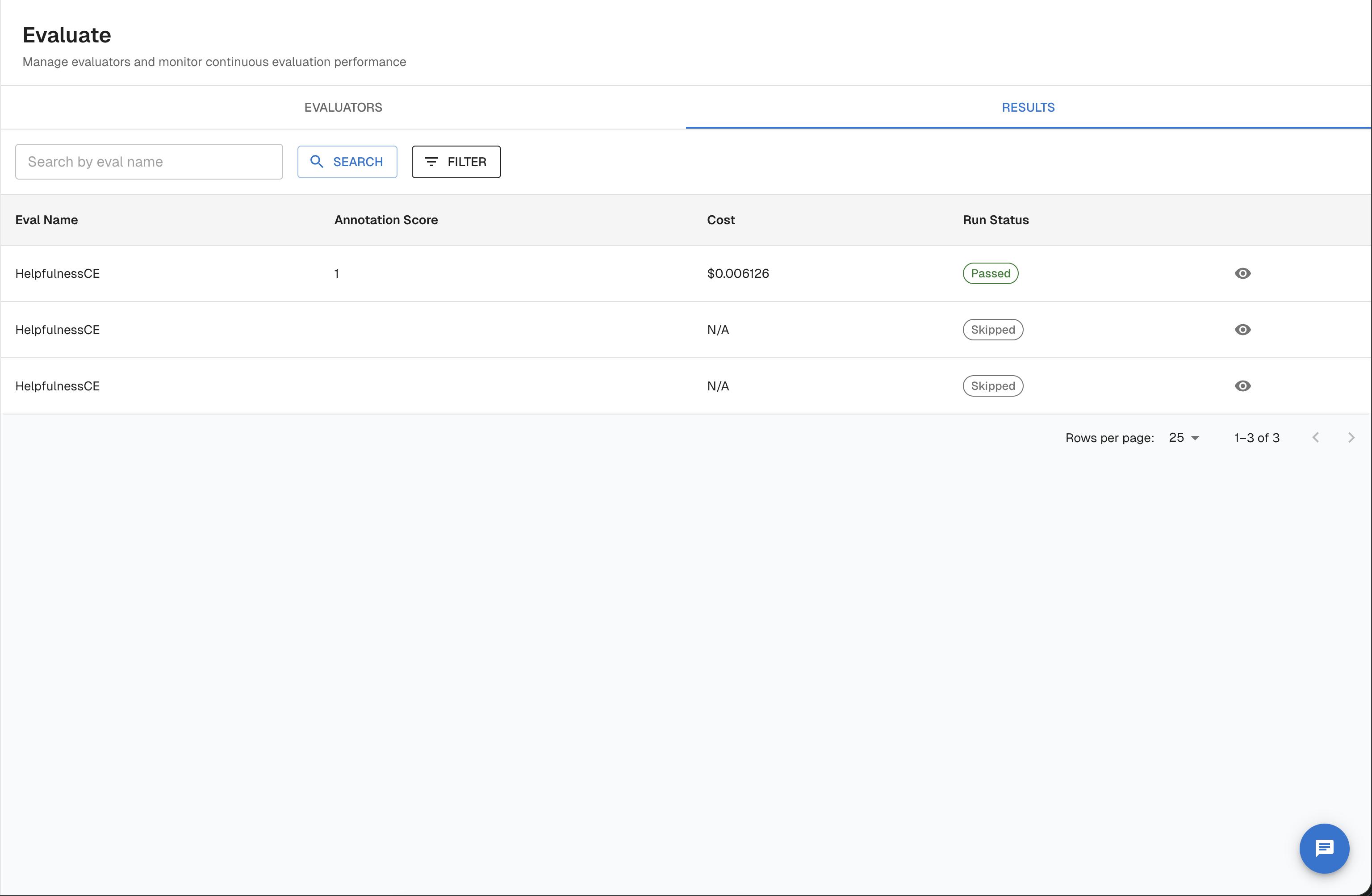
Navigate to results in the UI
- Open your task and click Evaluate in the task sidebar.
- Select the Results tab.
This view shows all continuous eval results across all evaluators for the task. You can filter by evaluator name, pass/fail score, run status, trace ID, and date range. Click any result row to open the trace detail view with the full evaluator reasoning.
To view results for a specific continuous eval, click the eval name on the Evaluators tab — this opens the eval detail page at /tasks/{taskId}/continuous-evals/{evalId} with a results list scoped to that eval.
Reading the dashboard
The Evaluate tab for your task shows:
- Pass rate over time — A time-series chart of pass rates per evaluator. Drops indicate quality regressions.
- Result distribution — A breakdown of pass/fail counts across all evaluated traces in the selected time window.
- Per-trace drill-down — Click any data point to see the exact span attributes, reasoning from the evaluator, and pass/fail classification.
- Flagged traces — Traces that failed are highlighted for review.
Retrieve results via API
import requests

ARTHUR_API_URL = "https://your-arthur-instance.com"
API_KEY = "your-api-key"
TASK_ID = "your-task-id"

headers = {"Authorization": f"Bearer {API_KEY}"}

response = requests.get(
    f"{ARTHUR_API_URL}/api/v1/tasks/{TASK_ID}/continuous_evals/results",
    headers=headers,
    params={
        "page_size": 100,
        "sort": "desc",
        "created_after": "2024-01-01T00:00:00Z",
        "created_before": "2024-01-31T23:59:59Z",
    },
)
response.raise_for_status()
data = response.json()
for result in data.get("annotations", []):
    status = "PASS" if result["annotation_score"] == 1 else "FAIL"
    print(f"Trace {result['trace_id']}: {status}")
    print(f"  Evaluator: {result['eval_name']}")
    print(f"  Reasoning: {result['annotation_description']}")
const params = new URLSearchParams({
page_size: "100",
sort: "desc",
created_after: "2024-01-01T00:00:00Z",
created_before: "2024-01-31T23:59:59Z",
});
const response = await fetch(
`${ARTHUR_API_URL}/api/v1/tasks/${TASK_ID}/continuous_evals/results?${params}`,
{ headers: { Authorization: `Bearer ${API_KEY}` } }
);
const data = await response.json();
data.annotations.forEach((result) => {
const status = result.annotation_score === 1 ? "PASS" : "FAIL";
console.log(`Trace ${result.trace_id}: ${status}`);
console.log(` Evaluator: ${result.eval_name}`);
console.log(` Reasoning: ${result.annotation_description}`);
});curl "https://your-arthur-instance.com/api/v1/tasks/{task_id}/continuous_evals/results?page_size=100&sort=desc&created_after=2024-01-01T00:00:00Z" \
-H "Authorization: Bearer your-api-key"Interpreting results
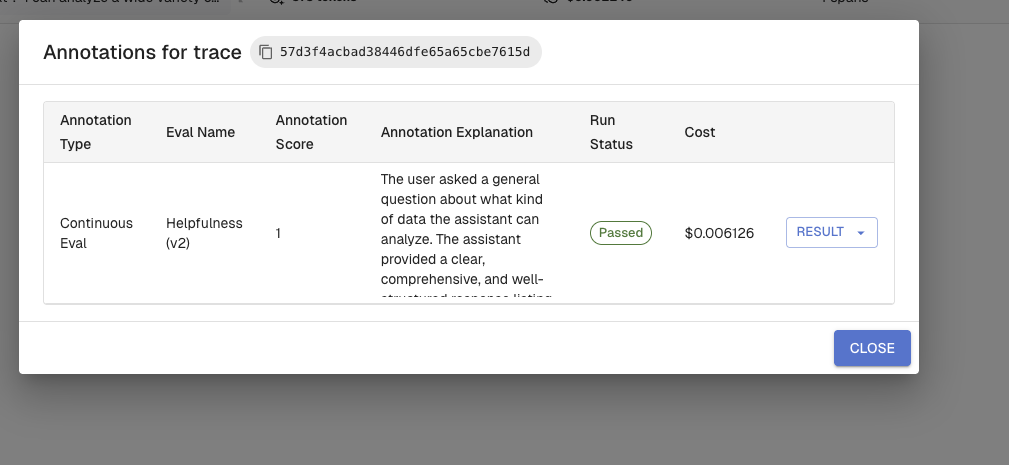
Each result has two key fields:
| Field | Values | Meaning |
|---|---|---|
annotation_score | 1 | Pass — the trace met the evaluator's criteria |
annotation_score | 0 | Fail — the trace did not meet the evaluator's criteria |
run_status | passed / failed | Evaluation completed and scored |
run_status | error / skipped | Evaluation could not complete (check transform mapping) |
annotation_description | string | The evaluator's reasoning — explains why it passed or failed |
You can filter results by continuous_eval_ids, trace_ids, annotation_score, run_status, and date range using query parameters.
Connecting scores to alerts
If your pass rate drops below a threshold you define, Arthur can fire an alert. Configure this in Alerts → Alert Rules. See the Alert Rules guide for configuration details.
Update and Manage Evals
Continuous evals are living configurations. You can pause, update, or delete them as your application evolves.
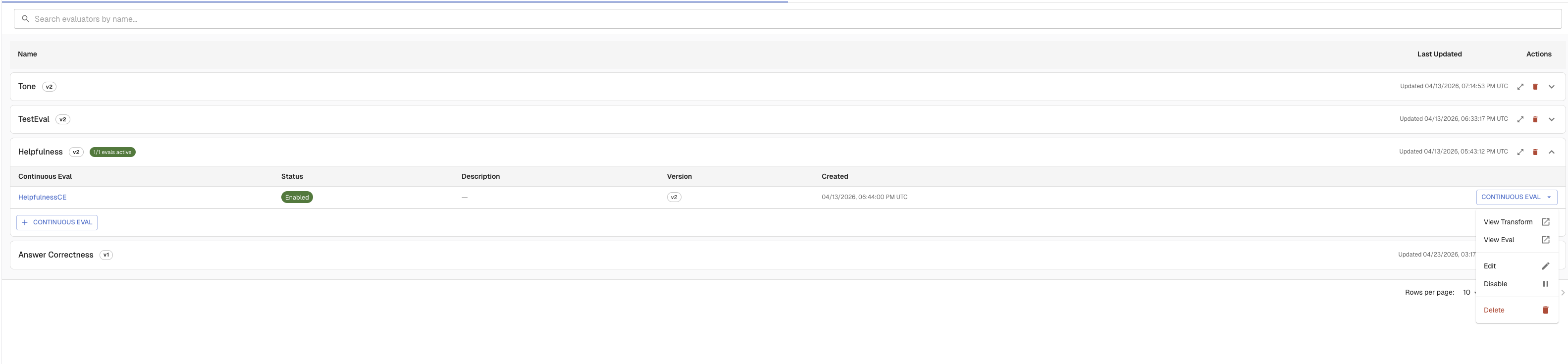
Manage evals in the UI
All continuous evals for a task are listed on Evaluate → Evaluators. From there:
- Click an eval name to open its detail page (
/tasks/{taskId}/continuous-evals/{evalId}) - Use the toggle on each row to enable or disable an eval without deleting it
- Open the eval detail page to edit the name, description, transform mapping, or evaluator version
- Use the delete action to remove an eval — historical results are preserved
List all evals for a task
response = requests.get(
    f"{ARTHUR_API_URL}/api/v1/tasks/{TASK_ID}/continuous_evals",
    headers=headers,
)
response.raise_for_status()
data = response.json()
for ev in data.get("evals", []):
    status = "enabled" if ev["enabled"] else "disabled"
    print(f"{ev['name']} ({ev['id']}): {status}")
const response = await fetch(
`${ARTHUR_API_URL}/api/v1/tasks/${TASK_ID}/continuous_evals`,
{ headers: { Authorization: `Bearer ${API_KEY}` } }
);
const data = await response.json();
data.evals.forEach((ev) => {
const status = ev.enabled ? "enabled" : "disabled";
console.log(`${ev.name} (${ev.id}): ${status}`);
});curl "https://your-arthur-instance.com/api/v1/tasks/{task_id}/continuous_evals" \
-H "Authorization: Bearer your-api-key"Pause an eval
Pausing stops scoring of new traces without deleting historical results.
EVAL_ID = "your-eval-id"

response = requests.patch(
    f"{ARTHUR_API_URL}/api/v1/continuous_evals/{EVAL_ID}",
    headers=headers,
    json={"enabled": False},
)
response.raise_for_status()
print("Eval paused.")
const response = await fetch(
`${ARTHUR_API_URL}/api/v1/continuous_evals/${EVAL_ID}`,
{
method: "PATCH",
headers: {
Authorization: `Bearer ${API_KEY}`,
"Content-Type": "application/json",
},
body: JSON.stringify({ enabled: false }),
}
);
console.log("Eval paused:", (await response.json()).id);curl -X PATCH "https://your-arthur-instance.com/api/v1/continuous_evals/{eval_id}" \
-H "Authorization: Bearer your-api-key" \
-H "Content-Type: application/json" \
-d '{"enabled": false}'Delete an eval
Deleting an eval removes the configuration and stops future scoring. Historical results are retained.
response = requests.delete(
    f"{ARTHUR_API_URL}/api/v1/continuous_evals/{EVAL_ID}",
    headers={"Authorization": f"Bearer {API_KEY}"},
)
if response.status_code == 204:
    print("Eval deleted. Historical results are preserved.")
const response = await fetch(
`${ARTHUR_API_URL}/api/v1/continuous_evals/${EVAL_ID}`,
{
method: "DELETE",
headers: { Authorization: `Bearer ${API_KEY}` },
}
);
console.log("Eval deleted. Status:", response.status);curl -X DELETE "https://your-arthur-instance.com/api/v1/continuous_evals/{eval_id}" \
-H "Authorization: Bearer your-api-key"Next Steps
You've set up continuous evals and Arthur is now automatically scoring your application's live traces. Here's where to go next:
| Goal | Resource |
|---|---|
| Get notified when pass rates drop | Configure Alert Rules — Set thresholds and notification channels so you're paged when quality degrades. |
| Investigate failing traces | Traces Explorer — Drill into individual traces with full result breakdowns and evaluator reasoning. |
| Build custom LLM evaluators | LLM Evaluators — Define your own judge prompts, score ranges, and rubrics. |
| Compare prompt or model variants | Experiments — Run evals side-by-side across different configurations. |
| Understand how variables reach the evaluator | Transforms — Map trace span attributes to evaluator input variables. |
| Evaluate retrieval quality in RAG pipelines | RAG Evaluation — Run Context Precision, Context Recall, and Answer Correctness on your retrieval results. |
Tip: Pair continuous evals with alert rules for a complete "set and forget" quality monitoring stack. You configure both once, and Arthur surfaces problems automatically — no manual review required until something actually needs your attention.
Updated 5 months ago