
Arthur + Mastra
How does a developer instrument a Mastra-based AI agent with Arthur in under 10 minutes? Install the @mastra/arthur package, create an ArthurExporter, and pass it into your Mastra observability configuration. Every LLM call, tool invocation, and agent step your Mastra app produces is automatically captured as OpenTelemetry traces using OpenInference semantic conventions and shipped to Arthur Engine — no changes to your agent logic required. The standout benefit is remote prompt management: you can update agent prompts in the Arthur UI and have them take effect immediately, without redeploying your application.
Overview
Mastra is a TypeScript agent framework for building AI-powered applications. The @mastra/arthur package provides an ArthurExporter that plugs directly into Mastra's observability layer. Once configured, you get full visibility into:
- LLM calls — every model invocation with prompts, completions, and token counts
- Tool calls — input arguments and return values for each tool
- Agent orchestration — parent-child span relationships across agent handoffs
- Remote prompt management — update prompts in the Arthur UI without code changes
- Session and user context — group traces by conversation or end-user
sequenceDiagram
    participant App as Mastra Agent
    participant Exporter as ArthurExporter
    participant Engine as Arthur GenAI Engine

    App->>Exporter: Generates spans
    Exporter->>Engine: OTLP / OpenInference
    Note over Engine: Traces visible in dashboard
    Engine-->>App: Updated prompts via get_prompt
Prerequisites:
- Node.js 18+
- An Arthur GenAI Engine instance (cloud or local)
- An Arthur API key — see API Keys to create one
Installation
Install the @mastra/arthur package alongside your existing Mastra dependencies:
npm install @mastra/arthur@latest
# or
pnpm add @mastra/arthur@latest
# or
yarn add @mastra/arthur@latest
Initialize Arthur
The ArthurExporter can read connection details from environment variables automatically (zero-config) or accept them as constructor arguments.
Zero-config setup
Set the environment variables and instantiate the exporter with no arguments:
import { Mastra } from '@mastra/core';
import { Observability } from '@mastra/observability';
import { ArthurExporter } from '@mastra/arthur';

export const mastra = new Mastra({
  observability: new Observability({
    configs: {
      arthur: {
        serviceName: 'my-service',
        exporters: [new ArthurExporter()],
      },
    },
  }),
});
Explicit configuration
Pass connection details directly when you need per-environment overrides:
import { Mastra } from '@mastra/core';
import { Observability } from '@mastra/observability';
import { ArthurExporter } from '@mastra/arthur';

export const mastra = new Mastra({
  observability: new Observability({
    configs: {
      arthur: {
        serviceName: 'my-service',
        exporters: [
          new ArthurExporter({
            apiKey: process.env.ARTHUR_API_KEY!,
            endpoint: process.env.ARTHUR_BASE_URL!,
            taskId: process.env.ARTHUR_TASK_ID,
          }),
        ],
      },
    },
  }),
});| Option | Description |
|---|---|
apiKey | Arthur Engine API key. Falls back to ARTHUR_API_KEY env var. |
endpoint | Base URL of the Arthur Engine. Falls back to ARTHUR_BASE_URL env var. |
taskId | Optional. Arthur task UUID. Falls back to ARTHUR_TASK_ID env var. |
headers | Additional headers attached to every OTLP request. |
logLevel | Exporter log verbosity ('debug' | 'info' | 'warn' | 'error'). |
batchSize | Span batch size before flushing. Default 512. |
timeout | OTLP request timeout in ms. Default 30000. |
resourceAttributes | Extra OTel resource attributes (merged with defaults). |
At least one oftaskIdorserviceNamemust be provided. A new task with theserviceNamewill be created iftaskIdis not specified.
Use environment variables for secrets. SetARTHUR_API_KEY,ARTHUR_BASE_URL, andARTHUR_TASK_IDas environment variables (e.g., in a.envfile) rather than hardcoding them in your application.
Instrument Your Agent
Once the ArthurExporter is wired into your Mastra instance, all agents, tools, and LLM calls are instrumented automatically. You do not need to add any tracing code inside your agent definitions.
To attach custom metadata to a specific agent invocation — for example, a tenant ID or feature flag — use tracingOptions.metadata:
await agent.generate(input, {
  tracingOptions: {
    metadata: {
      companyId: 'acme-co',
      tier: 'enterprise',
    },
  },
});
Reserved fields (input,output,sessionId, thread/user IDs) are automatically excluded from metadata serialization — Mastra captures those through the standard OpenInference attributes instead.
Every span produced during this invocation will carry the metadata you specified, making it easy to filter and group traces in the Arthur dashboard.
Remote Prompt Management
Remote prompt management is the key differentiator of the Arthur + Mastra integration. Instead of hard-coding system prompts in your codebase, you store and version them in Arthur Engine. When you update a prompt in the Arthur UI, your running agents pick up the change on the next invocation — no redeployment required.
sequenceDiagram
    participant Dev as Developer
    participant UI as Arthur UI
    participant Engine as Arthur Engine
    participant Agent as Mastra Agent

    Dev->>UI: Edit prompt "support-agent-v2"
    UI->>Engine: Save new prompt version
    Agent->>Engine: get_prompt("support-agent-v2")
    Engine-->>Agent: Returns latest prompt text
    Agent->>Agent: Uses updated prompt for generation
How it works
- Create a prompt in the Arthur Engine UI under your task. Give it a descriptive name (e.g.,
support-agent-system) and write the initial version. - Fetch the prompt at runtime using the Arthur Engine REST API:
const response = await fetch(
  `${process.env.ARTHUR_BASE_URL}/api/v1/tasks/${process.env.ARTHUR_TASK_ID}/prompts/support-agent-system/latest`,
  {
    headers: {
      'Authorization': `Bearer ${process.env.ARTHUR_API_KEY}`,
      'Content-Type': 'application/json',
    },
  }
);
const prompt = await response.json();
const systemMessage = prompt.text;- Use the fetched prompt as the system message in your Mastra agent definition. Because the prompt is fetched at runtime, updating it in the Arthur UI takes effect immediately.
Benefits
- Iterate faster — product and prompt-engineering teams can tweak prompts without waiting for a deploy cycle
- Version control — every prompt change is versioned in Arthur, so you can roll back instantly
- A/B testing — use prompt tags to serve different prompt variants and compare their performance in Arthur's evaluation tools
Multi-Agent Tracing
When your Mastra application orchestrates multiple agents (e.g., a router agent that delegates to specialist agents), the ArthurExporter preserves parent-child span relationships across the entire workflow. This gives you a single, unified trace view in Arthur.
flowchart TD
    Root["Router Agent (root span)"]
    Root --> A["Research Agent (child span)"]
    Root --> B["Writing Agent (child span)"]
    A --> A1["LLM Call"]
    A --> A2["Tool: web_search"]
    B --> B1["LLM Call"]
    B --> B2["Tool: format_output"]
Each agent, LLM call, and tool invocation appears as a distinct span with:
- OpenInference span kind —
AGENT,LLM,TOOL, orCHAIN - Input/output content — the messages sent to and received from each component
- Token usage — input and output token counts for LLM spans
- Latency — duration of each step in the workflow
Verify in Arthur
After running your instrumented Mastra agent, traces appear in the Arthur GenAI Engine within seconds.
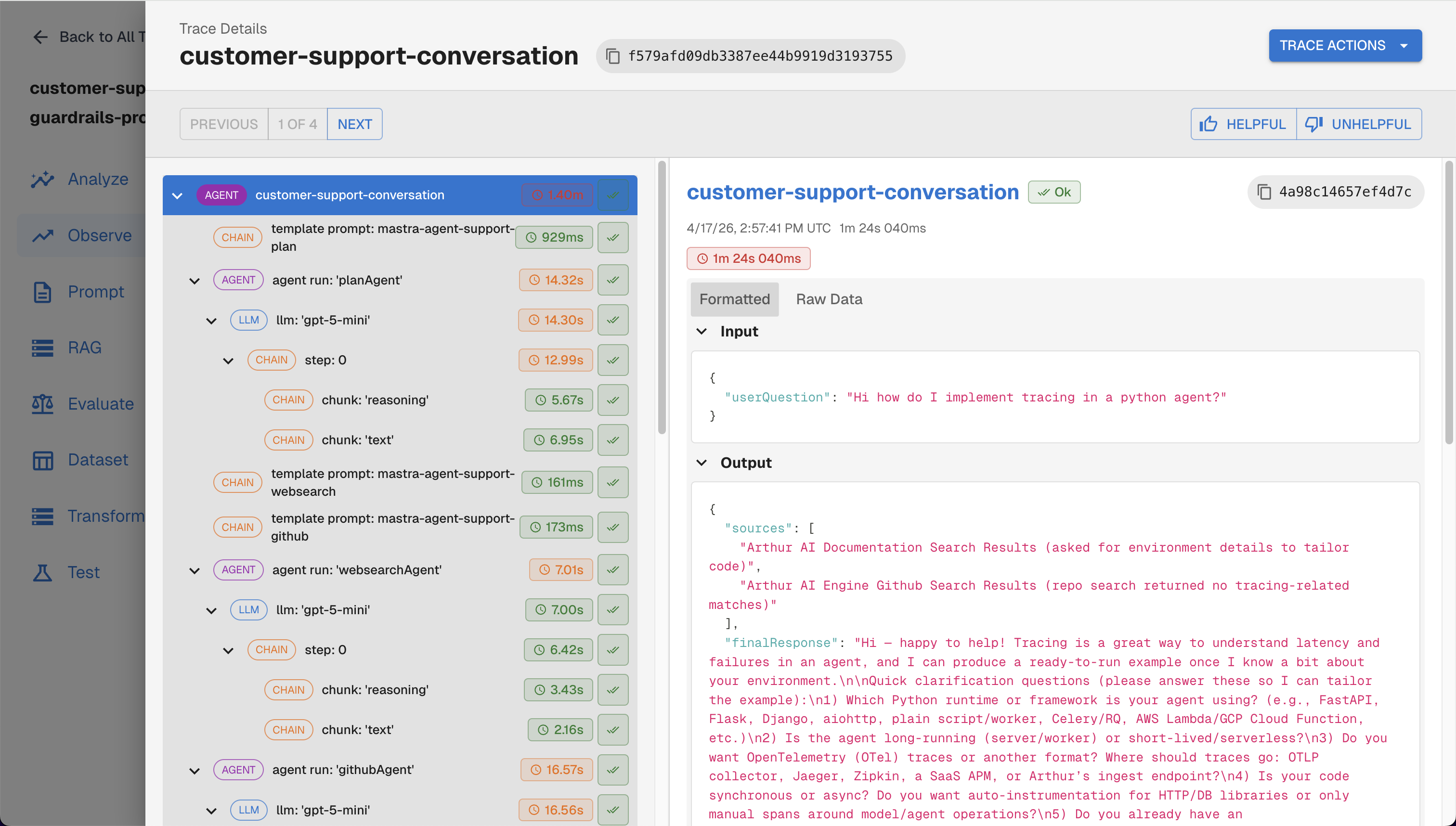
Traces viewed on the Arthur Engine UI
What to look for in the dashboard:
- Trace list — each agent invocation appears as a trace with the full agent/tool/LLM span tree
- Span hierarchy — parent-child relationships across agent handoffs are preserved
- Custom metadata — values passed via
tracingOptions.metadataappear as span attributes - Token usage — input and output token counts are captured automatically
You can also query traces programmatically:
curl -X GET "${ARTHUR_BASE_URL}/api/v1/traces?task_ids=${ARTHUR_TASK_ID}" \
  -H "Authorization: Bearer ${ARTHUR_API_KEY}"
Troubleshooting
| Symptom | Fix |
|---|---|
| No traces appear | Verify ARTHUR_API_KEY and ARTHUR_BASE_URL are set correctly. Check network connectivity to Arthur Engine. |
| Traces appear but are not grouped under a task | Ensure ARTHUR_TASK_ID is set or taskId is passed to the ArthurExporter. |
| Missing span details | Upgrade @mastra/arthur to the latest version: npm install @mastra/arthur@latest. |
| Exporter errors in logs | Set logLevel: 'debug' in the ArthurExporter constructor to get detailed diagnostics. |
Next Steps
Now that your Mastra agents are instrumented with Arthur, explore these capabilities:
- Prompt Management — create, version, and tag prompts in the Arthur UI; fetch them at runtime via the API
- Continuous Evaluations — set up automated eval pipelines that score your agent's outputs on quality, safety, and accuracy metrics
- Agentic Experiments — run structured experiments across test cases to compare agent configurations before deploying to production
- Read our Best Practices for Building Agents Blog Series — observability and tracing fundamentals for building production agents
- Other Integrations — if you also use Python-based frameworks (LangChain, CrewAI, OpenAI Agents, etc.), the Arthur Python SDK provides equivalent
instrument_*methods with the same trace format
flowchart LR
    A[Instrument Mastra] --> B[View Traces]
    B --> C[Add Evaluations]
    B --> D[Manage Prompts]
    C --> E[Set Up Continuous Evals]
    D --> F[A/B Test Prompts]
    E --> G[Production Monitoring]
    F --> G
Updated 5 months ago