
Traces Overview
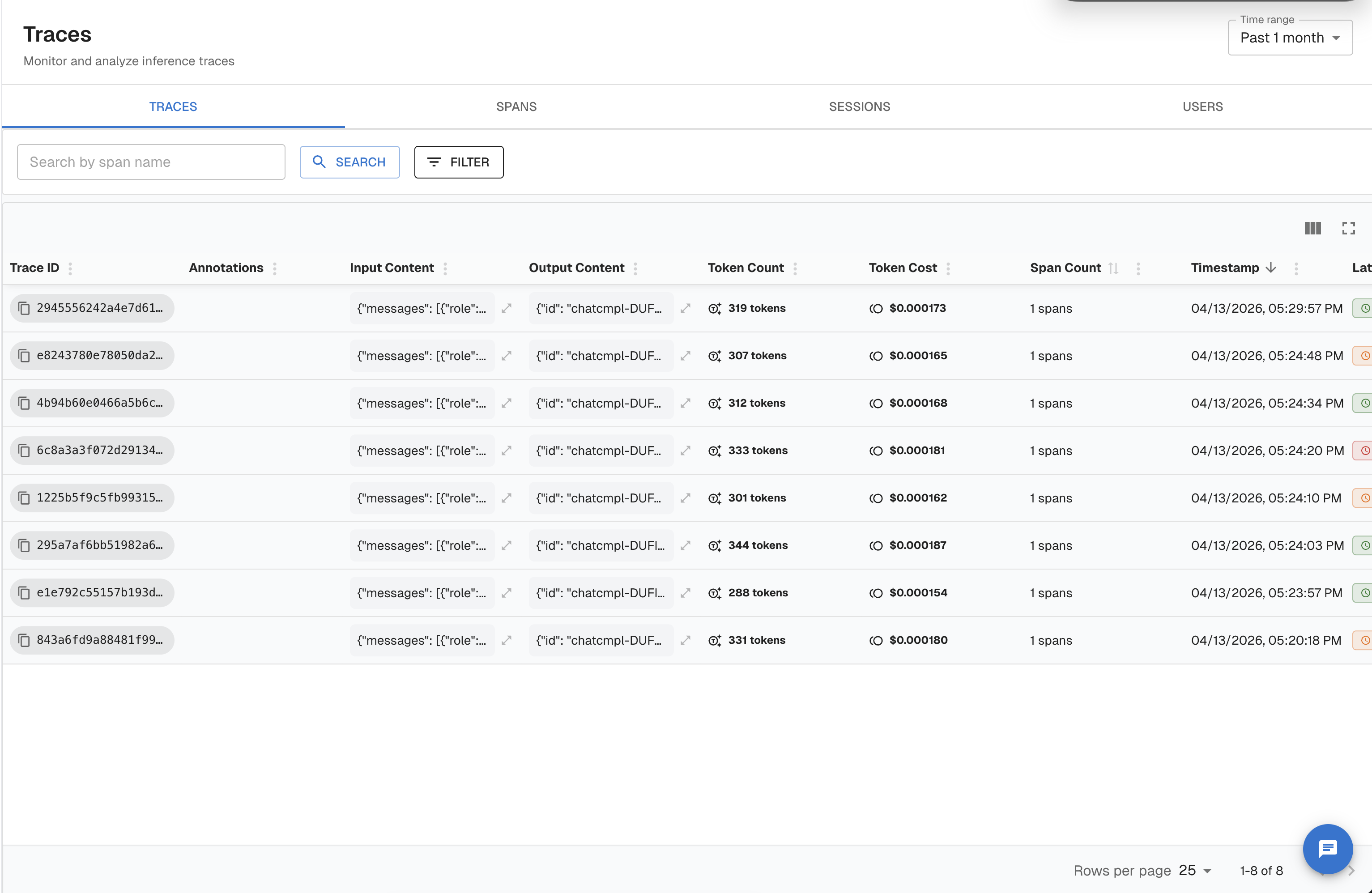
A trace in Arthur is a complete, end-to-end record of a single request flowing through your AI application — and the instrumentation structure you should use depends on the complexity of that request: wrap the entire request in a trace, break meaningful units of work inside it into spans, and group related traces together under a session. This page walks you from concept to working code, so you know exactly what to instrument and why.
New to Arthur? The Quickstart shows you how to send your first trace in under 5 minutes using the observability SDK.
What Is a Trace?
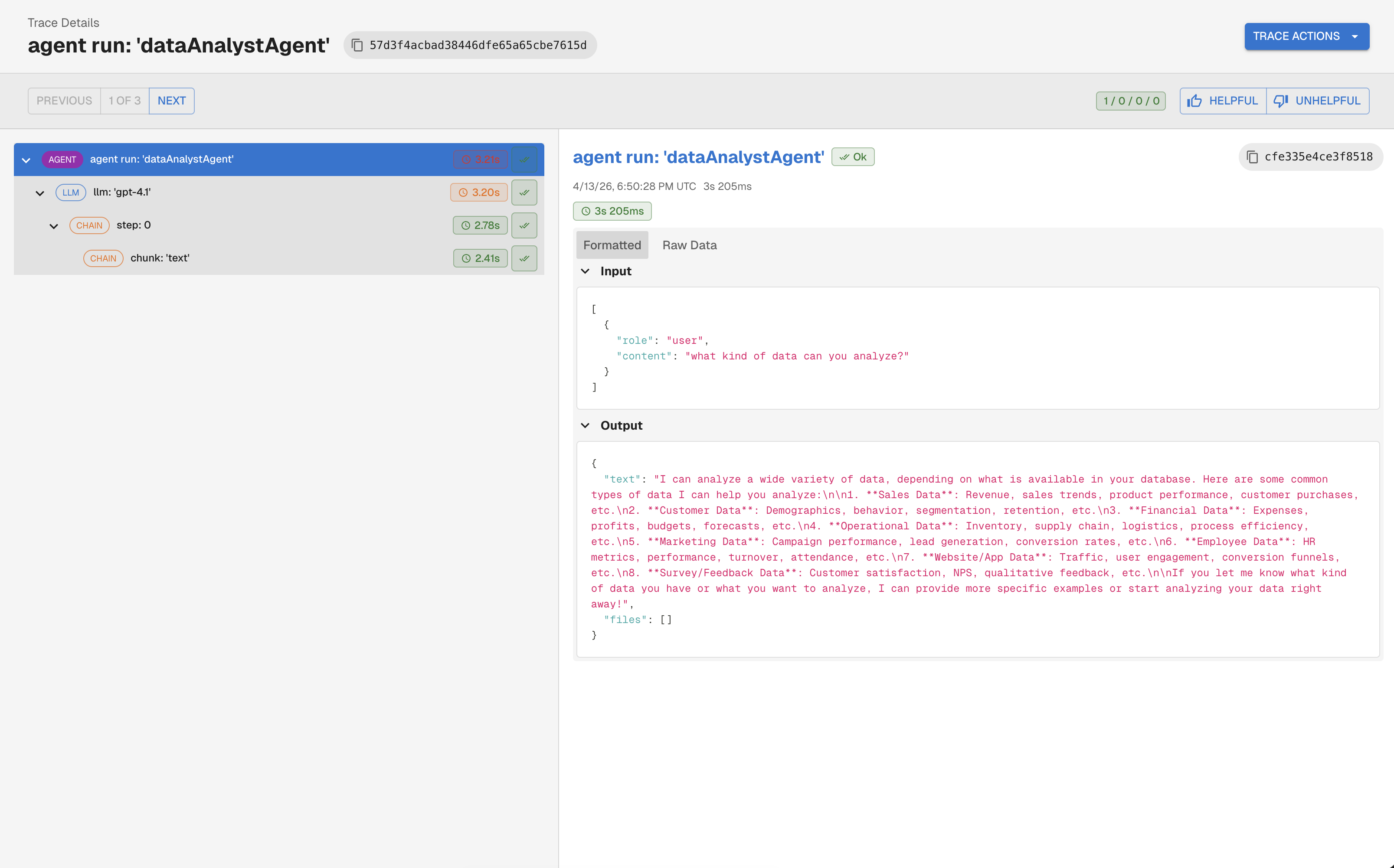
A trace is a directed tree of spans. Each span represents one meaningful unit of work: an LLM call, a retrieval step, a tool invocation, or an agent decision loop. Spans share a common trace_id and are linked by parent-child relationships that reconstruct the full execution path.
graph TD
    A["Trace: answer_question (root span)"]
    A --> B["RETRIEVER: fetch_documents"]
    A --> C["LLM: generate_answer"]
    B --> D["EMBEDDING: embed_query"]
Arthur ingests traces over OpenTelemetry (OTEL) using the OpenInference semantic conventions — an open standard for LLM observability. This means:
- You instrument once using standard OTEL APIs.
- Arthur understands LLM-specific attributes like
input.value,output.value,llm.token_count.total, and span kinds likeLLM,RETRIEVER,TOOL, andAGENT. - Any OTEL-compatible framework instrumentation (LangChain, LlamaIndex, OpenAI, etc.) works automatically.
Key Concepts
| Concept | Definition |
|---|---|
| Trace | The complete record of one request. Identified by a trace_id. |
| Span | One unit of work within a trace. Has a name, start/end time, attributes, and an optional parent span. |
| Root span | The top-level span in a trace. Has no parent. Represents the entire request. |
| Span kind | An OpenInference attribute (openinference.span.kind) that classifies what a span does: LLM, RETRIEVER, TOOL, AGENT, CHAIN, EMBEDDING, RERANKER, or GUARDRAIL. |
| Session | A group of traces that belong to the same user conversation or interaction thread. Set via the session.id attribute. |
| User | The end-user who triggered the request. Set via the user.id attribute. |
| Task | An Arthur-level concept that groups traces from the same deployed application or model. You associate your SDK client with a task at initialization. |
Rule of thumb for granularity: Create a span for each logical step that you want to observe, debug, or evaluate independently. You do not need a span for every Python function — only for steps where latency, inputs, outputs, or quality matter to you.
How Tracing Works in Arthur
sequenceDiagram
    participant App as Your Application
    participant SDK as Arthur SDK (OTEL)
    participant Engine as Arthur Engine
    participant Platform as Arthur Platform

    App->>SDK: Start span (e.g., LLM call)
    App->>SDK: Set attributes (input, output, tokens)
    App->>SDK: End span
    SDK->>Engine: Export spans via OTLP/HTTP (POST /api/v1/traces)
    Engine->>Platform: Evaluations, Full Agentic Tool Kit
    Platform-->>App: Dashboards, alerts, policies & governance available
The Arthur SDK wraps the OpenTelemetry SDK and configures an OTLP/HTTP exporter that sends spans to your Arthur deployment at {base_url}/api/v1/traces. Spans are batched and exported asynchronously — your application latency is not affected.
Instrument Your First Trace
The simplest case is a single LLM call wrapped in one trace with one span. Start here before adding complexity.
Step 1: Install the SDK
pip install "arthur-observability-sdk"

# To add framework auto-instrumentation (e.g., OpenAI)
pip install "arthur-observability-sdk[openai]"
# Mastra users: install the Arthur exporter
npm install @mastra/arthurSee the SDK Reference for the full API, available extras, and configuration options.
Step 2: Initialize Arthur and get a tracer
from arthur_observability_sdk.arthur import Arthur
from opentelemetry import trace
from openinference.semconv.trace import SpanAttributes, OpenInferenceSpanKindValues

arthur = Arthur(
    task_name="my-llm-app",
    api_key="your-api-key",
    base_url="https://your-arthur-engine-url",
)

tracer = trace.get_tracer("my-llm-app")
// Mastra handles tracer setup automatically once ArthurExporter is wired in.
// No manual tracer initialization needed.
const agent = mastra.getAgent('my-agent');Step 3: Create a span for your LLM call
import openai

client = openai.OpenAI()

with tracer.start_as_current_span("llm_call") as span:
    # Tag the span as an LLM span using OpenInference conventions
    span.set_attribute(
        SpanAttributes.OPENINFERENCE_SPAN_KIND,
        OpenInferenceSpanKindValues.LLM.value
    )
    span.set_attribute(SpanAttributes.INPUT_VALUE, "What is the capital of France?")

    response = client.chat.completions.create(
        model="gpt-4o",
        messages=[{"role": "user", "content": "What is the capital of France?"}],
    )

    output = response.choices[0].message.content
    span.set_attribute(SpanAttributes.OUTPUT_VALUE, output)
    span.set_attribute(SpanAttributes.LLM_MODEL_NAME, "gpt-4o")
    span.set_attribute(
        SpanAttributes.LLM_TOKEN_COUNT_TOTAL,
        response.usage.total_tokens
    )

print(output)
# Don't forget to flush on shutdown
arthur.shutdown()
// Mastra auto-instruments every agent/LLM call once ArthurExporter is wired in.
// No manual span creation needed — just invoke your agent.
const agent = mastra.getAgent('my-agent');
const response = await agent.generate('What is the capital of France?');
console.log(response.text);Step 4: Use auto-instrumentation (recommended)
If you use a supported framework, Arthur can instrument it automatically — no manual span creation needed:
from arthur_observability_sdk.arthur import Arthur

arthur = Arthur(
    task_name="my-llm-app",
    api_key="your-api-key",
    base_url="https://your-arthur-engine-url",
)

# Auto-instrument the OpenAI client — all calls are traced automatically
arthur.instrument_openai()

# Now use OpenAI normally
import openai
client = openai.OpenAI()
response = client.chat.completions.create(
    model="gpt-4o",
    messages=[{"role": "user", "content": "What is the capital of France?"}],
)
// Mastra auto-instruments all supported frameworks via ArthurExporter.
// See the Quickstart (doc:quickstart-eval) for the full setup.
const agent = mastra.getAgent('my-agent');
const response = await agent.generate('What is the capital of France?');
console.log(response.text);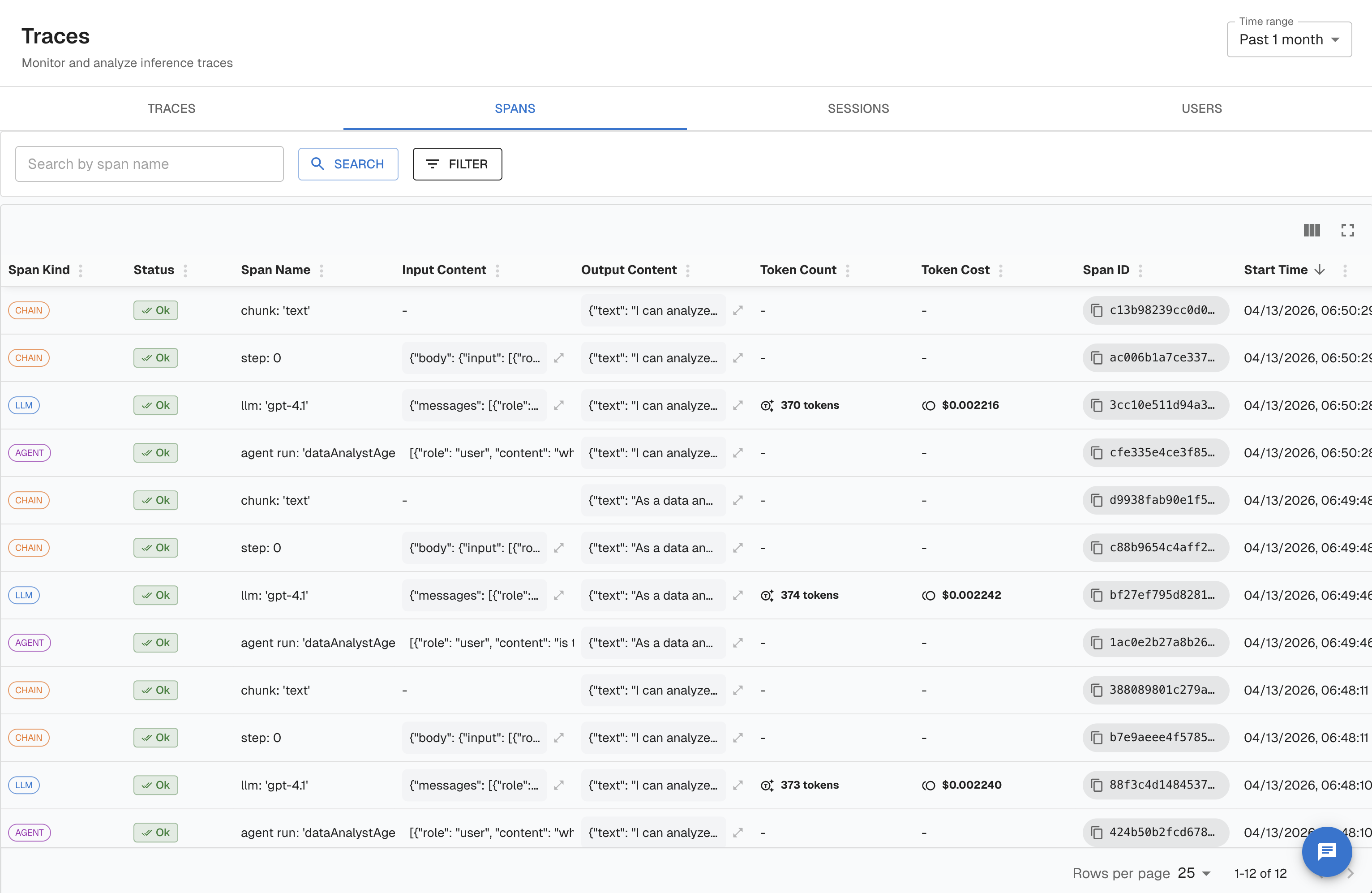
Multi-Span Traces
Most real applications involve more than one step. A RAG pipeline, for example, embeds the query, retrieves documents, and then generates an answer. Each step should be its own span, nested under a root span that represents the full request.
RAG Pipeline Example
graph TD
    Root["CHAIN: answer_question (root)"]
    Root --> Embed["EMBEDDING: embed_query"]
    Root --> Retrieve["RETRIEVER: fetch_documents"]
    Root --> Generate["LLM: generate_answer"]
from arthur_observability_sdk.arthur import Arthur
from opentelemetry import trace
from openinference.semconv.trace import SpanAttributes, OpenInferenceSpanKindValues
arthur = Arthur(task_name="rag-app", api_key="your-api-key", base_url="https://your-arthur-engine-url")
tracer = trace.get_tracer("rag-app")
def answer_question(user_query: str) -> str:
# Root span — represents the full request
with tracer.start_as_current_span("answer_question") as root:
root.set_attribute(SpanAttributes.OPENINFERENCE_SPAN_KIND, OpenInferenceSpanKindValues.CHAIN.value)
root.set_attribute(SpanAttributes.INPUT_VALUE, user_query)
# Optional: attach session and user context
root.set_attribute("session.id", "session-abc-123")
root.set_attribute("user.id", "user-42")
# Step 1: Embed the query
with tracer.start_as_current_span("embed_query") as embed_span:
embed_span.set_attribute(SpanAttributes.OPENINFERENCE_SPAN_KIND, OpenInferenceSpanKindValues.EMBEDDING.value)
embedding = embed_query(user_query) # your embedding function
embed_span.set_attribute(SpanAttributes.EMBEDDING_MODEL_NAME, "text-embedding-3-small")
# Step 2: Retrieve documents
with tracer.start_as_current_span("fetch_documents") as retriever_span:
retriever_span.set_attribute(SpanAttributes.OPENINFERENCE_SPAN_KIND, OpenInferenceSpanKindValues.RETRIEVER.value)
docs = retrieve_documents(embedding) # your retrieval function
retriever_span.set_attribute(SpanAttributes.INPUT_VALUE, user_query)
retriever_span.set_attribute("retrieval.document_count", len(docs))
# Step 3: Generate answer
with tracer.start_as_current_span("generate_answer") as llm_span:
llm_span.set_attribute(SpanAttributes.OPENINFERENCE_SPAN_KIND, OpenInferenceSpanKindValues.LLM.value)
answer = generate_with_context(user_query, docs) # your LLM call
llm_span.set_attribute(SpanAttributes.OUTPUT_VALUE, answer)
llm_span.set_attribute(SpanAttributes.LLM_MODEL_NAME, "gpt-4o")
root.set_attribute(SpanAttributes.OUTPUT_VALUE, answer)
return answer// Mastra traces RAG pipelines automatically — each step (embed, retrieve,
// generate) is captured as a separate span with the correct OpenInference
// span kind. No manual span creation needed.
const agent = mastra.getAgent('rag-agent');
const response = await agent.generate(userQuery);
console.log(response.text);# Submit all spans in a single OTLP payload.
# Each span references the root span's spanId as its parentSpanId.
# See the OTLP/HTTP spec for the full payload structure.Key rule: Child spans are created inside the parent span's context block. The OTEL context propagation system automatically sets the
parentSpanId— you do not need to set it manually.
Supported Span Types
Arthur uses OpenInference span kinds to classify and evaluate spans differently. Use the right kind for each step so Arthur can apply the correct evaluators and display the right metrics.
| Span Kind | Use For | Key Attributes |
|---|---|---|
LLM | Direct calls to a language model | llm.model_name, llm.token_count.total, llm.token_count.prompt, llm.token_count.completion, input.value, output.value |
CHAIN | Orchestration logic, pipelines, or any multi-step sequence | input.value, output.value |
RETRIEVER | Document retrieval from a vector store or search index | input.value, retrieval.documents |
EMBEDDING | Generating vector embeddings | embedding.model_name, embedding.embeddings |
TOOL | Tool or function calls made by an agent | tool.name, tool.description, input.value, output.value |
AGENT | An autonomous agent making decisions and invoking tools | input.value, output.value |
RERANKER | Reranking retrieved documents | reranker.model_name, reranker.input_documents, reranker.output_documents |
GUARDRAIL | Safety or policy checks on inputs/outputs | input.value, output.value |
Setting span kind in code
from openinference.semconv.trace import SpanAttributes, OpenInferenceSpanKindValues

with tracer.start_as_current_span("my_tool_call") as span:
    span.set_attribute(
        SpanAttributes.OPENINFERENCE_SPAN_KIND,
        OpenInferenceSpanKindValues.TOOL.value  # "TOOL"
    )
    span.set_attribute("tool.name", "search_web")
    span.set_attribute(SpanAttributes.INPUT_VALUE, '{"query": "Arthur AI pricing"}')
    result = search_web(query="Arthur AI pricing")
    span.set_attribute(SpanAttributes.OUTPUT_VALUE, str(result))
span.setAttribute("openinference.span.kind", "TOOL");
span.setAttribute("tool.name", "search_web");
span.setAttribute("input.value", JSON.stringify({ query: "Arthur AI pricing" }));Next Steps
- SDK Reference — Full API, available extras, and configuration options.
- Dataset Transforms — Automatically extract span attributes into evaluation datasets.
- Run Evaluations — Score your traces with LLM-as-judge or custom evaluators.
- Alerts & Alert Rules — Get notified when metrics cross a threshold.
- Observe & Dashboard — Monitor your application's health across traces.
Updated 5 months ago