
Webhooks & Notifications
How do you configure webhooks to send Arthur alerts to Slack, Jira, or your own incident management system? You create a webhook in Arthur that points to your destination URL, optionally customize the payload using Jinja2 templates, and Arthur will POST alert data to that endpoint every time an alert fires. This page walks you through the complete setup for both Slack and Jira, including working payload examples and template syntax.
Overview
Webhooks let Arthur POST alert data to any HTTP endpoint when an alert rule fires — routing notifications to Slack, Jira, PagerDuty, or any system you already use for incidents.
Webhooks are workspace-level resources. You create them once in your workspace and then attach them to one or more alert rules by ID. The same webhook can be reused across multiple alert rules.
How Webhooks Work
sequenceDiagram
    participant Arthur
    participant WebhookEngine
    participant Destination

    Arthur->>WebhookEngine: Alert fires
    WebhookEngine->>WebhookEngine: Render Jinja2 body template
    WebhookEngine->>Destination: HTTP POST (rendered JSON)
    Destination-->>WebhookEngine: 2xx OK
    WebhookEngine->>Arthur: Delivery recorded
When an alert rule fires, Arthur:
- Selects all webhooks attached to that alert rule
- Renders each webhook's Jinja2 body template with alert context variables
- POSTs the rendered body to the configured URL with the configured headers
- Records the delivery result — status code and response body
Create a Webhook (UI)
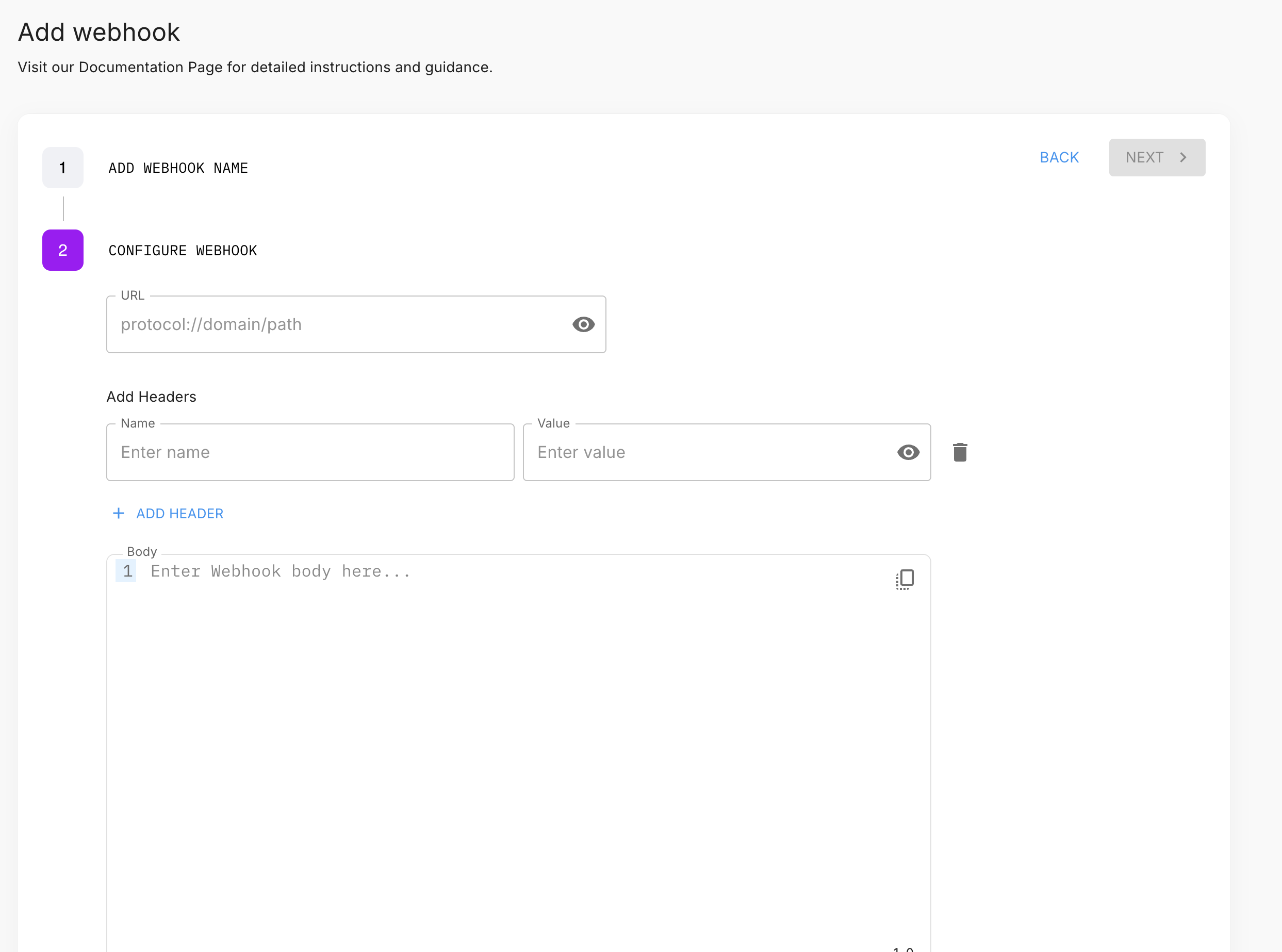
Navigate to your workspace and open the Webhooks section (/workspaces/:id/webhooks). Click New Webhook. The wizard has two steps.
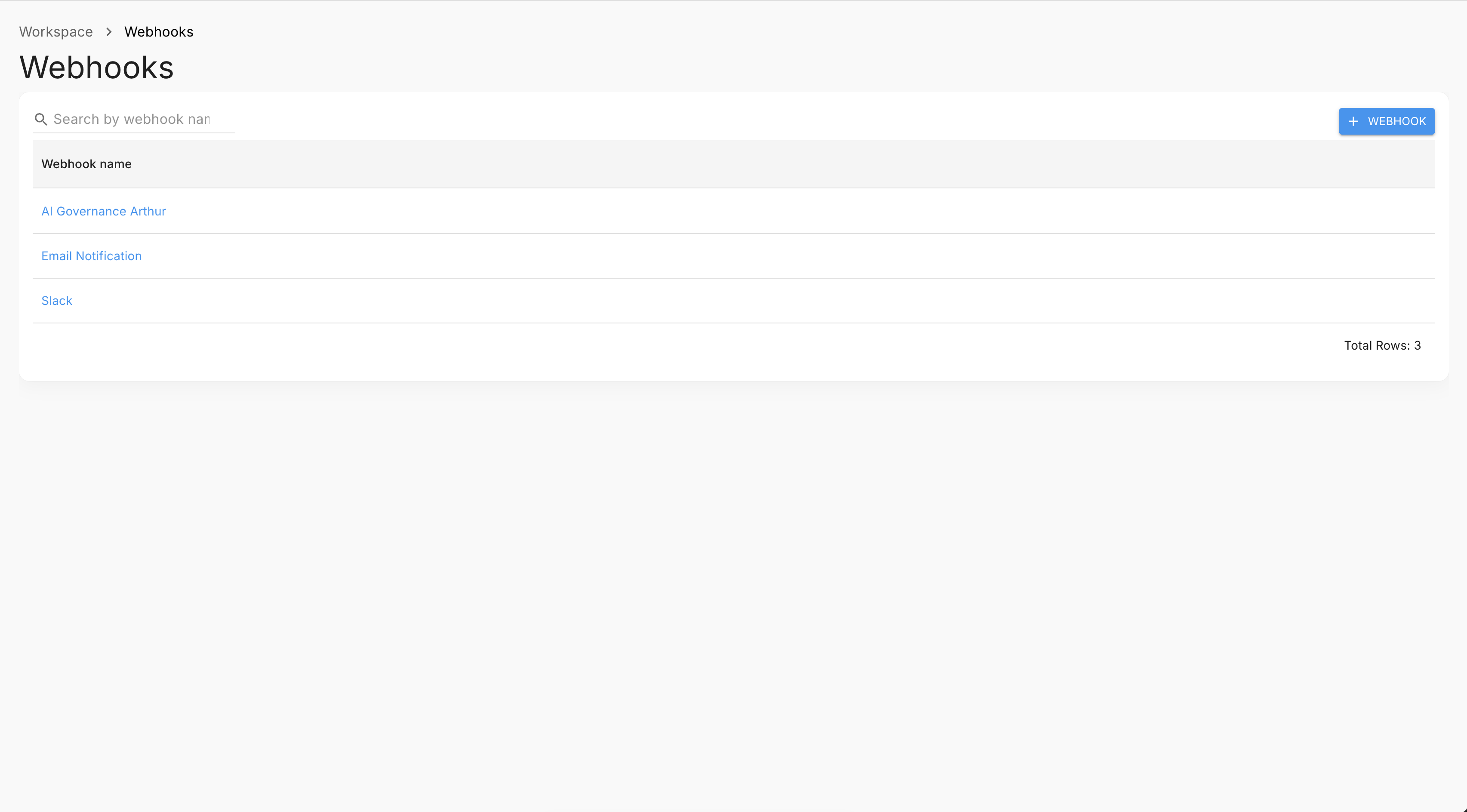
Step 1 — Name
Enter a human-readable name for the webhook (e.g., slack-ml-alerts, jira-incidents). This is how the webhook appears in the alert rule configuration.
Step 2 — Configure
| Field | Required | Description |
|---|---|---|
| URL | Yes | The HTTP/HTTPS endpoint Arthur will POST to |
| Headers | No | Key-value pairs added to every request (e.g., Authorization, Content-Type) |
| Body | Yes | Jinja2 template that renders the POST body — see Webhook Body Templates |
The Test button is available once you have entered a valid URL. It sends a test POST to your endpoint and shows the response status code and body — use this before saving to confirm delivery works.
Webhook Body Templates
Arthur uses Jinja2 for webhook body templates. When an alert fires, Arthur renders your template with an alert context object and POSTs the result.
The exact template variables injected by Arthur's backend should be verified against your deployment. The variables below are based on the alert and model context and are representative, but confirm with the Test button and your Arthur administrator before relying on specific variable names in production.
Template Variables
| Variable | Type | Description |
|---|---|---|
alert_rule_name | string | Name of the alert rule that fired |
alert_rule_id | string | UUID of the alert rule |
model_name | string | Display name of the monitored model |
model_id | string | UUID of the model |
metric_value | float | The observed metric_value that triggered the alert |
threshold | float | The threshold configured on the alert rule |
bound | string | upper_bound or lower_bound |
alert_id | string | UUID of the fired alert instance |
fired_at | string | ISO 8601 timestamp when the alert fired |
workspace_id | string | UUID of the workspace |
Template Syntax
{# Basic interpolation #}
{{ alert_rule_name }}

{# With a default fallback #}
{{ model_name | default("unknown model") }}

{# Format a float to 4 decimal places #}
{{ metric_value | round(4) }}
Your body template must render to valid JSON after substitution. Numeric variables (metric_value,threshold) must not be quoted; string variables must be quoted.
Minimal Template
{
  "alert_rule_id": "{{ alert_rule_id }}",
  "alert_rule_name": "{{ alert_rule_name }}",
  "model_id": "{{ model_id }}",
  "model_name": "{{ model_name }}",
  "metric_value": {{ metric_value }},
  "threshold": {{ threshold }},
  "fired_at": "{{ fired_at }}"
}
Slack Integration Example
Step 1 — Create a Slack Incoming Webhook
- Go to your Slack app settings and enable Incoming Webhooks.
- Click Add New Webhook to Workspace, select your target channel, and authorize.
- Copy the generated URL (
https://hooks.slack.com/services/...).
Step 2 — Configure in Arthur
URL: your Slack incoming webhook URL
Headers:
{
  "Content-Type": ["application/json"]
}
Body (Block Kit):
{
  "blocks": [
    {
      "type": "header",
      "text": {
        "type": "plain_text",
        "text": "Arthur Alert Fired"
      }
    },
    {
      "type": "section",
      "fields": [
        {
          "type": "mrkdwn",
          "text": "*Alert Rule:*\n{{ alert_rule_name }}"
        },
        {
          "type": "mrkdwn",
          "text": "*Model:*\n{{ model_name }}"
        },
        {
          "type": "mrkdwn",
          "text": "*Observed Value:*\n{{ metric_value | round(4) }}"
        },
        {
          "type": "mrkdwn",
          "text": "*Threshold:*\n{{ threshold }}"
        }
      ]
    },
    {
      "type": "section",
      "text": {
        "type": "mrkdwn",
        "text": "*Fired At:* {{ fired_at }}\n*Alert ID:* `{{ alert_id }}`"
      }
    }
  ]
}
No Authorization header is needed — the secret is embedded in the Slack webhook URL.
Jira Integration Example
Step 1 — Gather Jira Details
- Base URL:
https://your-org.atlassian.net - Project key: e.g.,
MLOPS - API token: generate at id.atlassian.com → Security → API tokens
- Account email
Step 2 — Build the Authorization Header
Jira Cloud uses HTTP Basic Auth — Base64-encode email:api-token:
echo -n "[email protected]:your-api-token" | base64Step 3 — Configure in Arthur
URL: https://your-org.atlassian.net/rest/api/3/issue
Headers:
{
  "Authorization": ["Basic <your-base64-token>"],
  "Content-Type": ["application/json"],
  "Accept": ["application/json"]
}
Body:
{
  "fields": {
    "project": { "key": "MLOPS" },
    "summary": "[Arthur] {{ alert_rule_name }} on {{ model_name }}",
    "description": {
      "type": "doc",
      "version": 1,
      "content": [
        {
          "type": "paragraph",
          "content": [
            {
              "type": "text",
              "text": "Alert: {{ alert_rule_name }} | Model: {{ model_name }} | Value: {{ metric_value }} | Threshold: {{ threshold }} | Fired: {{ fired_at }}"
            }
          ]
        }
      ]
    },
    "issuetype": { "name": "Bug" },
    "priority": { "name": "High" },
    "labels": ["arthur-alert"]
  }
}
Note: Jira Cloud uses Atlassian Document Format (ADF) for
description. For Jira Server, replace thedescriptionvalue with a plain string:"description": "Alert: {{ alert_rule_name }} fired on {{ model_name }}".
Test a Webhook
Use the Test button in the UI (available in both the create wizard and the webhook detail page) to send a test POST and inspect the response.
You can also test via API:
response = requests.post(
    f"https://your-arthur-instance.example.com/api/v1/workspaces/{WORKSPACE_ID}/webhooks/test",
    headers={"Authorization": f"Bearer {API_TOKEN}", "Content-Type": "application/json"},
    json={
        "url": "https://hooks.slack.com/services/...",
        "headers": {"Content-Type": ["application/json"]},
        "body": '{"text": "test"}'
    }
)
print(response.json())  # {"error": null, "response": {"status_code": 200, "response": "ok"}}
const response = await fetch(
`https://your-arthur-instance.example.com/api/v1/workspaces/${WORKSPACE_ID}/webhooks/test`,
{
method: "POST",
headers: { "Authorization": `Bearer ${API_TOKEN}`, "Content-Type": "application/json" },
body: JSON.stringify({
url: "https://hooks.slack.com/services/...",
headers: { "Content-Type": ["application/json"] },
body: '{"text": "test"}'
})
}
);
console.log(await response.json());curl -X POST https://your-arthur-instance.example.com/api/v1/workspaces/your-workspace-id/webhooks/test \
-H "Authorization: Bearer your-api-token" \
-H "Content-Type: application/json" \
-d '{"url": "https://your-endpoint.example.com", "headers": {}, "body": "{\"text\": \"test\"}"}'A status code > 299 is treated as a failure.
Create via API
response = requests.post(
    f"https://your-arthur-instance.example.com/api/v1/workspaces/{WORKSPACE_ID}/webhooks",
    headers={"Authorization": f"Bearer {API_TOKEN}", "Content-Type": "application/json"},
    json={
        "name": "slack-ml-alerts",
        "url": "https://hooks.slack.com/services/...",
        "headers": {"Content-Type": ["application/json"]},
        "body": '{"text": "{{ alert_rule_name }} fired on {{ model_name }}"}'
    }
)
webhook_id = response.json()["id"]
const response = await fetch(
`https://your-arthur-instance.example.com/api/v1/workspaces/${WORKSPACE_ID}/webhooks`,
{
method: "POST",
headers: { "Authorization": `Bearer ${API_TOKEN}`, "Content-Type": "application/json" },
body: JSON.stringify({
name: "slack-ml-alerts",
url: "https://hooks.slack.com/services/...",
headers: { "Content-Type": ["application/json"] },
body: '{"text": "{{ alert_rule_name }} fired on {{ model_name }}"}'
})
}
);
const { id } = await response.json();curl -X POST https://your-arthur-instance.example.com/api/v1/workspaces/your-workspace-id/webhooks \
-H "Authorization: Bearer your-api-token" \
-H "Content-Type: application/json" \
-d '{
"name": "slack-ml-alerts",
"url": "https://hooks.slack.com/services/...",
"headers": {"Content-Type": ["application/json"]},
"body": "{\"text\": \"{{ alert_rule_name }} fired on {{ model_name }}\"}"
}'Once created, attach the webhook to an alert rule by passing its id in notification_webhook_ids — see Alerts & Alert Rules.
Manage Webhooks
List all webhooks in a workspace
response = requests.get(
    f"https://your-arthur-instance.example.com/api/v1/workspaces/{WORKSPACE_ID}/webhooks",
    headers={"Authorization": f"Bearer {API_TOKEN}"}
)
for w in response.json():
    print(f"{w['id']} — {w['name']}")
const response = await fetch(
`https://your-arthur-instance.example.com/api/v1/workspaces/${WORKSPACE_ID}/webhooks`,
{ headers: { "Authorization": `Bearer ${API_TOKEN}` } }
);
(await response.json()).forEach(w => console.log(`${w.id} — ${w.name}`));curl https://your-arthur-instance.example.com/api/v1/workspaces/your-workspace-id/webhooks \
-H "Authorization: Bearer your-api-token"Update a webhook
response = requests.patch(
    f"https://your-arthur-instance.example.com/api/v1/webhooks/{WEBHOOK_ID}",
    headers={"Authorization": f"Bearer {API_TOKEN}", "Content-Type": "application/json"},
    json={"url": "https://hooks.slack.com/services/NEW_URL"}
)
await fetch(`https://your-arthur-instance.example.com/api/v1/webhooks/${WEBHOOK_ID}`, {
method: "PATCH",
headers: { "Authorization": `Bearer ${API_TOKEN}`, "Content-Type": "application/json" },
body: JSON.stringify({ url: "https://hooks.slack.com/services/NEW_URL" })
});curl -X PATCH https://your-arthur-instance.example.com/api/v1/webhooks/your-webhook-id \
-H "Authorization: Bearer your-api-token" \
-H "Content-Type: application/json" \
-d '{"url": "https://hooks.slack.com/services/NEW_URL"}'Delete a webhook
requests.delete(
    f"https://your-arthur-instance.example.com/api/v1/webhooks/{WEBHOOK_ID}",
    headers={"Authorization": f"Bearer {API_TOKEN}"}
)
await fetch(`https://your-arthur-instance.example.com/api/v1/webhooks/${WEBHOOK_ID}`, {
method: "DELETE",
headers: { "Authorization": `Bearer ${API_TOKEN}` }
});curl -X DELETE https://your-arthur-instance.example.com/api/v1/webhooks/your-webhook-id \
-H "Authorization: Bearer your-api-token"Troubleshoot Webhook Delivery
| Symptom | Likely Cause | Fix |
|---|---|---|
| HTTP 400 from destination | Malformed JSON after template rendering | Numeric variables (metric_value, threshold) must not be quoted in the template |
| HTTP 401 from destination | Missing or incorrect Authorization header | Verify your API token is current and the header value is correct |
| HTTP 403 from destination | Insufficient permissions at destination | For Jira, confirm the API token account has Create Issue permission on the target project |
| HTTP 404 from destination | Wrong URL | Double-check the endpoint URL; for Slack, confirm the webhook URL hasn't been revoked |
| Template renders empty values | Variable name typo | Variable names are case-sensitive — cross-reference against the table above |
| Webhook never fires | Alert rule not triggering | Confirm the alert rule is enabled and the webhook ID is in notification_webhook_ids |
Next Steps
- Attach webhooks to alert rules — See Alerts & Alert Rules to add webhook IDs to your alert rule's
notification_webhook_ids. - Understand the metrics schema — See Metrics Overview & Data Model to know which metrics to alert on.
Updated 5 months ago