
Alerts & Alert Rules
Overview
An alert rule is a named SQL query that Arthur evaluates on a recurring schedule. When the returned metric value crosses a threshold you define, Arthur fires an alert and routes it to your configured notification channels.
LLM quality degrades silently — a hallucination rate that creeps up overnight, an accuracy drop that hits at 2 AM, an inference count that falls to zero because a pipeline broke. Alert rules are how you make Arthur watch for these conditions automatically.
How Alert Rules Work
flowchart LR
    A["SQL query runs
on interval"] --> B["Returns metric_timestamp
+ metric_value"]
    B --> C{"metric_value vs
bound + threshold"}
    C -->|"Condition met"| D[Alert fired]
    C -->|"Condition not met"| E[No action]
    D --> F["Notification
channels"]
    F --> G["Email / Slack /
Webhook"]
Arthur evaluates each alert rule on a configurable interval. Your SQL query returns time-series data — a metric_timestamp column and a metric_value column. Arthur then applies the bound and threshold you set to determine whether to fire:
| Bound | Fires when |
|---|---|
| Upper bound | metric_value > threshold |
| Lower bound | metric_value < threshold |
The threshold comparison is handled by Arthur — your SQL query just needs to return the right value.
Create an Alert Rule (UI)
Navigate to your model, open the Alert Rules tab, and click New Alert Rule. The wizard has three steps.
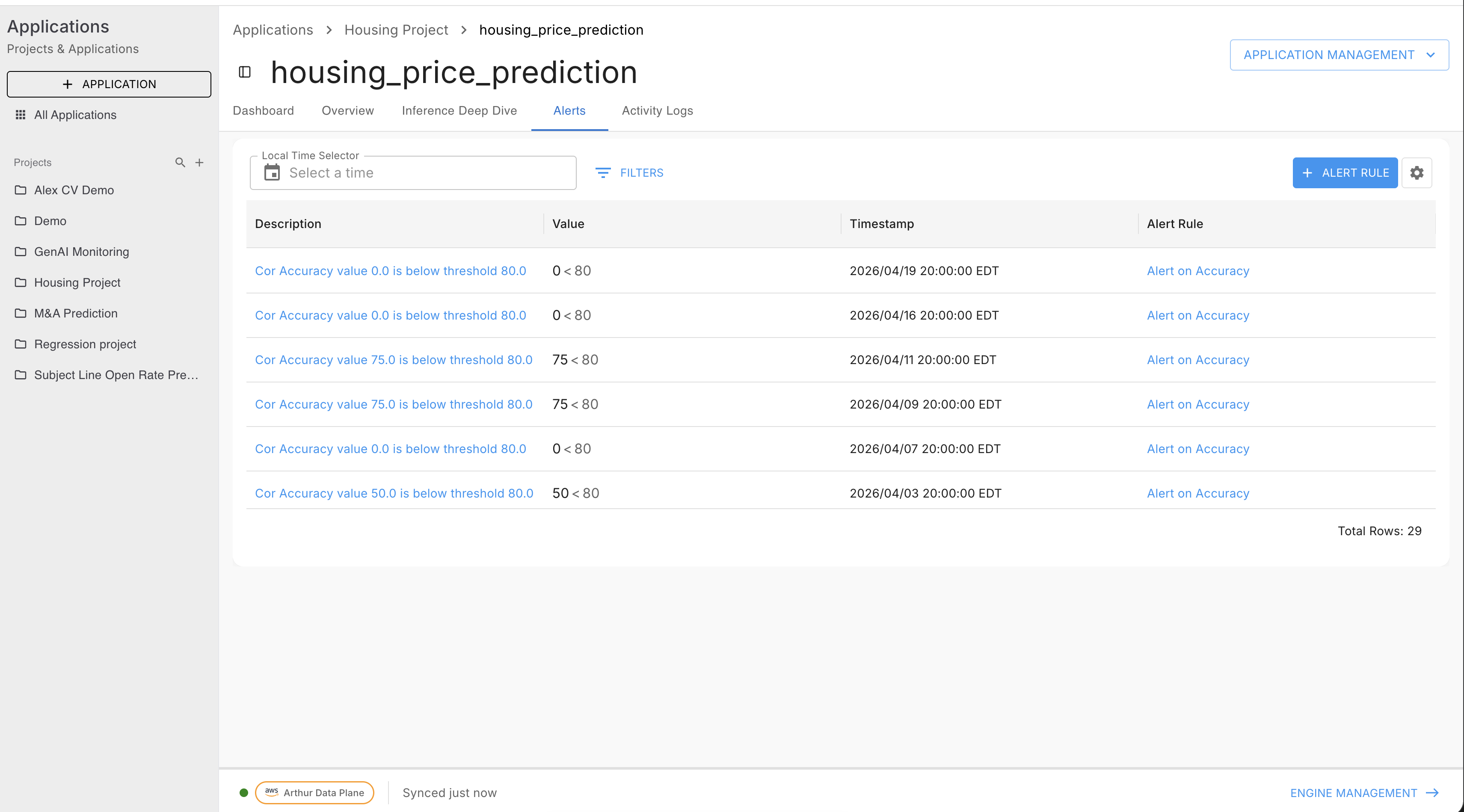
Step 1 — Information
| Field | Required | Description |
|---|---|---|
| Name | Yes | Human-readable name shown in the alert list and notifications |
| Metric Name | Yes | Display label for the metric this rule monitors |
| Description | No | Optional context for your team |
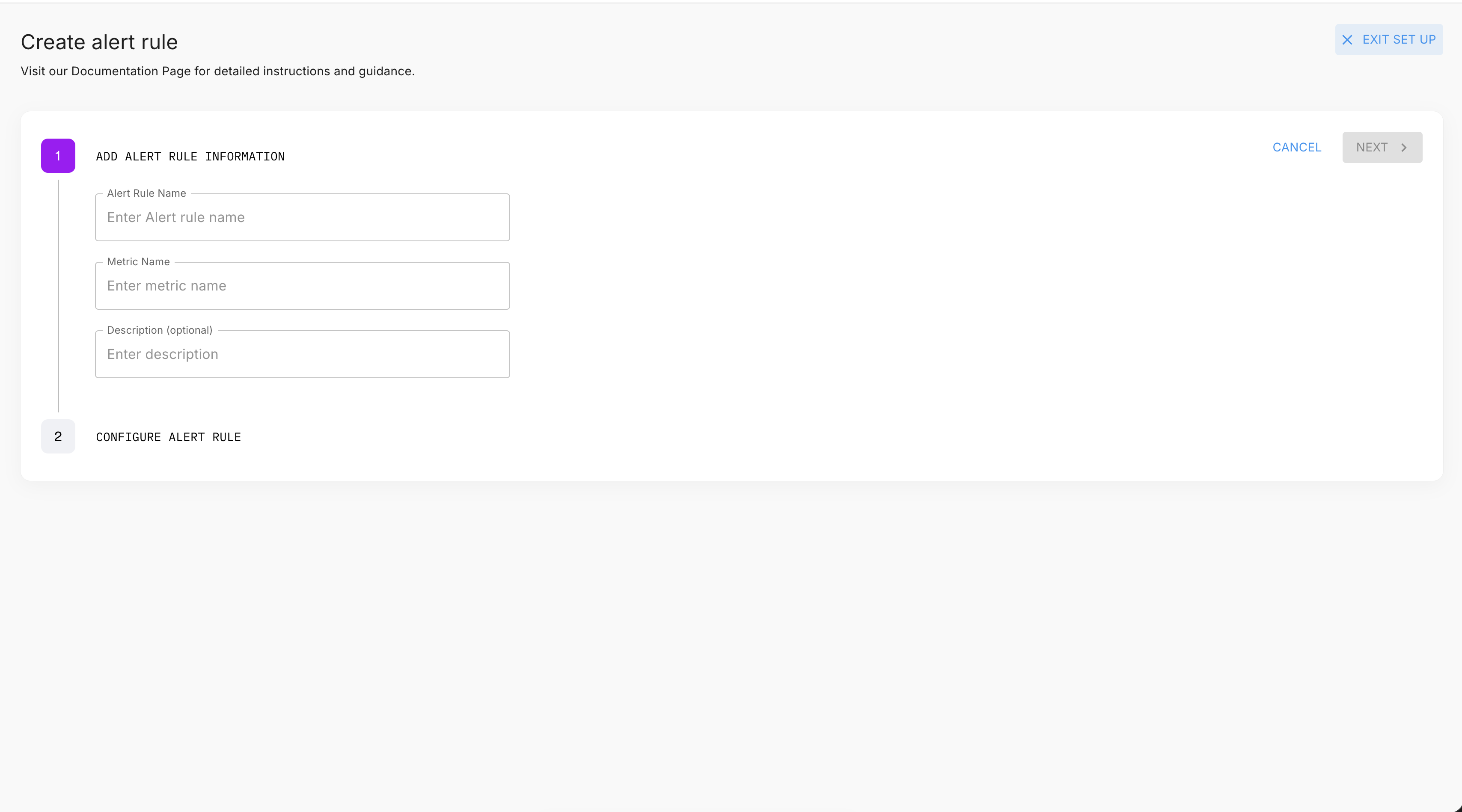
Step 2 — Configure
| Field | Required | Description |
|---|---|---|
| SQL Query | Yes | TimescaleDB SQL returning metric_timestamp and metric_value — see The Alert Rule SQL Contract |
| Bound | Yes | Lower bound (fires when value drops below threshold) or Upper bound (fires when value exceeds threshold) |
| Threshold | Yes | The numeric value to compare against |
| Interval | Yes | How often Arthur evaluates the rule — count + unit (seconds / minutes / hours / days) |
| Notification Webhooks | No | One or more webhooks to notify when the alert fires |
The ValidationChecklist runs automatically as you type and confirms your query satisfies the four SQL requirements (see The Alert Rule SQL Contract).
The Test button executes your query against real data and opens a chart with your threshold line overlaid — use this to verify the rule would have fired on past incidents before saving.
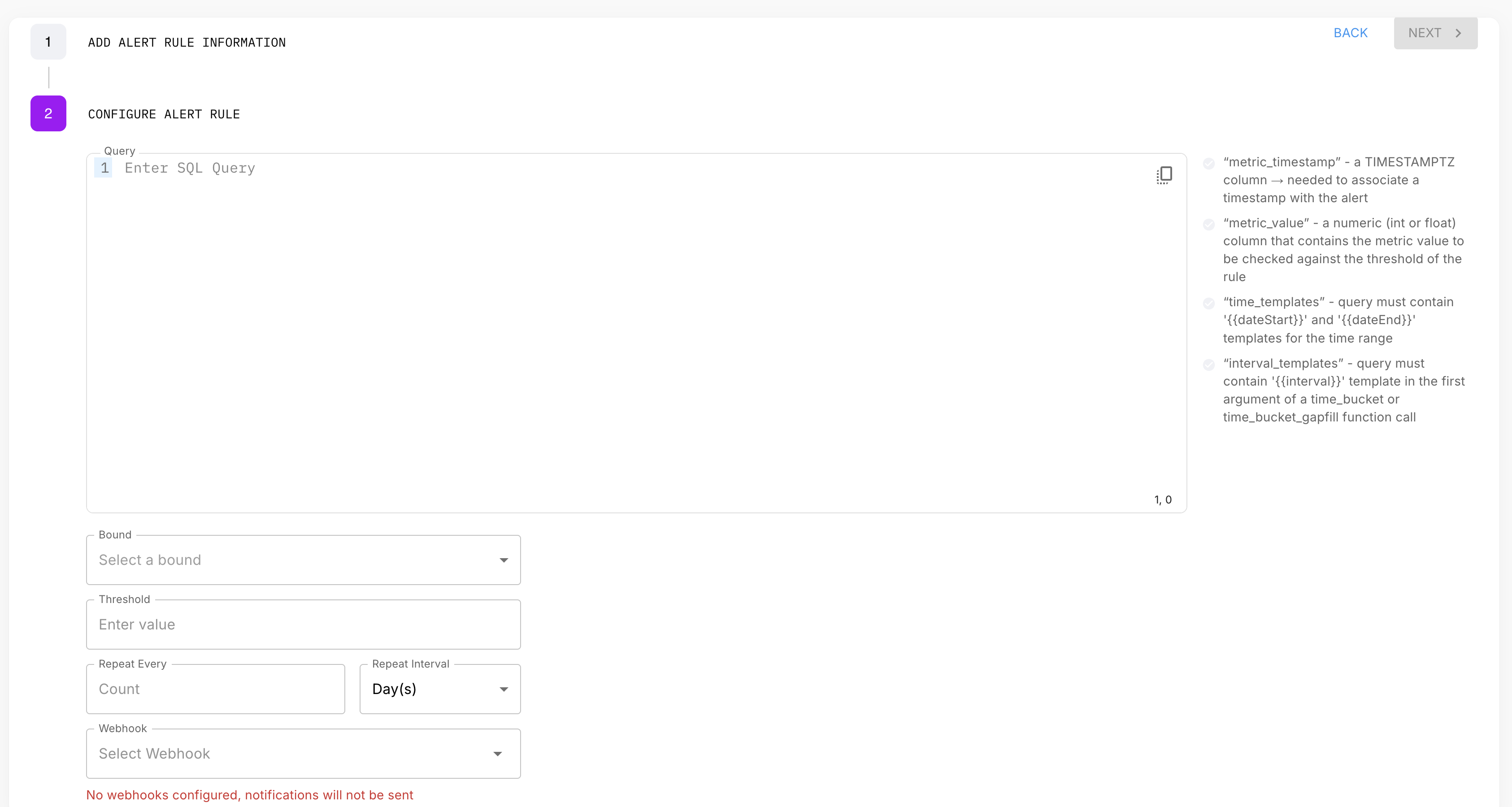
Step 3 — Review
Confirm all settings and click Create.
The Alert Rule SQL Contract
Alert rule SQL has four requirements checked by the ValidationChecklist:
| Requirement | Detail |
|---|---|
metric_timestamp column | The query must return a column named exactly metric_timestamp |
metric_value column | The query must return a column named exactly metric_value — this is what Arthur compares against your threshold |
| Time template variables | Use ${start_time} and ${end_time} to define the query window — Arthur substitutes these at evaluation time |
| Interval template variable | Use ${interval} as the time_bucket argument — Arthur substitutes the rule's configured interval |
NoHAVINGclause needed. Arthur applies the bound + threshold comparison againstmetric_valueafter the query runs. Your SQL just needs to return the right value — do not embed the threshold condition in the SQL.
Not the same as custom graph SQL. Custom graph SQL uses{{dateStart}}and{{dateEnd}}UI template variables. Alert rule SQL uses${start_time},${end_time}, and${interval}— they are different substitution systems.
Minimal query template
SELECT
    time_bucket('${interval}', timestamp) AS metric_timestamp,
    AGG(value)                             AS metric_value
FROM metrics_numeric_latest_version
WHERE model_id   = '{{your-model-uuid}}'
  AND metric_name = 'your_metric'
  AND timestamp  BETWEEN '${start_time}' AND '${end_time}'
GROUP BY metric_timestamp
ORDER BY metric_timestamp
Replace AGG(value) with the appropriate aggregation (AVG, SUM, MIN, MAX, or a sketch function for distributional metrics).
Alert Rule Examples
Each example shows the SQL query plus the Bound and Threshold to set in the UI or API.
Accuracy drops below threshold
SELECT
    time_bucket('${interval}', timestamp) AS metric_timestamp,
    AVG(value)                             AS metric_value
FROM metrics_numeric_latest_version
WHERE model_id   = '{{your-model-uuid}}'
  AND metric_name = 'accuracy'
  AND timestamp  BETWEEN '${start_time}' AND '${end_time}'
GROUP BY metric_timestamp
ORDER BY metric_timestamp| Setting | Value |
|---|---|
| Bound | Lower bound |
| Threshold | 0.8 |
Hallucination rate exceeds threshold
SELECT
    time_bucket('${interval}', timestamp) AS metric_timestamp,
    AVG(value)                             AS metric_value
FROM metrics_numeric_latest_version
WHERE model_id   = '{{your-model-uuid}}'
  AND metric_name = 'hallucination_rate'
  AND timestamp  BETWEEN '${start_time}' AND '${end_time}'
GROUP BY metric_timestamp
ORDER BY metric_timestamp| Setting | Value |
|---|---|
| Bound | Upper bound |
| Threshold | 0.05 |
Inference count drops to zero (pipeline failure)
SELECT
    time_bucket('${interval}', timestamp) AS metric_timestamp,
    COALESCE(SUM(value), 0)               AS metric_value
FROM metrics_numeric_latest_version
WHERE model_id   = '{{your-model-uuid}}'
  AND metric_name = 'inference_count'
  AND timestamp  BETWEEN '${start_time}' AND '${end_time}'
GROUP BY metric_timestamp
ORDER BY metric_timestamp| Setting | Value |
|---|---|
| Bound | Lower bound |
| Threshold | 1 |
COALESCE(..., 0) ensures missing buckets count as zero rather than being omitted. A threshold of 1 means the alert fires when count drops below 1 — i.e., reaches zero.
Error rate spike
SELECT
    time_bucket('${interval}', timestamp) AS metric_timestamp,
    AVG(value)                             AS metric_value
FROM metrics_numeric_latest_version
WHERE model_id   = '{{your-model-uuid}}'
  AND metric_name = 'error_rate'
  AND timestamp  BETWEEN '${start_time}' AND '${end_time}'
GROUP BY metric_timestamp
ORDER BY metric_timestamp| Setting | Value |
|---|---|
| Bound | Upper bound |
| Threshold | 0.1 |
p95 latency exceeds SLA
Latency is a sketch metric — use kll_float_sketch_merge and kll_float_sketch_get_quantile:
SELECT
    time_bucket('${interval}', timestamp)                                       AS metric_timestamp,
    kll_float_sketch_get_quantile(kll_float_sketch_merge(value), 0.95)          AS metric_value
FROM metrics_sketch_latest_version
WHERE model_id   = '{{your-model-uuid}}'
  AND metric_name = 'response_latency_ms'
  AND timestamp  BETWEEN '${start_time}' AND '${end_time}'
GROUP BY metric_timestamp
ORDER BY metric_timestamp| Setting | Value |
|---|---|
| Bound | Upper bound |
| Threshold | 2000 |
Relative spike (current vs. baseline ratio)
Alert when a metric spikes relative to its own recent baseline. The query returns the ratio of the current bucket's value to the 24-hour average — set threshold to the multiplier that represents a meaningful spike:
WITH baseline AS (
    SELECT AVG(value) AS avg_rate
    FROM metrics_numeric_latest_version
    WHERE model_id   = '{{your-model-uuid}}'
      AND metric_name = 'error_rate'
      AND timestamp  BETWEEN '${start_time}'::timestamptz - INTERVAL '24 hours'
                         AND '${start_time}'::timestamptz
),
current_period AS (
    SELECT
        time_bucket('${interval}', timestamp) AS metric_timestamp,
        AVG(value)                             AS current_rate
    FROM metrics_numeric_latest_version
    WHERE model_id   = '{{your-model-uuid}}'
      AND metric_name = 'error_rate'
      AND timestamp  BETWEEN '${start_time}' AND '${end_time}'
    GROUP BY metric_timestamp
)
SELECT
    c.metric_timestamp,
    c.current_rate / NULLIF(b.avg_rate, 0) AS metric_value
FROM current_period c
CROSS JOIN baseline b
ORDER BY c.metric_timestamp| Setting | Value |
|---|---|
| Bound | Upper bound |
| Threshold | 3.0 |
Fires when the current interval's error rate is more than 3× the 24-hour average.
Worst-performing dimension slice
Alert when the lowest-performing dimension value (e.g. a specific model version) drops below threshold — catches regressions hidden in the overall average:
SELECT
    bucket                AS metric_timestamp,
    MIN(slice_avg)        AS metric_value
FROM (
    SELECT
        time_bucket('${interval}', timestamp) AS bucket,
        AVG(value)                             AS slice_avg
    FROM metrics_numeric_latest_version
    WHERE model_id   = '{{your-model-uuid}}'
      AND metric_name = 'accuracy'
      AND timestamp  BETWEEN '${start_time}' AND '${end_time}'
    GROUP BY bucket, dimensions->>'model_version'
) slices
GROUP BY bucket
ORDER BY bucket| Setting | Value |
|---|---|
| Bound | Lower bound |
| Threshold | 0.80 |
MIN(slice_avg) takes the worst-performing version at each interval. The alert fires if any version drops below 0.80.
Threshold reference
| Metric | Bound | Typical Threshold | Severity |
|---|---|---|---|
| Accuracy | Lower | 0.8 | High |
| Hallucination rate | Upper | 0.05 | High |
| Toxicity score | Upper | 0.02 | High |
| Inference count | Lower | 1 | High |
| Latency p95 (ms) | Upper | 5000 | Medium |
| Data drift score | Upper | 0.3 | Medium |
Create via API
Use POST /api/v1/models/{model_id}/alert_rules to create rules programmatically. The API accepts the same fields as the UI:
| Field | Type | Description |
|---|---|---|
name | string | Rule name |
description | string | Optional description |
metric_name | string | Display label for the metric |
query | string | TimescaleDB SQL (must satisfy the contract above) |
bound | string | "upper_bound" or "lower_bound" |
threshold | number | Numeric threshold value |
interval | object | { count: number, unit: "seconds"|"minutes"|"hours"|"days" } |
notification_webhook_ids | string[] | Webhook IDs to notify |
Validate before creating
Always validate your query first:
import requests

response = requests.post(
    "https://your-arthur-instance.example.com/api/v1/models/{MODEL_ID}/alert_rule_query_validation",
    headers={"Authorization": f"Bearer {API_TOKEN}", "Content-Type": "application/json"},
    json={
        "query": """
            SELECT
                time_bucket('${interval}', timestamp) AS metric_timestamp,
                AVG(value) AS metric_value
            FROM metrics_numeric_latest_version
            WHERE model_id = 'your-model-uuid'
              AND metric_name = 'accuracy'
              AND timestamp BETWEEN '${start_time}' AND '${end_time}'
            GROUP BY metric_timestamp
            ORDER BY metric_timestamp
        """
    }
)
print(response.json())
const response = await fetch(
`https://your-arthur-instance.example.com/api/v1/models/${MODEL_ID}/alert_rule_query_validation`,
{
method: "POST",
headers: { "Authorization": `Bearer ${API_TOKEN}`, "Content-Type": "application/json" },
body: JSON.stringify({
query: `
SELECT
time_bucket('\${interval}', timestamp) AS metric_timestamp,
AVG(value) AS metric_value
FROM metrics_numeric_latest_version
WHERE model_id = 'your-model-uuid'
AND metric_name = 'accuracy'
AND timestamp BETWEEN '\${start_time}' AND '\${end_time}'
GROUP BY metric_timestamp
ORDER BY metric_timestamp
`
})
}
);
console.log(await response.json());curl -X POST https://your-arthur-instance.example.com/api/v1/models/your-model-id/alert_rule_query_validation \
-H "Authorization: Bearer your-api-token" \
-H "Content-Type: application/json" \
-d '{"query": "SELECT time_bucket('"'"'${interval}'"'"', timestamp) AS metric_timestamp, AVG(value) AS metric_value FROM metrics_numeric_latest_version WHERE model_id = '"'"'your-model-uuid'"'"' AND metric_name = '"'"'accuracy'"'"' AND timestamp BETWEEN '"'"'${start_time}'"'"' AND '"'"'${end_time}'"'"' GROUP BY metric_timestamp ORDER BY metric_timestamp"}'Create the rule
response = requests.post(
    "https://your-arthur-instance.example.com/api/v1/models/{MODEL_ID}/alert_rules",
    headers={"Authorization": f"Bearer {API_TOKEN}", "Content-Type": "application/json"},
    json={
        "name": "Accuracy Drop Below 0.8",
        "description": "Fires when accuracy falls below 0.8",
        "metric_name": "accuracy",
        "bound": "lower_bound",
        "threshold": 0.8,
        "query": """
            SELECT
                time_bucket('${interval}', timestamp) AS metric_timestamp,
                AVG(value) AS metric_value
            FROM metrics_numeric_latest_version
            WHERE model_id = 'your-model-uuid'
              AND metric_name = 'accuracy'
              AND timestamp BETWEEN '${start_time}' AND '${end_time}'
            GROUP BY metric_timestamp
            ORDER BY metric_timestamp
        """,
        "interval": {"count": 1, "unit": "hours"},
        "notification_webhook_ids": []
    }
)
print(response.json()["id"])
const response = await fetch(
`https://your-arthur-instance.example.com/api/v1/models/${MODEL_ID}/alert_rules`,
{
method: "POST",
headers: { "Authorization": `Bearer ${API_TOKEN}`, "Content-Type": "application/json" },
body: JSON.stringify({
name: "Accuracy Drop Below 0.8",
description: "Fires when accuracy falls below 0.8",
metric_name: "accuracy",
bound: "lower_bound",
threshold: 0.8,
query: `
SELECT
time_bucket('\${interval}', timestamp) AS metric_timestamp,
AVG(value) AS metric_value
FROM metrics_numeric_latest_version
WHERE model_id = 'your-model-uuid'
AND metric_name = 'accuracy'
AND timestamp BETWEEN '\${start_time}' AND '\${end_time}'
GROUP BY metric_timestamp
ORDER BY metric_timestamp
`,
interval: { count: 1, unit: "hours" },
notification_webhook_ids: []
})
}
);
const rule = await response.json();
console.log(rule.id);curl -X POST https://your-arthur-instance.example.com/api/v1/models/your-model-id/alert_rules \
-H "Authorization: Bearer your-api-token" \
-H "Content-Type: application/json" \
-d '{
"name": "Accuracy Drop Below 0.8",
"metric_name": "accuracy",
"bound": "lower_bound",
"threshold": 0.8,
"query": "SELECT time_bucket('"'"'${interval}'"'"', timestamp) AS metric_timestamp, AVG(value) AS metric_value FROM metrics_numeric_latest_version WHERE model_id = '"'"'your-model-uuid'"'"' AND metric_name = '"'"'accuracy'"'"' AND timestamp BETWEEN '"'"'${start_time}'"'"' AND '"'"'${end_time}'"'"' GROUP BY metric_timestamp ORDER BY metric_timestamp",
"interval": {"count": 1, "unit": "hours"},
"notification_webhook_ids": []
}'Notification Channels
Alert rules dispatch to one or more webhook channels when they fire. Webhooks are configured at the workspace level and referenced by ID. See Webhooks & Notifications for setup instructions.
Manage and Update Alerts
List all alert rules for a model
response = requests.get(
    f"https://your-arthur-instance.example.com/api/v1/models/{MODEL_ID}/alert_rules",
    headers={"Authorization": f"Bearer {API_TOKEN}"}
)
for rule in response.json():
    print(f"{rule['id']} — {rule['name']}")
const response = await fetch(
`https://your-arthur-instance.example.com/api/v1/models/${MODEL_ID}/alert_rules`,
{ headers: { "Authorization": `Bearer ${API_TOKEN}` } }
);
const rules = await response.json();
rules.forEach(r => console.log(`${r.id} — ${r.name}`));curl https://your-arthur-instance.example.com/api/v1/models/your-model-id/alert_rules \
-H "Authorization: Bearer your-api-token"Update a rule
response = requests.patch(
    f"https://your-arthur-instance.example.com/api/v1/alert_rules/{ALERT_RULE_ID}",
    headers={"Authorization": f"Bearer {API_TOKEN}", "Content-Type": "application/json"},
    json={"threshold": 0.75}
)
await fetch(`https://your-arthur-instance.example.com/api/v1/alert_rules/${ALERT_RULE_ID}`, {
method: "PATCH",
headers: { "Authorization": `Bearer ${API_TOKEN}`, "Content-Type": "application/json" },
body: JSON.stringify({ threshold: 0.75 })
});curl -X PATCH https://your-arthur-instance.example.com/api/v1/alert_rules/your-rule-id \
-H "Authorization: Bearer your-api-token" \
-H "Content-Type: application/json" \
-d '{"threshold": 0.75}'Delete a rule
requests.delete(
    f"https://your-arthur-instance.example.com/api/v1/alert_rules/{ALERT_RULE_ID}",
    headers={"Authorization": f"Bearer {API_TOKEN}"}
)
await fetch(`https://your-arthur-instance.example.com/api/v1/alert_rules/${ALERT_RULE_ID}`, {
method: "DELETE",
headers: { "Authorization": `Bearer ${API_TOKEN}` }
});curl -X DELETE https://your-arthur-instance.example.com/api/v1/alert_rules/your-rule-id \
-H "Authorization: Bearer your-api-token"View fired alerts
response = requests.get(
    f"https://your-arthur-instance.example.com/api/v1/models/{MODEL_ID}/alerts",
    headers={"Authorization": f"Bearer {API_TOKEN}"}
)
for alert in response.json():
    print(f"{alert['id']} fired at {alert['fired_at']}")
const response = await fetch(
`https://your-arthur-instance.example.com/api/v1/models/${MODEL_ID}/alerts`,
{ headers: { "Authorization": `Bearer ${API_TOKEN}` } }
);
(await response.json()).forEach(a => console.log(`${a.id} fired at ${a.fired_at}`));curl https://your-arthur-instance.example.com/api/v1/models/your-model-id/alerts \
-H "Authorization: Bearer your-api-token"Next Steps
- Set up notification routing — See Webhooks & Notifications to route alerts to Slack, Jira, or PagerDuty.
- Understand the metrics schema — See Metrics Overview & Data Model for the full view schema, metric types, and how dimensions work.
- Build dashboards alongside alerts — Alert rules tell you when something is wrong. Custom graphs tell you why. See Custom Graphs.
Updated 5 months ago