
Policies & Governance
If you manage dozens of AI applications across your organization, you need a way to set organization-wide monitoring requirements that automatically apply across all applications and alert you to compliance gaps — without manually configuring the same alert rules for every new model you deploy. Arthur's Policies feature solves exactly this: define your monitoring standards once at the organization level, and Arthur materializes them as concrete alert rules on every application, surfacing gaps wherever requirements aren't met.
Overview
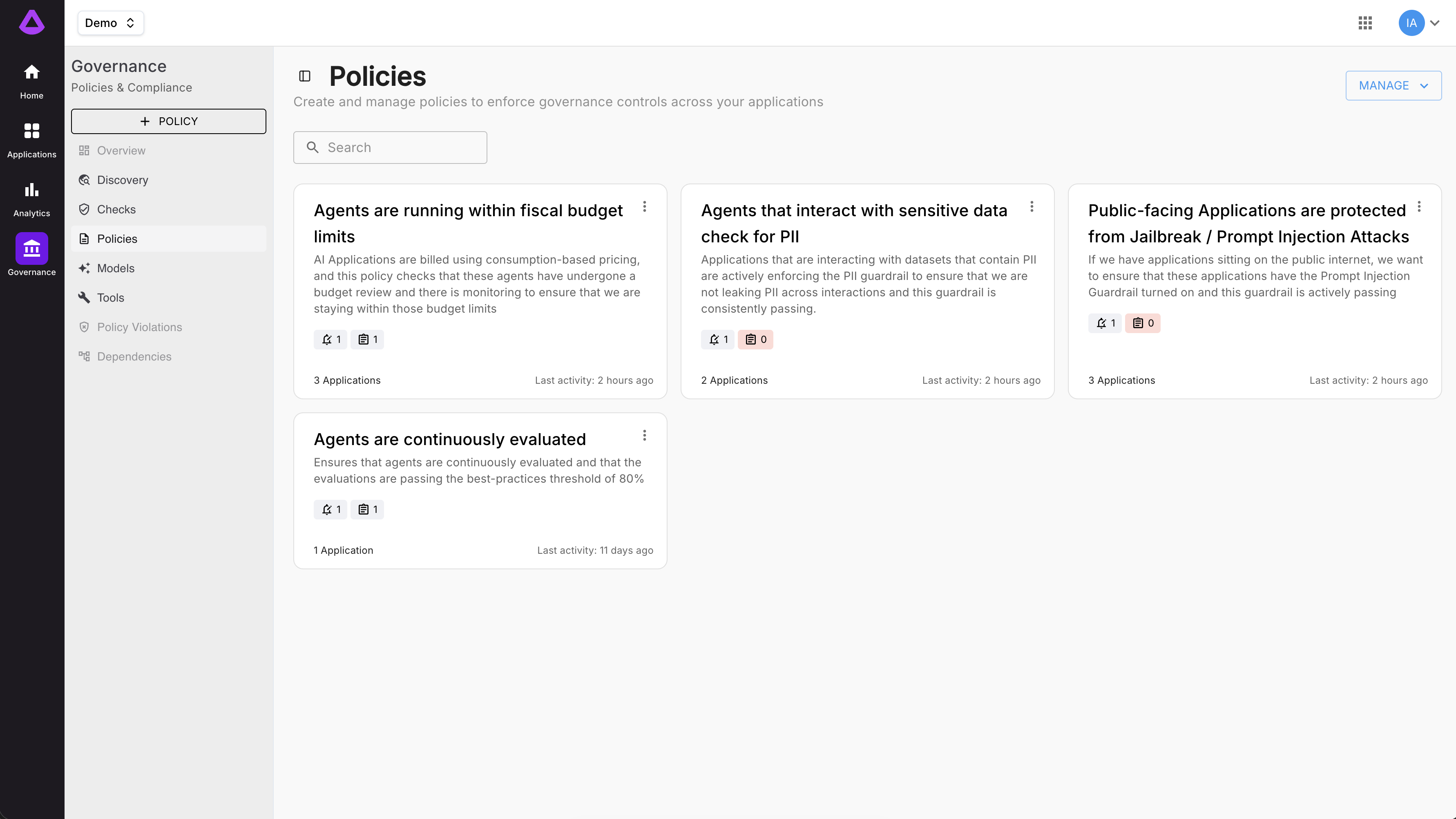
Policies are the foundation of AI governance at scale in Arthur. Instead of asking each team to remember which evaluations to enable, which thresholds to set, and which alerts to configure, your governance or platform team encodes those requirements into a reusable Policy template. That template can then be applied across any of your AI applications — giving you a consistent, auditable governance framework without reconfiguring each application from scratch.
Arthur ships with four built-in Policy Templates covering the most common enterprise governance scenarios, and you can create fully custom policies to match your organization's specific compliance framework.
What you'll accomplish on this page:
- Understand the mental model behind Policies and how they differ from Alert Rules
- Create a custom Policy from scratch
- Use built-in Policy Templates
- Configure Attestation Rules for compliance sign-off workflows
- Apply a Policy to your applications
- Monitor compliance status across your entire application portfolio
How Policies Work
A Policy is an organization-level template that declares what monitoring requirements must be in place. When a Policy is applied to an application, Arthur materializes that Policy into concrete Alert Rules on that specific application — one Alert Rule per Policy requirement.
flowchart TD
    P["Policy (Org-level template)"]
    P --> A1["Application A"]
    P --> A2["Application B"]
    P --> A3["Application C"]
    A1 --> C1{Compliant?}
    A2 --> C2{Compliant?}
    A3 --> C3{Compliant?}
    C1 -->|Yes| G1["✅ Pass"]
    C1 -->|No| G2["🚨 Compliance Gap"]
    C2 -->|Yes| G3["✅ Pass"]
    C2 -->|No| G4["🚨 Compliance Gap"]
    C3 -->|Yes| G5["✅ Pass"]
    C3 -->|No| G6["🚨 Compliance Gap"]
Key behaviors:
- Automatic propagation. When you add a new application and attach a Policy, the required Alert Rules are created automatically — no manual setup needed.
- Centralized updates. When you update a Policy (e.g., tighten a threshold), the change propagates to all applications covered by that Policy.
- Audit trail. Every Policy change, application attachment, and attestation event is logged for compliance reporting.
Policy Building Blocks
A Policy is made up of three components:
| Component | Purpose |
|---|---|
| Policy Details | Defines the goal of the policy — its name, ownership, enforcement delay, and which applications it governs. |
| Alert Rules | Metric-based thresholds that trigger a policy violation when breached (e.g., PII detection rate exceeds 0.1%). One policy can include multiple alert rules. |
| Attestation Rules | Human-in-the-loop sign-off requirements. Define who must periodically validate that the policy is being met and how long that sign-off remains valid. |
A policy requires at least one alert rule or one attestation rule to be valid.
Prerequisites
Before creating or applying Policies, make sure you have:
- Organization Admin or Governance Manager role in Arthur
- At least one application created in your Arthur workspace
- Familiarity with the evaluation types you want to require (Hallucination, PII, Toxicity, Sensitive Data, etc.)
- Defined your compliance thresholds (e.g., "PII detection rate must stay below 2%")
Create a Policy
In the left navigation, select Governance → Policies and click + New Policy. The creation wizard has four steps.
Step 1 — Details
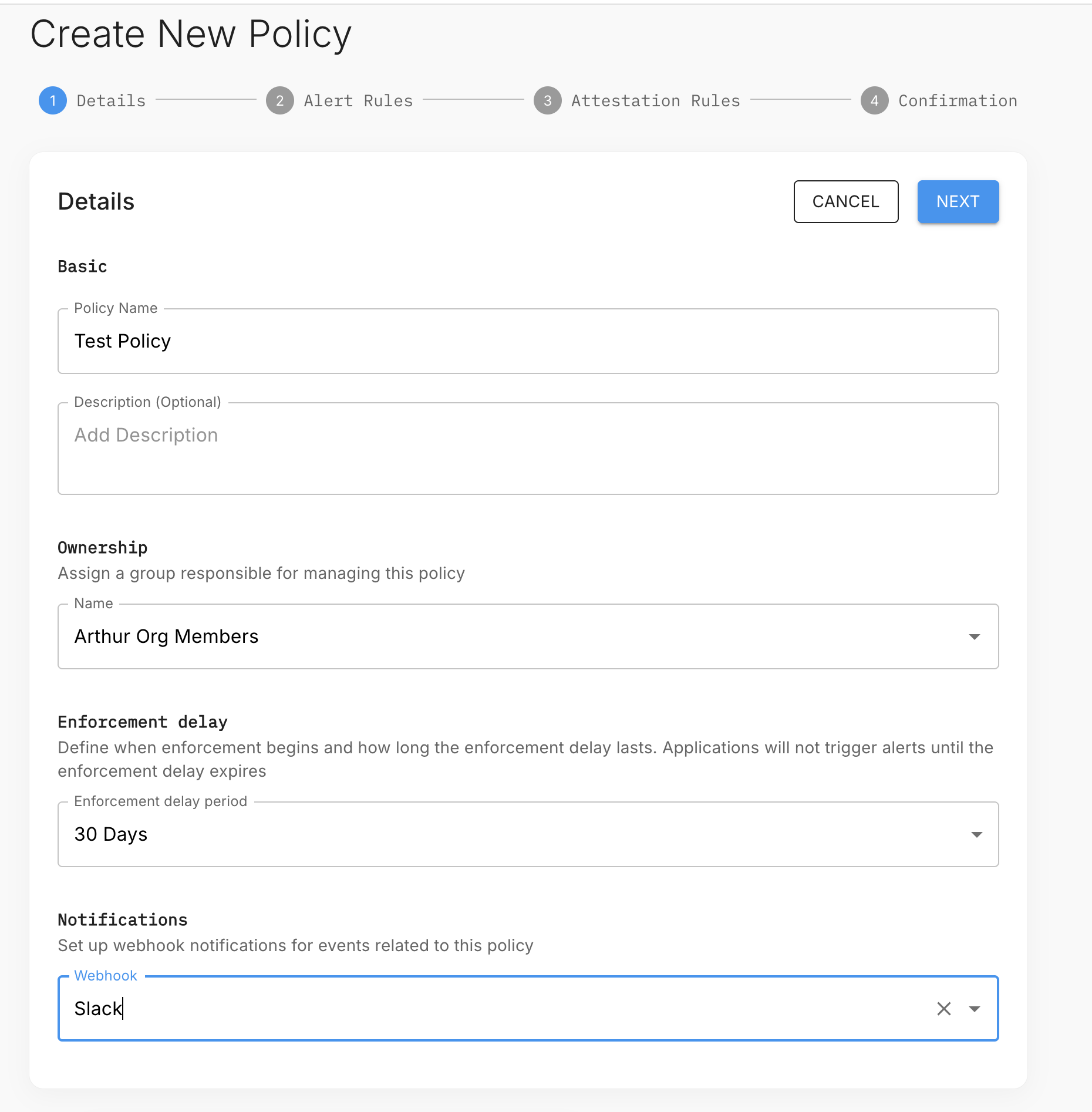
| Field | Description |
|---|---|
| Policy Name | Required. A clear name visible to all admins. |
| Description | Optional. Reference the compliance framework or business requirement this policy satisfies. |
| Ownership | The group responsible for managing this policy (e.g., "Arthur Org Members"). |
| Enforcement delay | How long after a policy is applied before alerts start firing. Gives teams time to remediate before enforcement begins. Default: 30 days. |
| Notifications | A webhook channel (e.g., Slack) to receive notifications for events related to this policy. |
Step 2 — Alert Rules
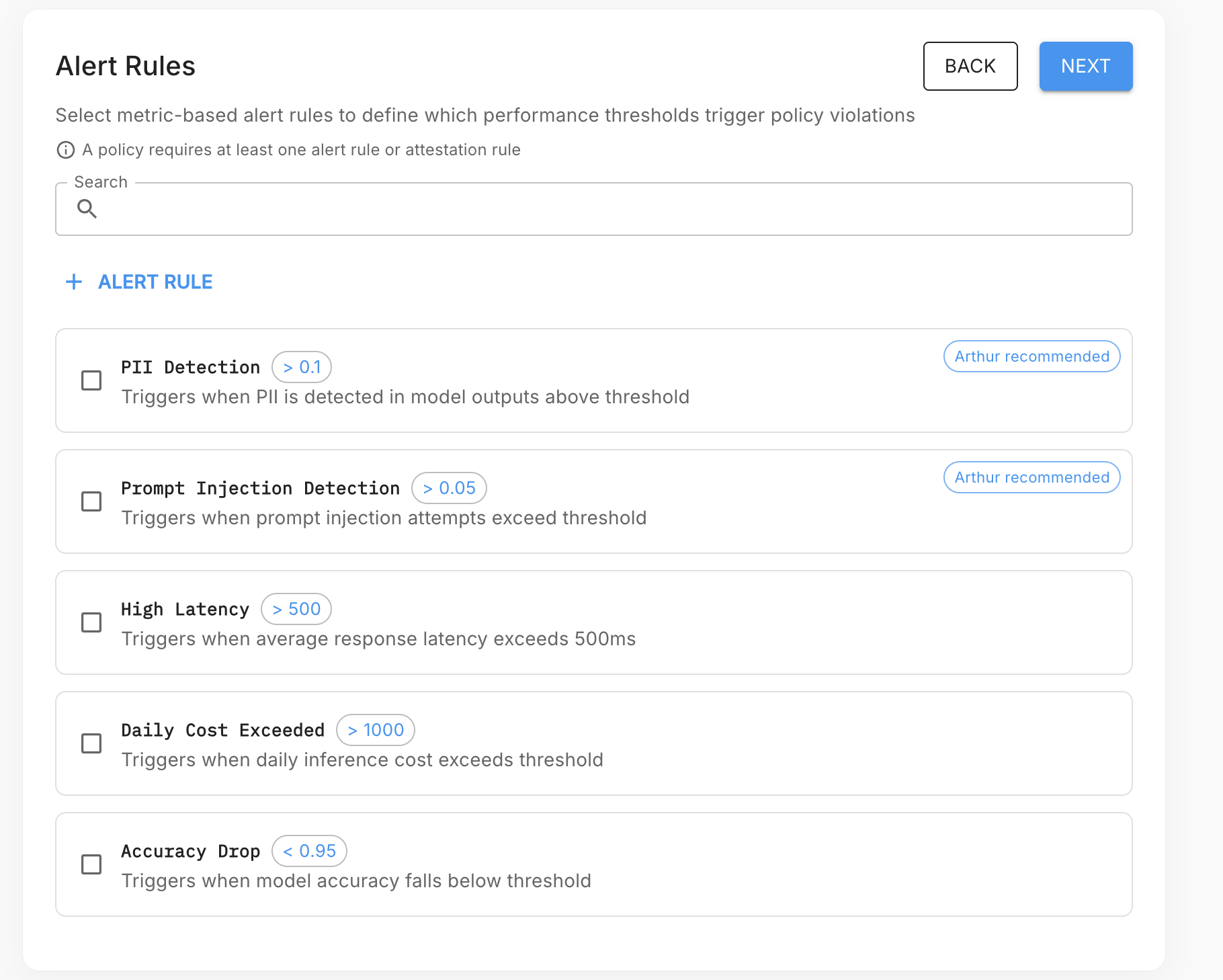
Select the metric-based alert rules that define which performance thresholds trigger policy violations. Arthur shows all available alert rules — select any combination. Arthur-recommended rules are flagged.
A policy requires at least one alert rule or one attestation rule.
Use + ALERT RULE to create a new alert rule if the one you need doesn't exist yet.
Step 3 — Attestation Rules
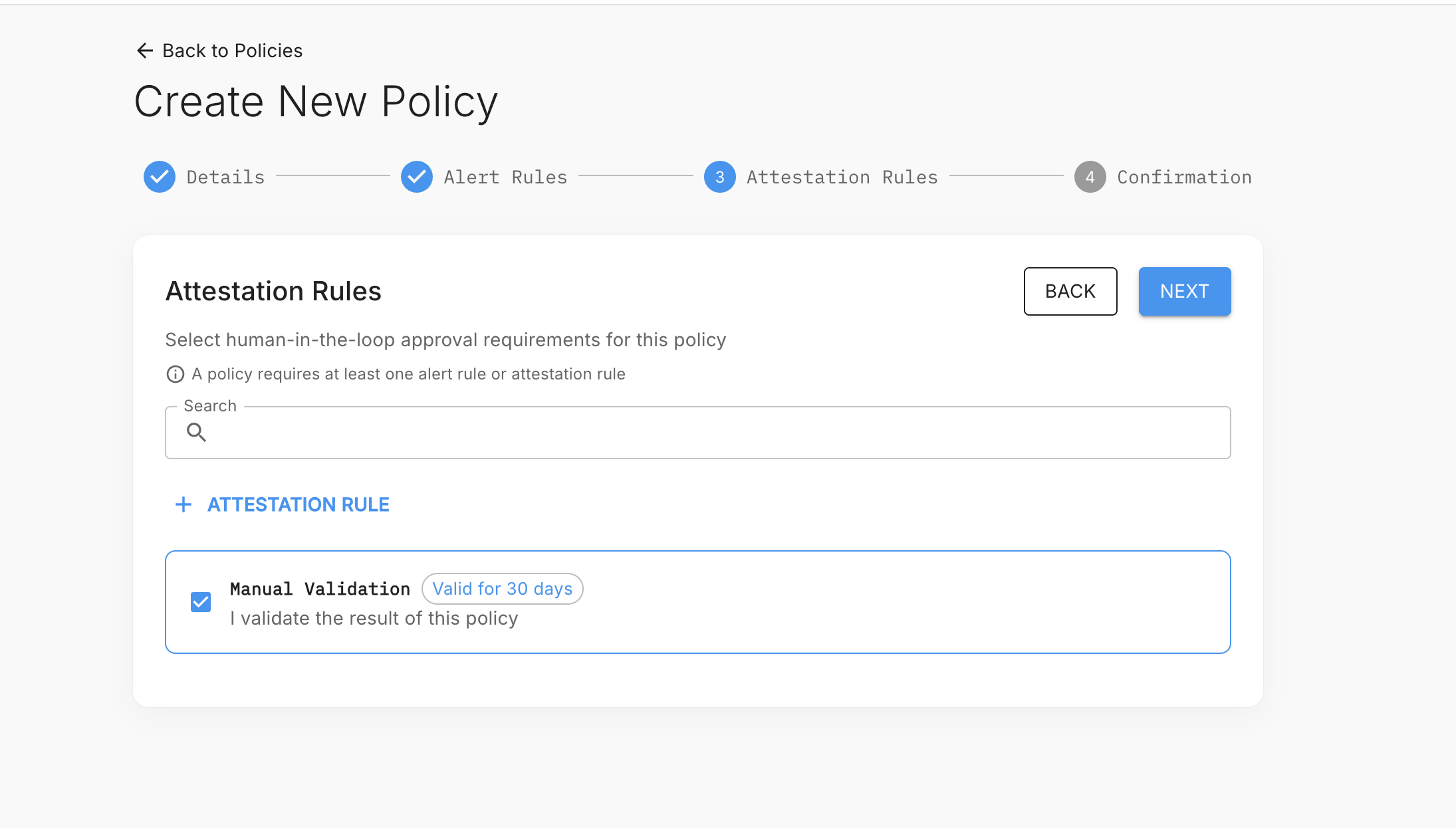
Select human-in-the-loop approval requirements for this policy. Attestation rules require a designated reviewer to manually validate that the policy is being met on a defined cadence.
Use + ATTESTATION RULE to create a new attestation rule (e.g., "Manual Validation — Valid for 30 days").
Step 4 — Confirmation
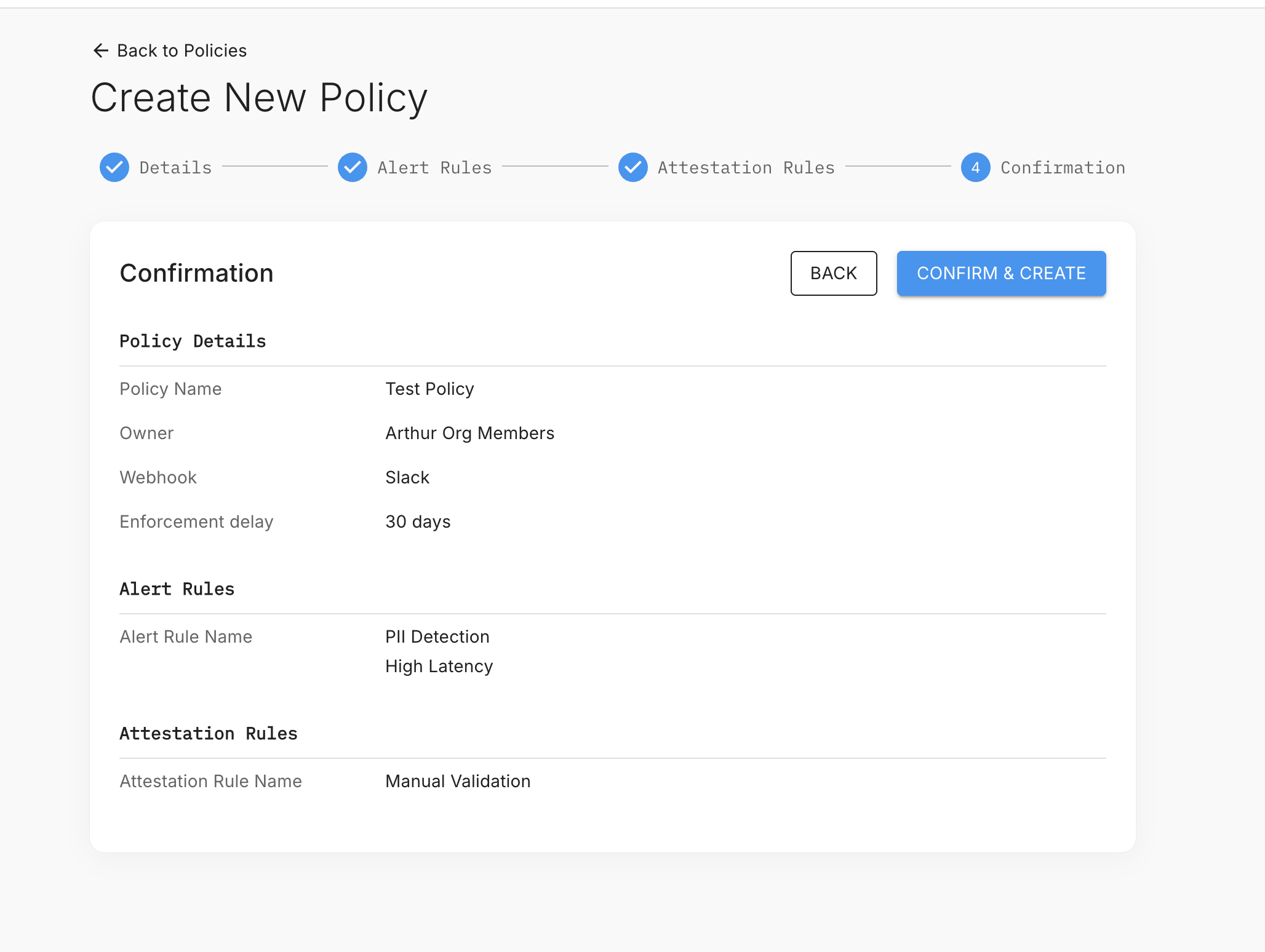
Review the full policy configuration — details, selected alert rules, and selected attestation rules — then click CONFIRM & CREATE.
Policy Templates
Arthur ships with four built-in Policy Templates. Templates give you a production-ready starting point that you can apply as-is or clone and customize.
To access templates, navigate to Governance → Policies.
🖥️ System Health
Purpose: Ensures every application has baseline operational monitoring in place.
Included requirements:
| Requirement | Default Threshold | Severity |
|---|---|---|
| Response latency (p95) | > 5000ms | High |
| Error rate | > 5% | Critical |
| Throughput drop | > 50% week-over-week | High |
| Model availability | < 99% | Critical |
Best for: All production applications as a universal baseline.
🔒 Sensitive Data
Purpose: Prevents sensitive or regulated data from appearing in LLM inputs or outputs.
Included requirements:
| Requirement | Default Threshold | Severity |
|---|---|---|
| PII detection rate | > 2% | Critical |
| Sensitive data detection rate | > 1% | Critical |
| Credit card / financial data | > 0% (zero tolerance) | Critical |
| SSN / government ID detection | > 0% (zero tolerance) | Critical |
Best for: Applications handling customer data, healthcare information, or financial records. Aligns with HIPAA, PCI-DSS, and GDPR requirements.
🛡️ Hardened for External Usage
Purpose: Comprehensive security posture for LLM applications exposed to untrusted end users.
Included requirements:
| Requirement | Default Threshold | Severity |
|---|---|---|
| Prompt injection detection rate | > 0.5% | Critical |
| Toxicity rate | > 1% | High |
| PII detection rate | > 2% | Critical |
| Sensitive data detection rate | > 1% | Critical |
| Jailbreak attempt rate | > 0.1% | Critical |
Best for: Customer-facing chatbots, public-facing AI assistants, and any application where you cannot control who submits prompts.
📊 Performance Monitored
Purpose: Tracks LLM output quality over time to catch model drift and degradation.
Included requirements:
| Requirement | Default Threshold | Severity |
|---|---|---|
| Hallucination rate | > 5% | High |
| Response coherence score | < 0.75 | Medium |
| Task completion rate | < 90% | High |
| User satisfaction score | < 3.5 / 5.0 | Medium |
Best for: Internal productivity tools, copilots, and any application where output quality directly impacts business outcomes.
Combining templatesYou can apply multiple Policies to a single application. For example, apply both Sensitive Data and Hardened for External Usage to a customer-facing chatbot that also handles account information. Arthur deduplicates overlapping requirements and uses the stricter threshold when conflicts exist.
Attestation Rules
Attestation Rules are the compliance sign-off mechanism within a Policy. They define who must periodically review and confirm that an application's monitoring posture is acceptable — and what happens if they don't.
This is critical for regulated industries where you need a documented human-in-the-loop review process, not just automated alerting.
How attestation works
- Request sent — Arthur sends an attestation request to the designated reviewer on the configured schedule.
- Reviewer validates — The reviewer checks the compliance dashboard and either submits sign-off with optional notes, or misses the deadline.
- If attested — Arthur logs the attestation (reviewer, timestamp, notes) and marks the policy as signed off.
- If overdue — Arthur flags the policy as Attestation Overdue, logs the escalation event, and notifies the escalation path.
Configuring an Attestation Rule
When creating or editing a Policy, navigate to the Attestation Rules step and configure:
| Field | Description | Example |
|---|---|---|
| Attestation frequency | How often sign-off is required | Monthly, Quarterly, Annually |
| Reviewers | Users or groups who must attest | [email protected], @app-owners group |
| Deadline window | Days after request before escalation triggers | 7 days |
| Escalation path | Who gets notified if attestation is overdue | CISO, VP Engineering |
| Required notes | Whether the reviewer must provide written justification | Required / Optional |
| Blocking behavior | Whether overdue attestation blocks new deployments | Block / Warn only |
Attestation via API
# Submit an attestation sign-off
attestation_payload = {
    "policy_id": "pol_abc123",
    "status": "compliant",  # or "compliant_with_exceptions" or "non_compliant"
    "notes": "All requirements passing. PII exception for app-xyz tracked in JIRA-1234.",
    "exceptions": [
        {
            "application_id": "app_xyz789",
            "requirement": "pii",
            "justification": "Accepted risk — JIRA-1234, approved by CISO 2024-01-15",
            "expiry_date": "2024-04-15"
        }
    ]
}

response = arthur_client.post(
    "https://YOUR_ARTHUR_HOST/api/v1/organization/policies/pol_abc123/attestations",
    json=attestation_payload
)
attestation = response.json()
print(f"Attestation recorded: {attestation['id']} at {attestation['attested_at']}")
const response = await fetch(
"https://YOUR_ARTHUR_HOST/api/v1/organization/policies/pol_abc123/attestations",
{
method: "POST",
headers: {
"Authorization": "Bearer YOUR_API_TOKEN",
"Content-Type": "application/json"
},
body: JSON.stringify({
policy_id: "pol_abc123",
status: "compliant_with_exceptions",
notes: "All requirements passing. PII exception for app-xyz tracked in JIRA-1234.",
exceptions: [
{
application_id: "app_xyz789",
requirement: "pii",
justification: "Accepted risk — JIRA-1234, approved by CISO 2024-01-15",
expiry_date: "2024-04-15"
}
]
})
}
);
const attestation = await response.json();
console.log("Attestation recorded:", attestation.id, "at", attestation.attested_at);curl -X POST https://YOUR_ARTHUR_HOST/api/v1/organization/policies/pol_abc123/attestations \
-H "Authorization: Bearer YOUR_API_TOKEN" \
-H "Content-Type: application/json" \
-d '{
"policy_id": "pol_abc123",
"status": "compliant_with_exceptions",
"notes": "All requirements passing. PII exception for app-xyz tracked in JIRA-1234.",
"exceptions": [
{
"application_id": "app_xyz789",
"requirement": "pii",
"justification": "Accepted risk — JIRA-1234, approved by CISO 2024-01-15",
"expiry_date": "2024-04-15"
}
]
}'Apply a Policy to Applications
Once your Policy is published, you can apply it to one or more applications. Arthur will immediately evaluate each application against the Policy requirements and materialize the corresponding Alert Rules.
Apply via the UI
- Navigate to Governance → Policies and open your published Policy.
- Click Apply to Applications.
- Select the applications (Tasks) you want to cover. You can filter by tag, team, or environment.
- Click Apply. Arthur will:
- Create materialized Alert Rules on each selected application
- Run an initial compliance check
- Display the compliance status for each application
Apply via the API
patch_payload = {
    "scope": {
        "apply_to_all": False,
        "tags": ["external-facing", "production"],
        "application_ids": []  # empty when using tags
    }
}

response = arthur_client.patch(
    "https://YOUR_ARTHUR_HOST/api/v1/organization/policies/pol_abc123",
    json=patch_payload
)
print(f"Policy scope updated: {response.json()['scope']}")

# Apply a policy to specific applications
patch_explicit = arthur_client.patch(
    "https://YOUR_ARTHUR_HOST/api/v1/organization/policies/pol_abc123",
    json={
        "scope": {
            "apply_to_all": False,
            "tags": [],
            "application_ids": ["app_001", "app_002", "app_003"]
        }
    }
)
print(f"Policy applied to: {patch_explicit.json()['scope']['application_ids']}")
// Apply a policy to applications by tag
const tagScopeRes = await fetch(
"https://YOUR_ARTHUR_HOST/api/v1/organization/policies/pol_abc123",
{
method: "PATCH",
headers: {
"Authorization": "Bearer YOUR_API_TOKEN",
"Content-Type": "application/json"
},
body: JSON.stringify({
scope: {
apply_to_all: false,
tags: ["external-facing", "production"],
application_ids: []
}
})
}
);
console.log("Scope updated:", (await tagScopeRes.json()).scope);
// Apply to specific applications
const explicitScopeRes = await fetch(
"https://YOUR_ARTHUR_HOST/api/v1/organization/policies/pol_abc123",
{
method: "PATCH",
headers: {
"Authorization": "Bearer YOUR_API_TOKEN",
"Content-Type": "application/json"
},
body: JSON.stringify({
scope: {
apply_to_all: false,
tags: [],
application_ids: ["app_001", "app_002", "app_003"]
}
})
}
);
console.log("Applied to:", (await explicitScopeRes.json()).scope.application_ids);# Apply by tag
curl -X PATCH https://YOUR_ARTHUR_HOST/api/v1/organization/policies/pol_abc123 \
-H "Authorization: Bearer YOUR_API_TOKEN" \
-H "Content-Type: application/json" \
-d '{
"scope": {
"apply_to_all": false,
"tags": ["external-facing", "production"],
"application_ids": []
}
}'
# Apply to specific applications
curl -X PATCH https://YOUR_ARTHUR_HOST/api/v1/organization/policies/pol_abc123 \
-H "Authorization: Bearer YOUR_API_TOKEN" \
-H "Content-Type: application/json" \
-d '{
"scope": {
"apply_to_all": false,
"tags": [],
"application_ids": ["app_001", "app_002", "app_003"]
}
}'What happens after you apply
| Event | What Arthur does |
|---|---|
| Policy applied | Materializes Alert Rules on each application |
| Initial compliance check | Evaluates current metric values against thresholds |
| Gap detected | Flags application as non-compliant; sends notifications |
| Alert Rule deleted on application | Re-flags as non-compliant; optionally auto-restores the rule |
| New application added | If auto-apply is enabled, Policy is applied automatically |
Auto-apply to new applicationsEnable Auto-apply on a Policy to automatically cover every new application created in your organization. This is the recommended setting for baseline Policies like System Health — you never want a new application to slip through without monitoring.
Monitor Policy Compliance
The Governance Dashboard gives you a real-time, organization-wide view of Policy compliance across all your applications.
Compliance status values
| Status | Meaning |
|---|---|
| ✅ Compliant | All Policy requirements are met; all materialized Alert Rules are in place and within thresholds |
| ⚠️ Warning | One or more medium/low severity requirements are breached |
| 🚨 Non-Compliant | One or more critical/high severity requirements are breached or Alert Rules are missing |
| 🕐 Attestation Overdue | Automated checks pass, but a required human sign-off is past its deadline |
| ⏸️ Pending | Policy was just applied; initial compliance evaluation is in progress |
Retrieve compliance status programmatically
# Get compliance status for all policies
compliance_response = arthur_client.get(
    "https://YOUR_ARTHUR_HOST/api/v1/organization/policies/compliance"
)
compliance = compliance_response.json()

for policy in compliance["policies"]:
    print(f"Policy: {policy['name']}")
    print(f"  Compliant apps: {policy['compliant_count']}/{policy['total_count']}")
    print(f"  Gaps: {policy['gap_count']}")
    if policy["gaps"]:
        for gap in policy["gaps"]:
            print(f"    - {gap['application_name']}: failing {gap['failing_requirements']}")

# Get compliance status for a specific application
app_compliance = arthur_client.get(
    "https://YOUR_ARTHUR_HOST/api/v1/organization/policies/compliance",
    params={"application_id": "app_xyz789"}
)
print(app_compliance.json())
// Get compliance status for all policies
const complianceRes = await fetch(
"https://YOUR_ARTHUR_HOST/api/v1/organization/policies/compliance",
{ headers: { "Authorization": "Bearer YOUR_API_TOKEN" } }
);
const compliance = await complianceRes.json();
for (const policy of compliance.policies) {
console.log(`Policy: ${policy.name}`);
console.log(` Compliant: ${policy.compliant_count}/${policy.total_count}`);
if (policy.gaps?.length) {
policy.gaps.forEach(gap => {
console.log(` Gap: ${gap.application_name} — failing: ${gap.failing_requirements.join(", ")}`);
});
}
}
// Get compliance for a specific application
const appComplianceRes = await fetch(
"https://YOUR_ARTHUR_HOST/api/v1/organization/policies/compliance?application_id=app_xyz789",
{ headers: { "Authorization": "Bearer YOUR_API_TOKEN" } }
);
console.log(await appComplianceRes.json());# Get compliance status for all policies
curl -X GET https://YOUR_ARTHUR_HOST/api/v1/organization/policies/compliance \
-H "Authorization: Bearer YOUR_API_TOKEN"
# Get compliance for a specific application
curl -X GET "https://YOUR_ARTHUR_HOST/api/v1/organization/policies/compliance?application_id=app_xyz789" \
-H "Authorization: Bearer YOUR_API_TOKEN"Export compliance reports
For audit submissions, you can export a full compliance report as PDF or CSV from Governance → Reports → Export. Reports include:
- Policy version at time of export
- Per-application compliance status
- All active and resolved gaps with timestamps
- Full attestation history with reviewer names and notes
- Alert Rule inventory per application
SummaryPolicies let you define monitoring requirements once and enforce them everywhere. Use the four built-in templates as starting points, add Attestation Rules to create a documented human review process, and use the Governance Dashboard to maintain real-time visibility into compliance gaps across your entire AI application portfolio. When a new application is deployed, your governance standards follow it automatically — no manual configuration required.
Updated 5 months ago