
RAG
Overview
To evaluate your RAG pipeline in Arthur, you connect a vector database, define search settings, and run an experiment that applies those settings to a test dataset — scoring each result with the LLM evaluators you choose. Arthur runs the retrieval and evaluation steps for every row in your dataset, so you can compare different search configurations (keyword vs. vector vs. hybrid, different top-k values, different collections) against the same questions.
RAG systems fail in two distinct, often invisible ways:
| Failure Mode | What Goes Wrong | Symptom |
|---|---|---|
| Retrieval quality | The wrong chunks are fetched — the retrieved context is irrelevant, incomplete, or noisy | The model answers confidently but from the wrong source material |
| Generation faithfulness | The right chunks are fetched but the model ignores or contradicts them | The answer sounds plausible but isn't grounded in what was retrieved |
Arthur evaluates both dimensions by letting you attach any LLM evaluator to an experiment — including built-in templates like Context Precision, Context Recall, and Answer Relevance — so you can pinpoint exactly where your pipeline breaks down.
flowchart LR
    Q[User Query] --> R[Retriever]
    R --> C[Retrieved Chunks]
    C --> G[Generator / LLM]
    G --> A[Answer]

    C --> RE[Retrieval Evaluators]
    RE --> RS["Context Precision<br>Context Recall"]

    A --> FE[Faithfulness Evaluators]
    C --> FE
    FE --> FS["Answer Relevance<br>Custom Evals"]

    RS --> EX[Experiment Results]
    FS --> EX
How RAG Evaluation Works
An experiment ties together three things:
- RAG configurations — one or more search setups (provider, collection, search type, parameters) to test
- A dataset — rows of test queries, with optional ground truth or expected outputs
- Evaluators — LLM-as-judge evaluators that score each retrieved result
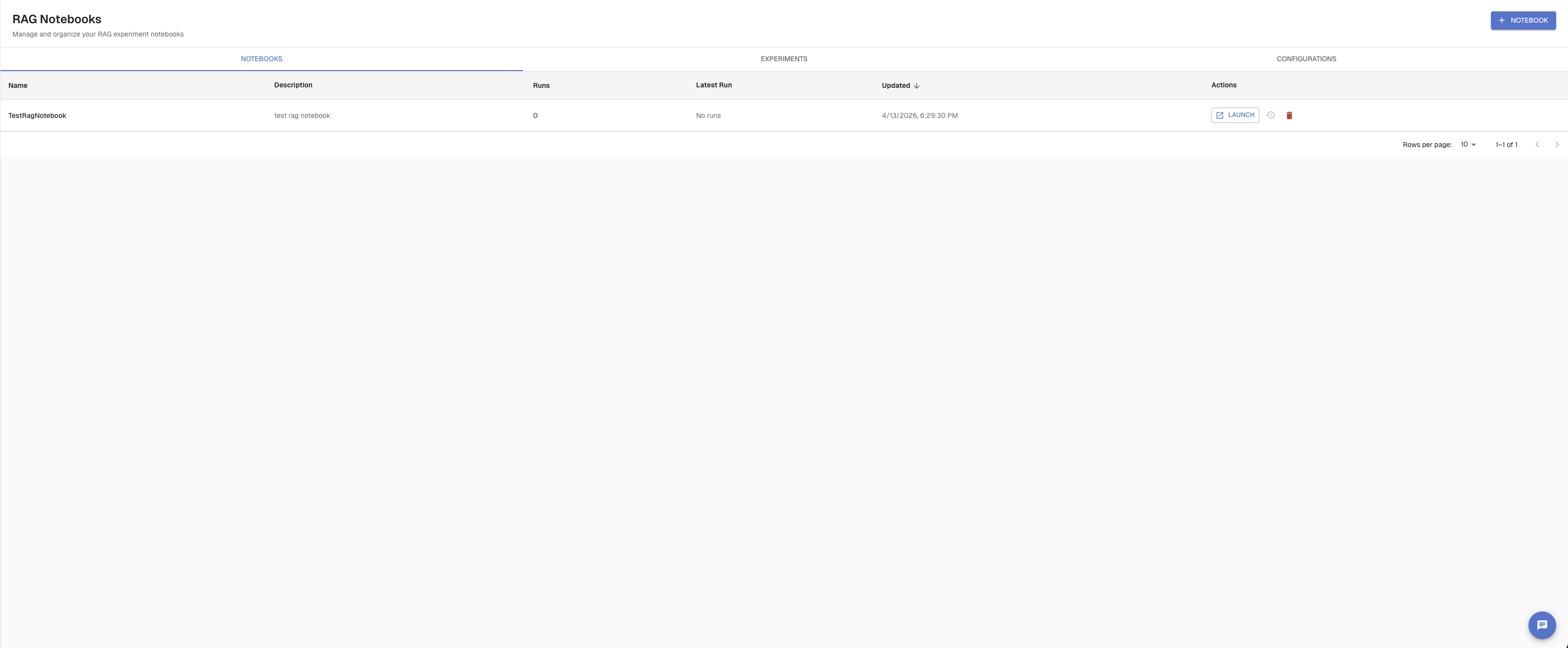
For every row in your dataset, Arthur runs the retrieval step for each configuration, then scores the output with each evaluator. Results are grouped by configuration so you can compare them directly.
flowchart TD
    A[RAG Experiment] --> B[Config A<br>vector search top-5]
    A --> C[Config B<br>hybrid search top-10]

    B --> D[Run retrieval<br>for each test row]
    C --> E[Run retrieval<br>for each test row]

    D --> F[Score with<br>selected evaluators]
    E --> F

    F --> G[Results per config<br>pass/fail counts per eval]
Evaluators for RAG — use the built-in LLM templates from the evaluator library:
- Context Precision — were the retrieved chunks actually relevant?
- Context Recall — did the retrieved chunks cover the necessary information?
- Answer Relevance — does the answer address the question?
- Or any custom evaluator you've defined
Prerequisites
- An Arthur Engine instance running and reachable (default:
http://localhost:3030) - An API key — set as
ARTHUR_API_KEYin your environment - A Weaviate vector database instance (currently the only supported provider) with:
- Host URL
- API key
- At least one populated collection
- A test dataset already created in Arthur (see Datasets) with at minimum a column containing your test queries
- Evaluators configured for your task (see LLM Evaluators)
Step 1 — Connect a RAG Provider
A RAG provider is a connection to your vector database. You create it once per task and reuse it across experiments.
UI
Navigate to RAG → RAG Configurations in the left sidebar. Click + Configuration.
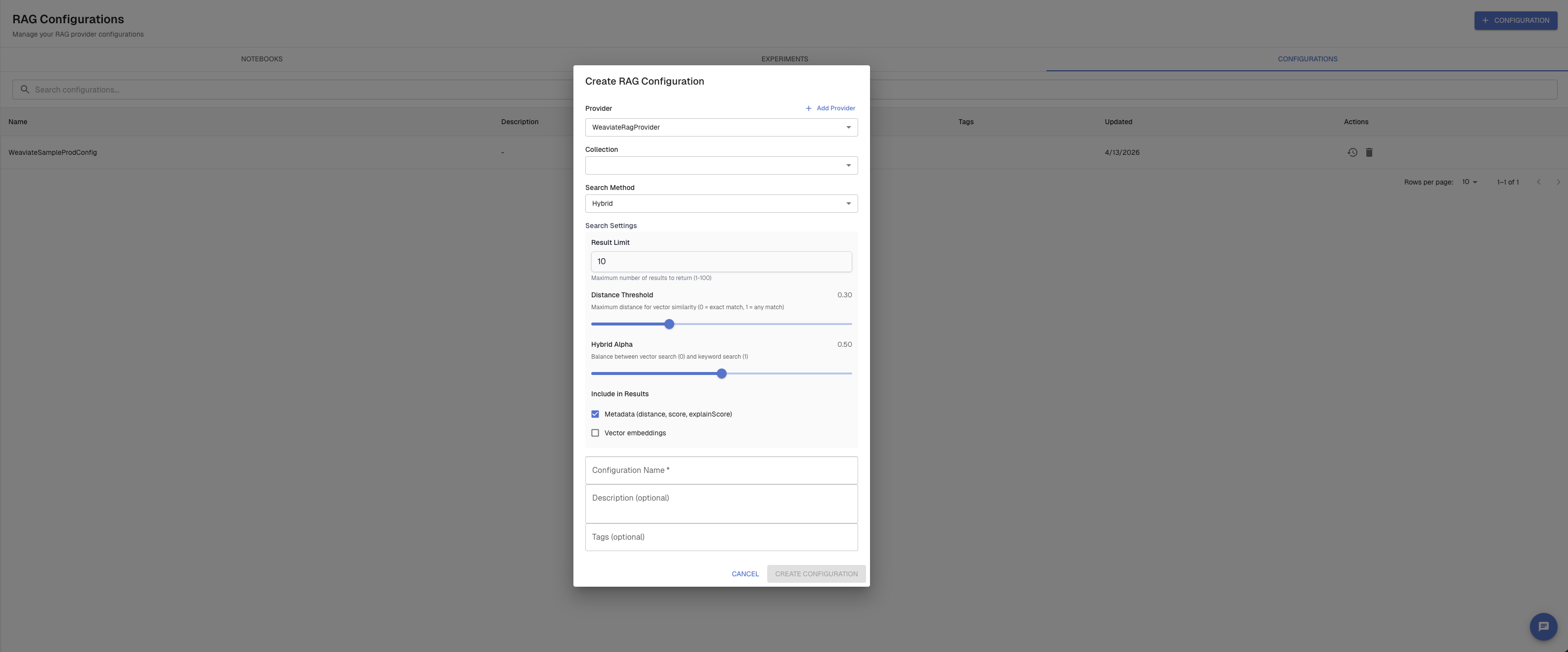
Fill in:
- Name — a label for this connection (e.g.,
prod-weaviate) - Host URL — your Weaviate instance URL (with or without
https://) - API key — your Weaviate API key
Optionally click Test Connection to verify the credentials before saving.
API
import requests, os

ARTHUR_BASE_URL = os.environ.get("ARTHUR_BASE_URL", "http://localhost:3030")
ARTHUR_API_KEY = os.environ["ARTHUR_API_KEY"]
TASK_ID = "your-task-id"

response = requests.post(
    f"{ARTHUR_BASE_URL}/api/v1/tasks/{TASK_ID}/rag_providers",
    headers={
        "Authorization": f"Bearer {ARTHUR_API_KEY}",
        "Content-Type": "application/json",
    },
    json={
        "name": "prod-weaviate",
        "description": "Production Weaviate cluster",
        "authentication_config": {
            "authentication_method": "api_key_authentication",
            "rag_provider": "weaviate",
            "host_url": "https://my-cluster.weaviate.network",
            "api_key": "your-weaviate-api-key",
        },
    },
)
response.raise_for_status()
provider_id = response.json()["id"]
print(f"Created provider: {provider_id}")
const ARTHUR_BASE_URL = process.env.ARTHUR_BASE_URL ?? "http://localhost:3030";
const ARTHUR_API_KEY = process.env.ARTHUR_API_KEY;
const TASK_ID = "your-task-id";
const response = await fetch(
`${ARTHUR_BASE_URL}/api/v1/tasks/${TASK_ID}/rag_providers`,
{
method: "POST",
headers: {
Authorization: `Bearer ${ARTHUR_API_KEY}`,
"Content-Type": "application/json",
},
body: JSON.stringify({
name: "prod-weaviate",
authentication_config: {
authentication_method: "api_key_authentication",
rag_provider: "weaviate",
host_url: "https://my-cluster.weaviate.network",
api_key: "your-weaviate-api-key",
},
}),
}
);
const provider = await response.json();
console.log("Created provider:", provider.id);curl -X POST http://localhost:3030/api/v1/tasks/{task_id}/rag_providers \
-H "Authorization: Bearer $ARTHUR_API_KEY" \
-H "Content-Type: application/json" \
-d '{
"name": "prod-weaviate",
"authentication_config": {
"authentication_method": "api_key_authentication",
"rag_provider": "weaviate",
"host_url": "https://my-cluster.weaviate.network",
"api_key": "your-weaviate-api-key"
}
}'Step 2 — Create Search Settings
Search settings define how Arthur queries your vector database: which collection to search, which search method to use, and the parameters for that method. Each saved configuration is versioned — you can update it and old versions remain unchanged.
Arthur supports three search methods:
| Method | search_kind | Best for |
|---|---|---|
| Vector similarity | vector_similarity_text_search | Semantic similarity, embedding-based retrieval |
| Keyword (BM25) | keyword_search | Exact term matching, structured queries |
| Hybrid | hybrid_search | Blend of vector + keyword (most flexible) |
UI
In RAG → RAG Experiments, click Create RAG Configuration. Select your provider, choose a collection from the dropdown (auto-loaded from Weaviate), select a search method, and configure the parameters.
API
# Vector similarity search configuration
response = requests.post(
    f"{ARTHUR_BASE_URL}/api/v1/tasks/{TASK_ID}/rag_search_settings",
    headers={
        "Authorization": f"Bearer {ARTHUR_API_KEY}",
        "Content-Type": "application/json",
    },
    json={
        "name": "support-docs-vector-top5",
        "description": "Vector search over support docs collection, top 5 results",
        "rag_provider_id": provider_id,
        "settings": {
            "search_kind": "vector_similarity_text_search",
            "rag_provider": "weaviate",
            "collection_name": "SupportDocs",
            "limit": 5,
            "certainty": 0.7,          # min similarity score (0–1)
            "return_properties": ["text", "source", "title"],
            "return_metadata": ["distance", "certainty", "score"],
        },
    },
)
settings_id = response.json()["id"]
settings_version = response.json()["latest_version_number"]
response = requests.post(
f"{ARTHUR_BASE_URL}/api/v1/tasks/{TASK_ID}/rag_search_settings",
headers={
"Authorization": f"Bearer {ARTHUR_API_KEY}",
"Content-Type": "application/json",
},
json={
"name": "support-docs-hybrid-top10",
"rag_provider_id": provider_id,
"settings": {
"search_kind": "hybrid_search",
"rag_provider": "weaviate",
"collection_name": "SupportDocs",
"limit": 10,
"alpha": 0.7, # 1.0 = pure vector, 0.0 = pure keyword
"return_properties": ["text", "source"],
},
},
)curl -X POST http://localhost:3030/api/v1/tasks/{task_id}/rag_search_settings \
-H "Authorization: Bearer $ARTHUR_API_KEY" \
-H "Content-Type: application/json" \
-d '{
"name": "support-docs-vector-top5",
"rag_provider_id": "your-provider-id",
"settings": {
"search_kind": "vector_similarity_text_search",
"rag_provider": "weaviate",
"collection_name": "SupportDocs",
"limit": 5,
"certainty": 0.7,
"return_properties": ["text", "source"]
}
}'Search settings parameters
Vector similarity (vector_similarity_text_search):
| Parameter | Type | Description |
|---|---|---|
collection_name | string | Weaviate collection to search |
limit | int | Max results to return |
certainty | float (0–1) | Min similarity threshold (mutually exclusive with distance) |
distance | float | Max distance threshold (mutually exclusive with certainty) |
return_properties | string[] | Which object properties to return |
return_metadata | string[] | Metadata to return (distance, certainty, score, etc.) |
offset | int | Skip first N results |
include_vector | bool | Include embedding vectors in response |
Keyword / BM25 (keyword_search):
| Parameter | Type | Description |
|---|---|---|
collection_name | string | Weaviate collection to search |
limit | int | Max results to return |
and_operator | bool | All tokens must match (mutually exclusive with minimum_match_or_operator) |
minimum_match_or_operator | int | Minimum number of tokens that must match |
Hybrid (hybrid_search):
| Parameter | Type | Description |
|---|---|---|
collection_name | string | Weaviate collection to search |
limit | int | Max results to return |
alpha | float (0–1) | Balance: 1.0 = pure vector, 0.0 = pure keyword. Default: 0.7 |
query_properties | string[] | Apply keyword search to a subset of properties |
fusion_type | string | Fusion algorithm (default: Relative Score Fusion) |
max_vector_distance | float | Max threshold for the vector component |
Step 3 — Test Retrieval with RAG Search Panels
Before running a full experiment, use the RAG Search Panels to interactively test your search settings against real queries. This lets you verify that the right chunks are being retrieved before committing to a full dataset run.
UI
Navigate to RAG → RAG Experiments. The page shows up to 5 search panels side by side. Each panel lets you:
- Select a provider and collection
- Choose a search method and configure its parameters
- Enter a query and click Run — results appear immediately with metadata (distance, certainty, score)
- Optionally save the panel configuration as a named Search Settings config
Run the same query across multiple panels simultaneously with Run All to compare how different configurations retrieve for the same input.
Step 4 — Create a RAG Notebook (Optional)
A RAG Notebook is a saved, reusable experiment template. It stores your RAG configuration choices, dataset selection, and evaluator assignments so you can re-run the same experiment setup without reconfiguring from scratch each time.
Notebooks are optional — you can run experiments directly without one — but they're useful for recurring evaluation setups like nightly regression runs or benchmarks you revisit after each pipeline change.
UI
Navigate to RAG → RAG Notebooks and click Create Notebook. Give it a name, then open it to configure:
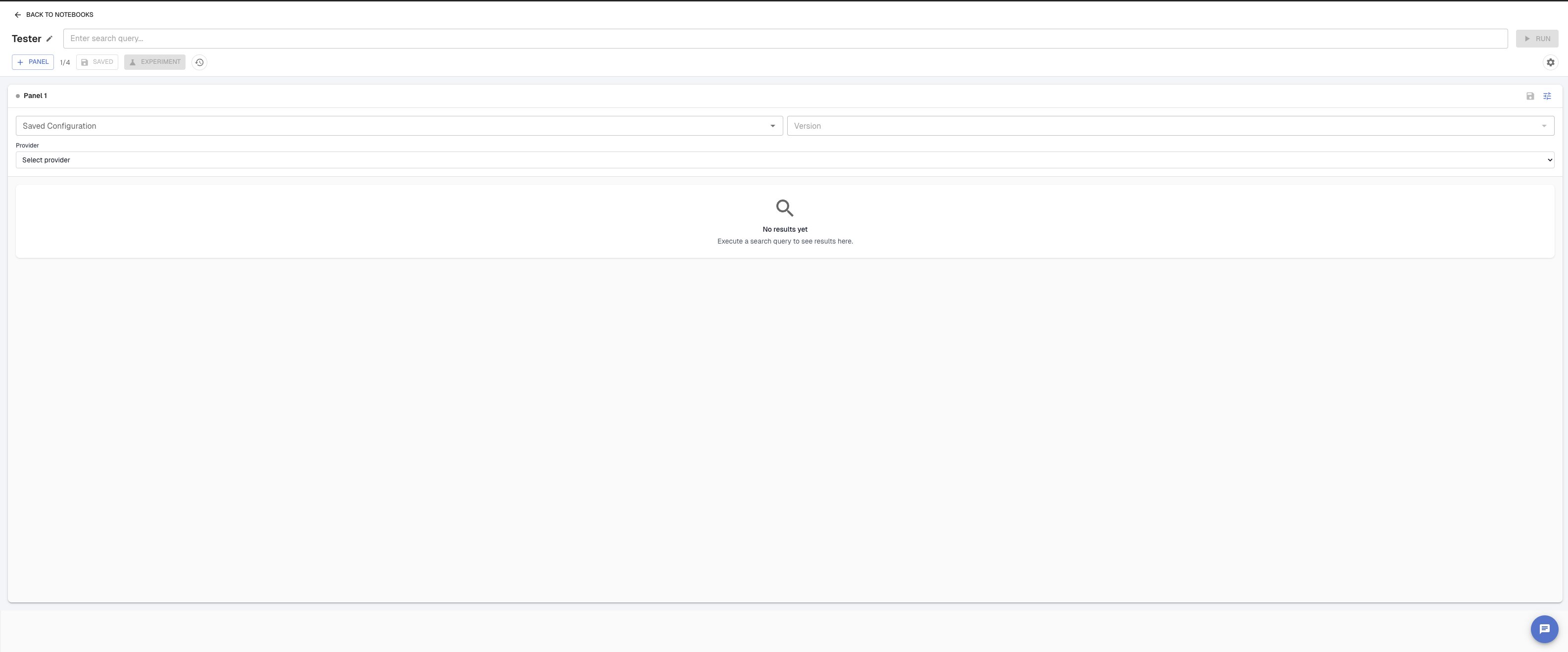
- Which RAG search configurations to test
- Which dataset and version to use
- Which evaluators to run and how to map their variables
A notebook's configuration can be partially filled in and saved at any time — it only needs to be complete when you click Run.
API
# Create a notebook
response = requests.post(
    f"{ARTHUR_BASE_URL}/api/v1/tasks/{TASK_ID}/rag_notebooks",
    headers={
        "Authorization": f"Bearer {ARTHUR_API_KEY}",
        "Content-Type": "application/json",
    },
    json={
        "name": "Support docs weekly benchmark",
        "description": "Runs every Monday against the golden Q&A dataset",
    },
)
notebook_id = response.json()["id"]

# Save experiment state to the notebook
requests.put(
    f"{ARTHUR_BASE_URL}/api/v1/rag_notebooks/{notebook_id}/state",
    headers={
        "Authorization": f"Bearer {ARTHUR_API_KEY}",
        "Content-Type": "application/json",
    },
    json={
        "state": {
            "rag_configs": [
                {
                    "type": "saved",
                    "setting_configuration_id": settings_id,
                    "version": settings_version,
                    "query_column": {"dataset_column": "question"},
                }
            ],
            "dataset_ref": {
                "id": "your-dataset-id",
                "name": "support-qa-golden",
                "version": 1,
            },
            "eval_list": [
                {"name": "Context Precision", "version": 1},
                {"name": "Answer Relevance", "version": 1},
            ],
        }
    },
)
Step 5 — Run a RAG Experiment
An experiment applies your RAG configurations to every row in your dataset, runs the selected evaluators, and stores per-row and aggregate results.
UI
From RAG → RAG Experiments, click Create Experiment. The creation flow has these steps:
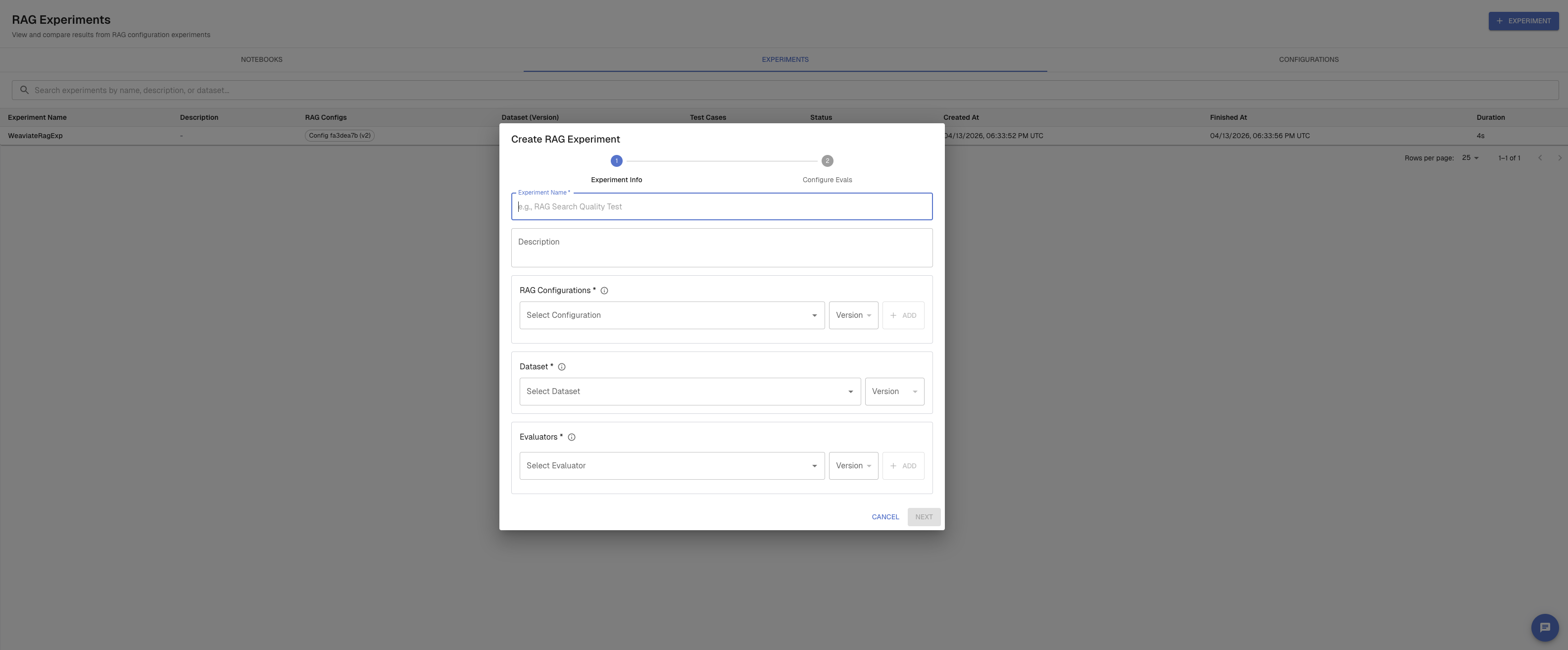
- Name and description
- Dataset — select a dataset and version; choose which column contains the queries
- RAG configurations — select saved configurations or define inline ones; you can run multiple configurations in a single experiment to compare them
- Evaluators — select which evaluators to run and map their variables to dataset columns or RAG output fields
- Review and run
API
response = requests.post(
    f"{ARTHUR_BASE_URL}/api/v1/tasks/{TASK_ID}/rag_experiments",
    headers={
        "Authorization": f"Bearer {ARTHUR_API_KEY}",
        "Content-Type": "application/json",
    },
    json={
        "name": "vector-vs-hybrid-comparison",
        "description": "Compare top-5 vector search against top-10 hybrid",
        "dataset_ref": {
            "id": "your-dataset-id",
            "name": "support-qa-golden",
            "version": 1,
        },
        "rag_configs": [
            {
                "type": "saved",
                "setting_configuration_id": vector_settings_id,
                "version": 1,
                "query_column": {"dataset_column": "question"},
            },
            {
                "type": "saved",
                "setting_configuration_id": hybrid_settings_id,
                "version": 1,
                "query_column": {"dataset_column": "question"},
            },
        ],
        "eval_list": [
            {"name": "Context Precision", "version": 1},
            {"name": "Answer Relevance", "version": 1},
        ],
    },
)
response.raise_for_status()
experiment = response.json()
experiment_id = experiment["id"]
print(f"Experiment started: {experiment_id} — status: {experiment['status']}")
const response = await fetch(
`${ARTHUR_BASE_URL}/api/v1/tasks/${TASK_ID}/rag_experiments`,
{
method: "POST",
headers: {
Authorization: `Bearer ${ARTHUR_API_KEY}`,
"Content-Type": "application/json",
},
body: JSON.stringify({
name: "vector-vs-hybrid-comparison",
dataset_ref: {
id: "your-dataset-id",
name: "support-qa-golden",
version: 1,
},
rag_configs: [
{
type: "saved",
setting_configuration_id: vectorSettingsId,
version: 1,
query_column: { dataset_column: "question" },
},
{
type: "saved",
setting_configuration_id: hybridSettingsId,
version: 1,
query_column: { dataset_column: "question" },
},
],
eval_list: [
{ name: "Context Precision", version: 1 },
{ name: "Answer Relevance", version: 1 },
],
}),
}
);
const experiment = await response.json();
console.log(`Experiment started: ${experiment.id} — status: ${experiment.status}`);curl -X POST http://localhost:3030/api/v1/tasks/{task_id}/rag_experiments \
-H "Authorization: Bearer $ARTHUR_API_KEY" \
-H "Content-Type: application/json" \
-d '{
"name": "vector-vs-hybrid-comparison",
"dataset_ref": {"id": "your-dataset-id", "name": "support-qa-golden", "version": 1},
"rag_configs": [
{
"type": "saved",
"setting_configuration_id": "vector-settings-id",
"version": 1,
"query_column": {"dataset_column": "question"}
}
],
"eval_list": [
{"name": "Context Precision", "version": 1}
]
}'Poll for completion
import time

while True:
    resp = requests.get(
        f"{ARTHUR_BASE_URL}/api/v1/rag_experiments/{experiment_id}",
        headers={"Authorization": f"Bearer {ARTHUR_API_KEY}"},
    )
    status = resp.json()["status"]
    print(f"Status: {status}")
    if status in ("completed", "failed"):
        break
    time.sleep(5)

result = resp.json()
Experiment status values: queued → running → completed or failed.
View Results
UI
From RAG → RAG Experiments, click on your Experiment
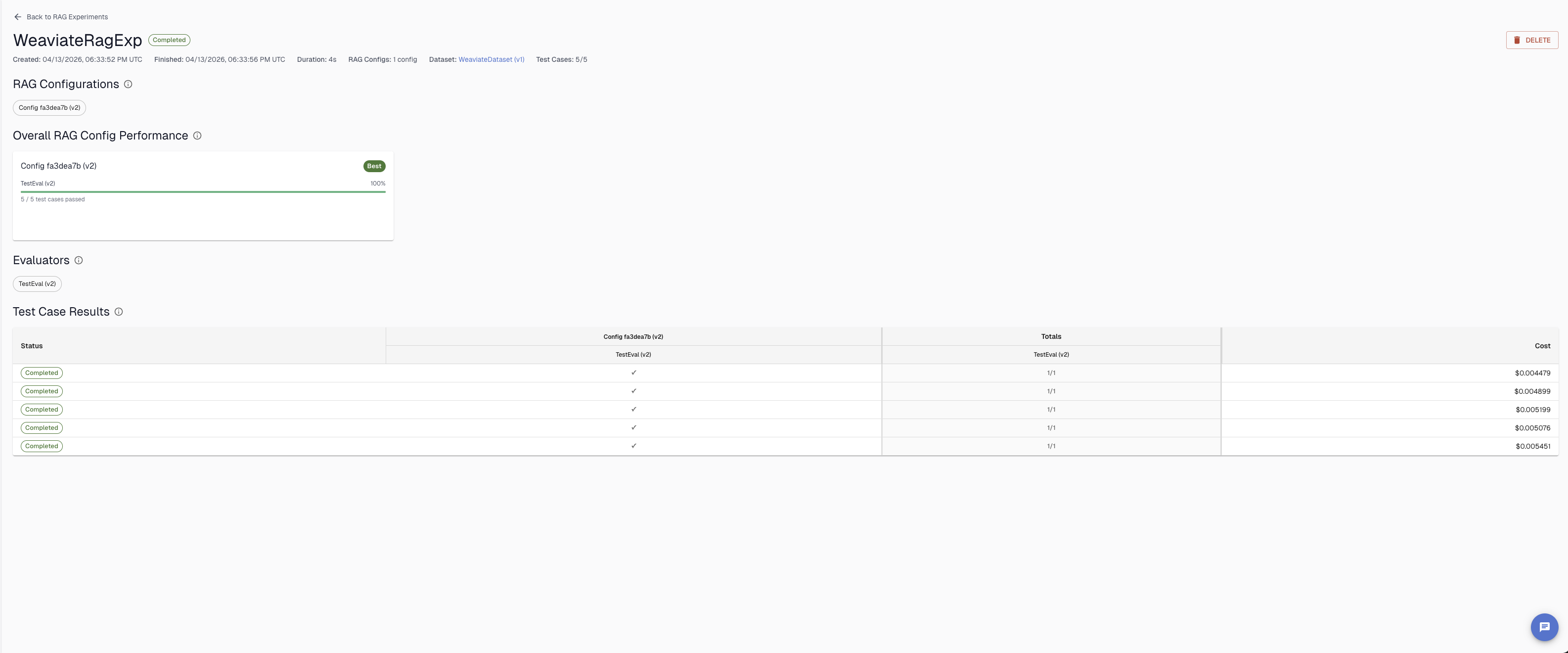
Once a RAG experiment completes, the results page shows a summary of how each configuration performed across all test cases. At a glance you can see the overall pass rate per evaluator, which configurations passed or failed each test case, and the cost per row. The experiment header shows total duration, number of test cases run, and the dataset used — making it easy to compare runs over time.
Aggregate results
The completed experiment response includes a summary of pass/fail counts per configuration per evaluator:
{
  "id": "...",
  "status": "completed",
  "summary_results": {
    "rag_eval_summaries": [
      {
        "rag_config_key": "saved:uuid:1",
        "rag_config_type": "saved",
        "eval_results": [
          {
            "eval_name": "Context Precision",
            "passed_count": 38,
            "failed_count": 12,
            "total_count": 50,
            "error_count": 0
          }
        ]
      }
    ]
  }
}
Per-row results
resp = requests.get(
    f"{ARTHUR_BASE_URL}/api/v1/rag_experiments/{experiment_id}/test_cases",
    headers={"Authorization": f"Bearer {ARTHUR_API_KEY}"},
    params={"page": 0, "page_size": 20},
)

for case in resp.json()["data"]:
    print(f"\nRow: {case['dataset_row_id']} — status: {case['status']}")
    for rag_result in case["rag_results"]:
        config = rag_result["rag_config_key"]
        query = rag_result["query_text"]
        objects = rag_result["output"]["response"]["objects"]
        print(f"  Config {config}: {len(objects)} chunks retrieved for '{query}'")
        for obj in objects[:2]:
            score = obj.get("metadata", {}).get("score")
            print(f"    score={score} — {str(obj['properties'])[:80]}")
Per-configuration results
To get results for a specific RAG configuration only:
rag_config_key = "saved:your-settings-id:1"  # format: saved:{id}:{version} or unsaved:{uuid}

resp = requests.get(
    f"{ARTHUR_BASE_URL}/api/v1/rag_experiments/{experiment_id}/rag_configs/{rag_config_key}/results",
    headers={"Authorization": f"Bearer {ARTHUR_API_KEY}"},
    params={"page": 0, "page_size": 20},
)
Next Steps
| Goal | Where to go |
|---|---|
| Build the evaluators you want to run on RAG experiments | LLM Evaluators — create Context Precision, Answer Relevance, and custom judge prompts |
| Set up test datasets for RAG experiments | Datasets — create versioned datasets with your test queries |
| Automate RAG evaluation in CI | CI/CD Integration — trigger experiments on every pipeline change |
Updated 5 months ago