
Arthur + Google ADK
How does a developer instrument a Google ADK application with Arthur in under 10 minutes? You install the Arthur SDK with the google-adk extra, initialize the Arthur client with your credentials, and call arthur.instrument_google_adk(). That single method call auto-instruments every Google ADK agent, runner, and tool invocation — capturing model decisions, tool calls, and conversation turns as OpenInference-compatible traces that flow into Arthur for observability and evaluation.
Overview
Google's Agent Development Kit (ADK) lets you build multi-step agents powered by Gemini models. Arthur's integration uses the openinference-instrumentation-google-adk library to automatically capture every layer of your agent execution. Once instrumented, you get full visibility into:
- LLM calls — every Gemini model invocation with input/output tokens
- Tool calls — each tool the agent invokes, including arguments and results
- Agent orchestration — the full chain of decisions across sub-agents and runners
- Conversation turns — user messages and agent responses within a session
- Session and user context — group traces by conversation or end-user
sequenceDiagram
    participant App as Your Application
    participant SDK as Arthur SDK
    participant ADK as Google ADK
    participant Engine as Arthur GenAI Engine

    App->>SDK: arthur.instrument_google_adk()
    Note over SDK: Auto-instrumentation enabled
    App->>ADK: runner.run(...)
    ADK-->>App: Events
    SDK->>Engine: Trace (spans, attributes)
    Note over Engine: Traces visible in dashboard
Prerequisites:
- Python 3.10+
- An Arthur GenAI Engine instance (cloud or local)
- An Arthur API key — see API Keys to create one
Installation
Install the Arthur Observability SDK with the google-adk extra:
pip install "arthur-observability-sdk[google-adk]"Initialize Arthur
Create a single Arthur instance at application startup.
from arthur_observability_sdk import Arthur

arthur = Arthur(
    api_key="your-api-key",        # or set ARTHUR_API_KEY env var
    base_url="https://your-arthur-engine-instance",  # or set ARTHUR_BASE_URL env var
    task_id="<your-task-uuid>",    # Arthur task UUID
    service_name="my-adk-app",
)| Parameter | Description |
|---|---|
api_key | Your Arthur Engine API key. Falls back to ARTHUR_API_KEY env var. |
base_url | Base URL of your Arthur GenAI Engine. Falls back to ARTHUR_BASE_URL env var, then http://localhost:3030. |
task_id | Arthur task UUID for associating traces with a specific task. |
service_name | OpenTelemetry service.name resource attribute. Used to identify your application in the Arthur dashboard. Creates a new task based on service_name if task_id isn't specified. |
At least one oftask_idorservice_namemust be provided. A new task with theservice_namewill be created iftask_idis not specified.
Use environment variables for secrets. SetARTHUR_API_KEYandARTHUR_BASE_URLas environment variables (e.g., in a.envfile) rather than hardcoding them in your application.
Instrument Google ADK
After initializing Arthur, call instrument_google_adk() before creating your agents or runners. This registers the OpenInference instrumentor with the Arthur-managed TracerProvider.
from google.adk.agents import Agent
from google.adk.runners import InMemoryRunner
from google.genai import types
from arthur_observability_sdk import Arthur

# 1. Initialize Arthur
arthur = Arthur(
    api_key="your-api-key",
    base_url="https://your-arthur-engine-instance",
    task_id="<your-task-uuid>",
    service_name="my-adk-app",
)

# 2. Instrument Google ADK (one call — does everything)
arthur.instrument_google_adk()

# 3. Build your agent as usual — no code changes needed
agent = Agent(
    name="assistant",
    model="gemini-2.0-flash",
    instruction="You are a helpful assistant.",
)

runner = InMemoryRunner(agent=agent, app_name="my-adk-app")
session = runner.session_service.create_session(app_name="my-adk-app", user_id="user-42")

# 4. Run the agent — traces are captured automatically
for event in runner.run(
    user_id="user-42",
    session_id=session.id,
    new_message=types.Content(role="user", parts=[types.Part(text="Hello!")]),
):
    if event.content and event.content.parts:
        for part in event.content.parts:
            if part.text:
                print(part.text)

# 5. Flush remaining spans on shutdown
arthur.shutdown()
Key points:
instrument_google_adk()must be called before instantiating any ADKAgentorRunner.- All LLM calls, tool invocations, and agent orchestration steps are automatically traced.
- Call
arthur.shutdown()when your application exits to flush any remaining traces.
Order matters. The instrumentor patches ADK internals at import time — agents created before instrumentation won't be traced.
Trace Agent Actions and Tool Calls
Once instrumented, Arthur automatically captures spans for every layer of your ADK agent:
flowchart TD
    A[Root Span: Agent Run] --> B[LLM Span: Gemini Call]
    A --> C[Tool Span: search_web]
    C --> D[LLM Span: Gemini Call]
    A --> E[Tool Span: calculate]
    E --> F[LLM Span: Gemini Call]
    A --> G[LLM Span: Final Response]
Each span includes:
- LLM spans — model name, input messages, output completion, token counts
- Tool spans — tool name, input arguments, output results, duration
- Agent spans — orchestration decisions, sub-agent delegation
When your ADK agent uses tools, each tool invocation is captured as a child span with full input/output details:
def get_weather(city: str) -> str:
    """Get the current weather for a city."""
    return f"The weather in {city} is sunny, 72°F."

agent = Agent(
    name="weather-assistant",
    model="gemini-2.0-flash",
    instruction="You help users check the weather. Use the get_weather tool.",
    tools=[get_weather],
)

runner = InMemoryRunner(agent=agent, app_name="my-adk-app")
session = runner.session_service.create_session(app_name="my-adk-app", user_id="user-42")

# Tool calls are automatically traced — no extra code needed
for event in runner.run(
    user_id="user-42",
    session_id=session.id,
    new_message=types.Content(
        role="user",
        parts=[types.Part(text="What's the weather in San Francisco?")]
    ),
):
    if event.content and event.content.parts:
        for part in event.content.parts:
            if part.text:
                print(part.text)
Add Session and User Context
Use arthur.attributes() to attach session and user metadata to all spans within a context block.
with arthur.attributes(session_id="sess-1", user_id="user-42"):
    for event in runner.run(
        user_id="user-42",
        session_id=session.id,
        new_message=types.Content(
            role="user",
            parts=[types.Part(text="What's the weather in NYC?")]
        ),
    ):
        if event.content and event.content.parts:
            for part in event.content.parts:
                if part.text:
                    print(part.text)
This is especially useful for:
- Multi-turn conversations — trace an entire chat session end-to-end
- Per-user analytics — understand how individual users interact with your application
- Debugging — filter traces in the Arthur dashboard by session or user
Verify in Arthur
After running your instrumented agent, traces appear in the Arthur GenAI Engine within seconds.
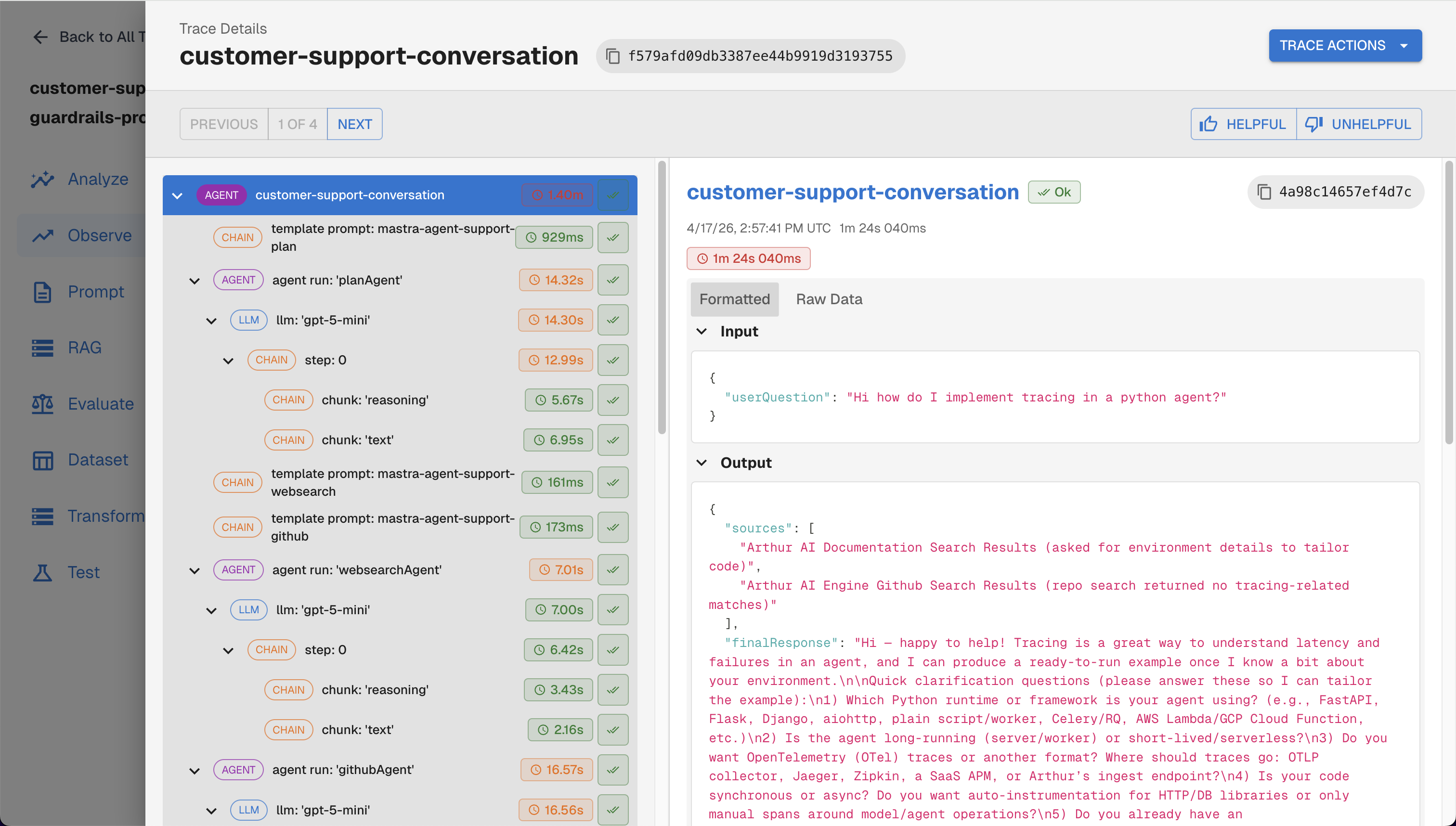
Traces viewed on the Arthur Engine UI
What to look for in the dashboard:
- Trace list — each
runner.run()call appears as a trace with the full agent execution timeline - Session grouping — if you used
arthur.attributes(session_id=...), traces are grouped by session - User filtering — filter by
user_idto see a specific user's interactions - Tool calls — click into a tool span to see arguments and return values
You can also query traces programmatically:
curl -X GET "${ARTHUR_BASE_URL}/api/v1/traces?task_ids=${ARTHUR_TASK_ID}" \
  -H "Authorization: Bearer ${ARTHUR_API_KEY}"
Troubleshooting
| Symptom | Fix |
|---|---|
| No traces appear | Ensure instrument_google_adk() is called before any Agent() or Runner() instantiation. |
| Missing tool spans | Define tools before or at the same time as the agent — tools added after instrumentation are not patched. |
| Connection refused | Verify ARTHUR_BASE_URL points to a reachable Arthur Engine instance. |
| 401 Unauthorized | Regenerate your API key in the Arthur UI and update your environment. |
| Traces delayed | Call arthur.shutdown() to flush the batch exporter, or wait for the next batch interval. |
Next Steps
Now that your Google ADK agent is instrumented and sending traces to Arthur, explore these capabilities:
- Continuous Evaluations — automatically score agent responses for quality, safety, and accuracy
- Agentic Experiments — compare agent configurations side-by-side
- Prompt Management — store and version your agent instructions, then fetch them at runtime with
arthur.get_prompt() - Read our Best Practices for Building Agents Blog Series — observability and tracing fundamentals for building production agents
- Other Integrations — Arthur supports LangChain, OpenAI, Bedrock, and other frameworks; you can layer multiple instrumentations on the same
Arthurinstance
flowchart LR
    A[Instrument Google ADK] --> B[View Traces]
    B --> C[Add Evaluations]
    B --> D[Manage Prompts]
    C --> E[Set Up Continuous Evals]
    D --> F[A/B Test Prompts]
    E --> G[Production Monitoring]
    F --> G
Updated 5 months ago