
Agent Tool Kit Settings
The Agent Tool Kit's settings are accessible from the gear icon (⚙) in the top-right corner of the UI. Clicking it opens a dropdown with four items: Settings, Model Providers, API Keys, and Preferences.
The Settings item opens a modal with workspace-level configuration options.
Timezone & Time Format
| Field | Description |
|---|---|
| Timezone | Sets the timezone used when displaying timestamps across the UI (default: UTC) |
| Time format | Choose between 12-hour and 24-hour clock display |
Application
| Field | Description |
|---|---|
| Trace retention (days) | How long traces are kept before automatic deletion (default: 90 days) |
Traces older than the configured retention period are automatically and permanently deleted.
AI Assistant
The AI Assistant provides in-product help and analysis features.
| Field | Description |
|---|---|
| Enable AI Assistant | Toggle to enable or disable the AI Assistant across the workspace |
| Model Provider | The model provider the AI Assistant uses (must be a configured provider) |
| Model Name | The specific model to use for AI Assistant responses |
The Model Provider and Model Name dropdowns are only active when Enable AI Assistant is turned on. The available options depend on which providers you have configured under Model Providers.
Blocked Endpoints
Use the Blocked Endpoints search field to select API endpoints that should be blocked from receiving traces. This is useful for filtering out health check routes or internal endpoints you don't want to monitor.
Model Providers
Model Providers is a separate page (not inside the Settings modal) where you configure credentials for external LLM providers. Arthur uses these credentials to route evaluation and inference tasks.
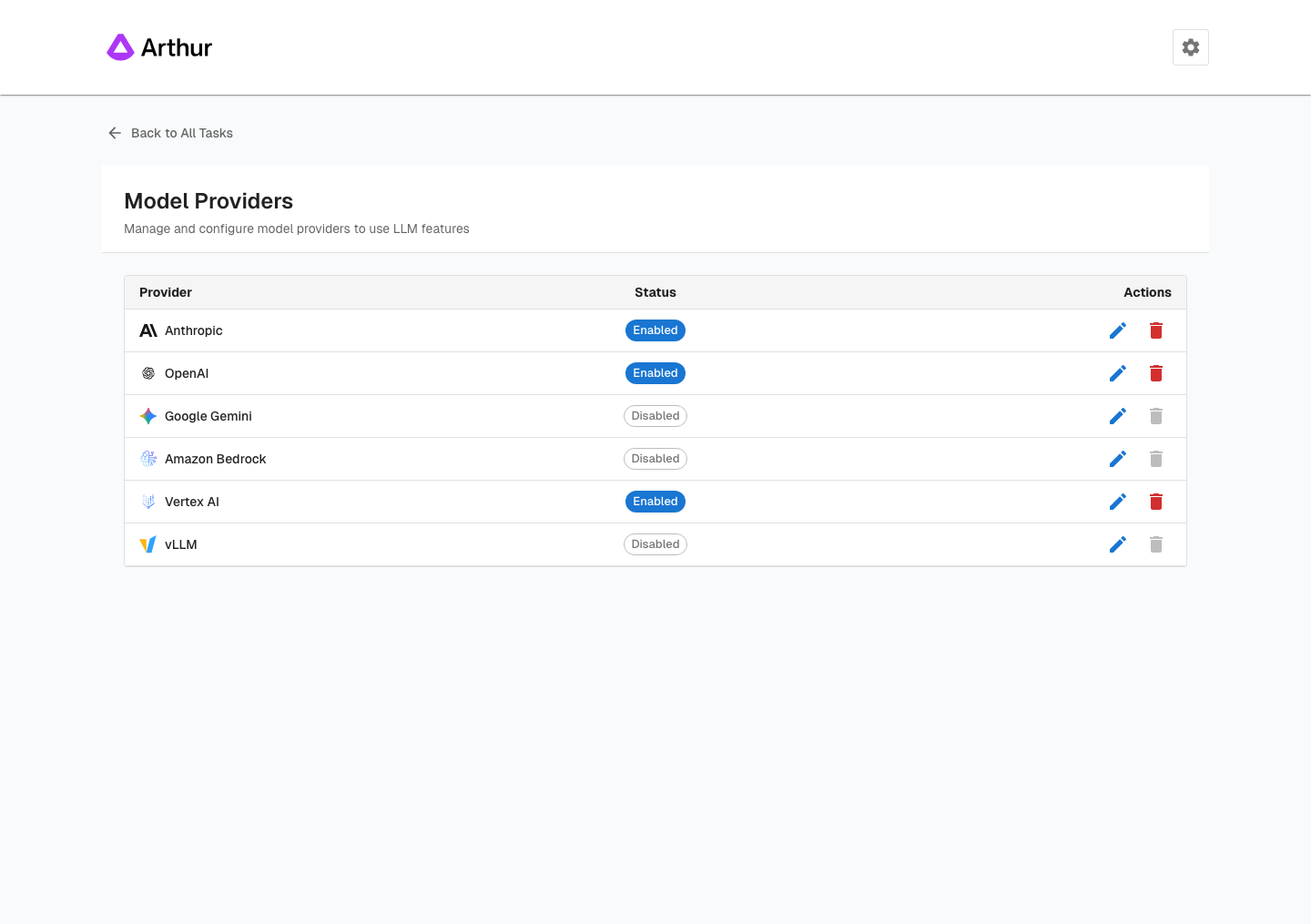
Supported providers
- OpenAI (GPT-4, GPT-4o, etc.)
- Anthropic (Claude family)
- Azure OpenAI
- AWS Bedrock
- Google Vertex AI / Gemini
- Custom / self-hosted endpoints
Add a provider
- Open ⚙ → Model Providers.
- Click Add Provider.
- Select your provider from the dropdown.
- Enter the required credentials (API key, endpoint URL, region, etc.).
- Click Save. Arthur validates the credential before saving.
Credentials are encrypted at rest. Arthur never exposes stored credentials in plaintext after saving.
Edit or remove a provider
- Click the pencil icon to update credentials.
- Click the trash icon to remove a provider. Any evaluations or AI Assistant configurations that depend on it will stop working — update those first.
API Keys
API Keys is a separate page where you generate and manage personal API keys for programmatic access to the Arthur Engine API and Python SDK.
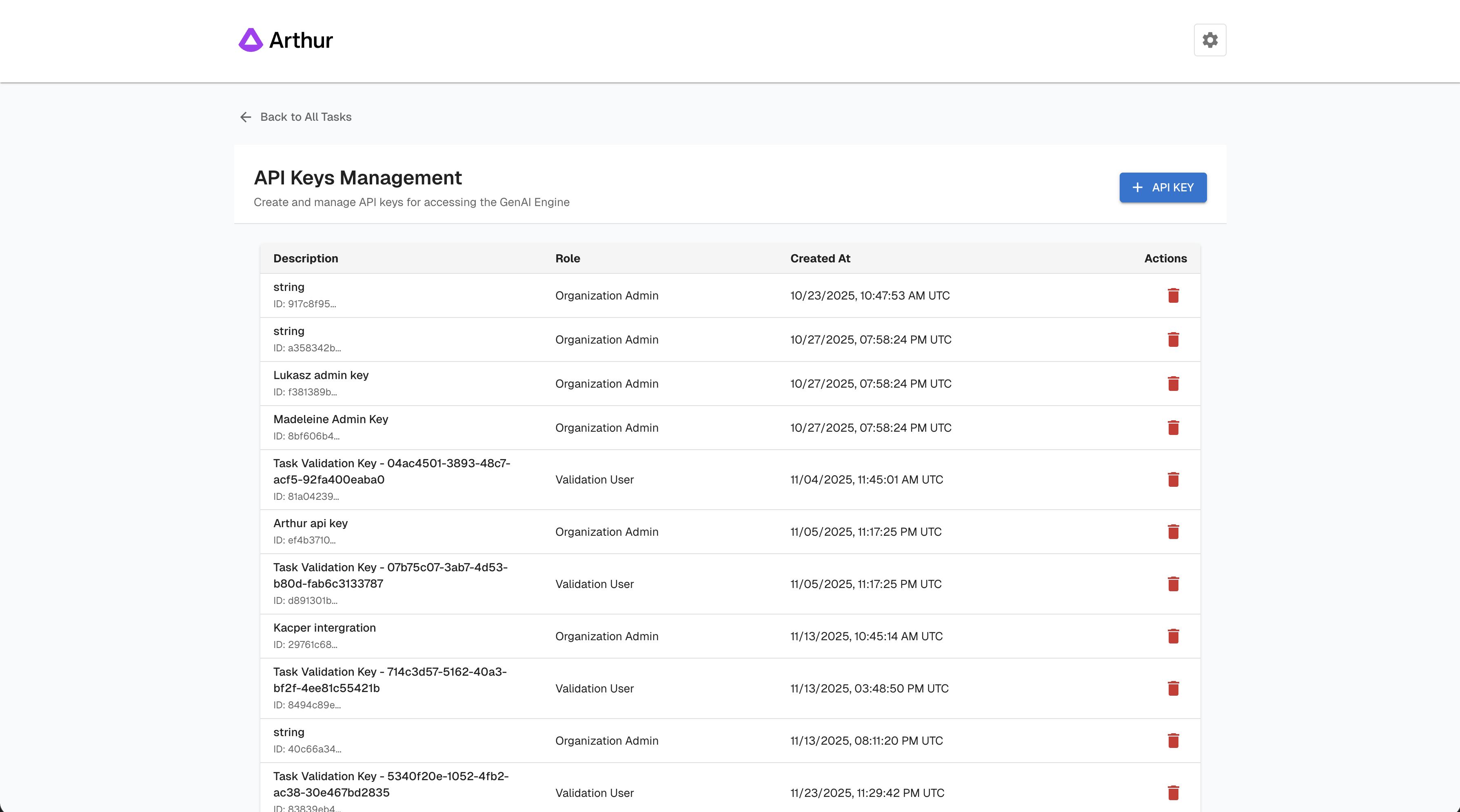
Generate a new API key
- Open ⚙ → API Keys.
- Click Create API Key.
- Give the key a descriptive name (e.g.,
local-dev,ci-pipeline). - Copy the key immediately — Arthur shows it only once. Store it in a secrets manager or
.envfile.
Treat your API key like a password. Do not commit it to source control.
Use your API key
from arthur_client import ArthurClient

client = ArthurClient(
    api_key="YOUR_API_KEY",
    base_url="https://your-arthur-instance.com"
)
const response = await fetch("https://your-arthur-instance.com/api/v1/...", {
method: "GET",
headers: {
"Authorization": "Bearer YOUR_API_KEY",
"Content-Type": "application/json"
}
});
const data = await response.json();curl -X GET https://your-arthur-instance.com/api/v1/... \
-H "Authorization: Bearer YOUR_API_KEY" \
-H "Content-Type: application/json"Revoke a key
Click the trash icon next to a key to revoke it. Revocation is immediate — any service using that key loses access instantly. Rotate keys regularly and revoke any that are no longer in use.
Preferences
Preferences controls your personal display theme and does not affect other users in the workspace.
| Option | Description |
|---|---|
| System | Follows your OS light/dark mode setting |
| Light | Forces light mode |
| Dark | Forces dark mode |
Quick reference
| Task | Where to go |
|---|---|
| Change timezone or time format | ⚙ → Settings |
| Adjust trace retention period | ⚙ → Settings → Application |
| Enable or configure the AI Assistant | ⚙ → Settings → AI Assistant |
| Block endpoints from tracing | ⚙ → Settings → Blocked Endpoints |
| Add an LLM provider credential | ⚙ → Model Providers |
| Generate an API key | ⚙ → API Keys |
| Change UI theme | ⚙ → Preferences |
Updated 5 months ago