
Prompts
Overview
Arthur's Prompt Library gives you a single source of truth for every prompt your AI application uses — replacing scattered Notion pages, code comments, and copy-pasted strings with a versioned, queryable store that ties directly to your observability data.
Every prompt in Arthur belongs to a task and has a name. Each time you save a new iteration of that prompt, Arthur creates a new version number automatically. You can also attach human-readable tags (like production or v2-experiment) to any version, making it trivial to pin exactly which prompt ran in production on any given day.
This page walks you through the core prompt lifecycle. Once your prompts are versioned and tagged, you can also use them as inputs to Prompt Runs and Agent Experimentation to systematically compare prompt variants before deploying changes.
flowchart LR
    A[Browse Prompt Library] --> B[Retrieve a Version or Tag]
    B --> C[Test in Prompt Notebooks]
    C --> D[Use in Your Application]
    B --> E[Manage / Delete Versions]
    B --> F[Prompt Runs]
    B --> G[Agent Experimentation]
Prerequisites
- Access to an Arthur engine and at least one task configured.
- At least one prompt saved in the engine. If you haven't created any yet, navigate to Prompt → Prompts in the engine sidebar and create one from the UI.
Programmatic accessIf you want to retrieve or render prompts via the API, you'll also need an Arthur API key and the Observability SDK. See Connect Your Application for setup steps.
Browse Your Prompt Library
Navigate to Prompt in the engine sidebar. The Prompt section has three tabs:
| Tab | What it shows |
|---|---|
| Notebooks | Prompt experiment notebooks — one per prompt version, used for interactive testing |
| Prompts | The full prompt library — all prompts saved to this task |
| Runs | Execution history from notebook runs |
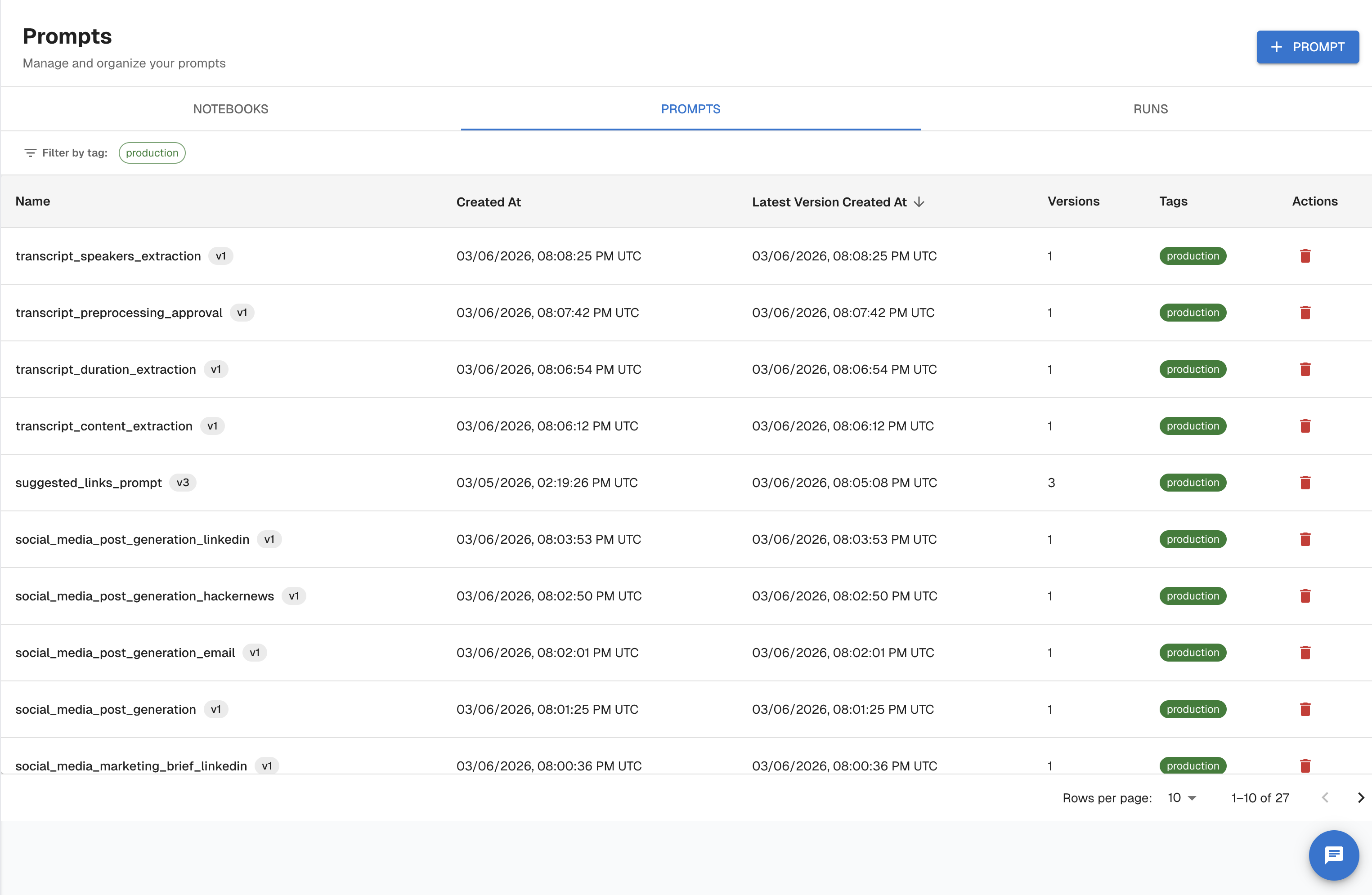
Click Prompts to open the prompt library. The table shows:
| Column | Description |
|---|---|
| Name | The prompt's unique name within the task |
| Created At | When the prompt was first created |
| Latest Version Created At | Timestamp of the most recent version |
| Version Count | Total number of saved versions |
| Tags | Any human-readable labels attached to versions |
Filter the list by tag or sort by any column to find what you need.
Using the API
Endpoint: GET /api/v1/tasks/{task_id}/prompts
Filter by model provider, model name, tags, or creation date range. Results are paginated (default page size: 10, maximum: 5000).
from arthur_observability_sdk._client import ArthurAPIClient

client = ArthurAPIClient(
    base_url="https://your-arthur-host",
    api_key="YOUR_API_KEY",
)

# If you only know the task name, resolve it first
task_id = client.resolve_task_id("customer-support-agent")

response = client._prompts_api \
    .get_all_agentic_prompts_api_v1_tasks_task_id_prompts_get(
        task_id=task_id,
        page=0,
        page_size=25,
        sort="desc",
    )

for prompt in response.prompts:
    print(prompt.name, prompt.latest_version)
const taskId = "YOUR_TASK_ID";
const response = await fetch(
`https://your-arthur-host/api/v1/tasks/${taskId}/prompts?page=0&page_size=25&sort=desc`,
{
headers: {
Authorization: `Bearer YOUR_API_KEY`,
"Content-Type": "application/json",
},
}
);
const data = await response.json();
data.prompts.forEach((p) => console.log(p.name, p.latest_version));curl -X GET \
"https://your-arthur-host/api/v1/tasks/YOUR_TASK_ID/prompts?page=0&page_size=25&sort=desc" \
-H "Authorization: Bearer YOUR_API_KEY"Filtering examples:
| Goal | Query parameter |
|---|---|
| Only OpenAI prompts | model_provider=openai |
| Only GPT-4 prompts | model_name=gpt-4 |
Prompts tagged production | tags=production |
| Created this week | created_after=2025-01-13T00:00:00 |
Retrieve and Version Prompts
Click any prompt row in the Prompts tab to open its detail view at /tasks/:id/prompts/:promptName.
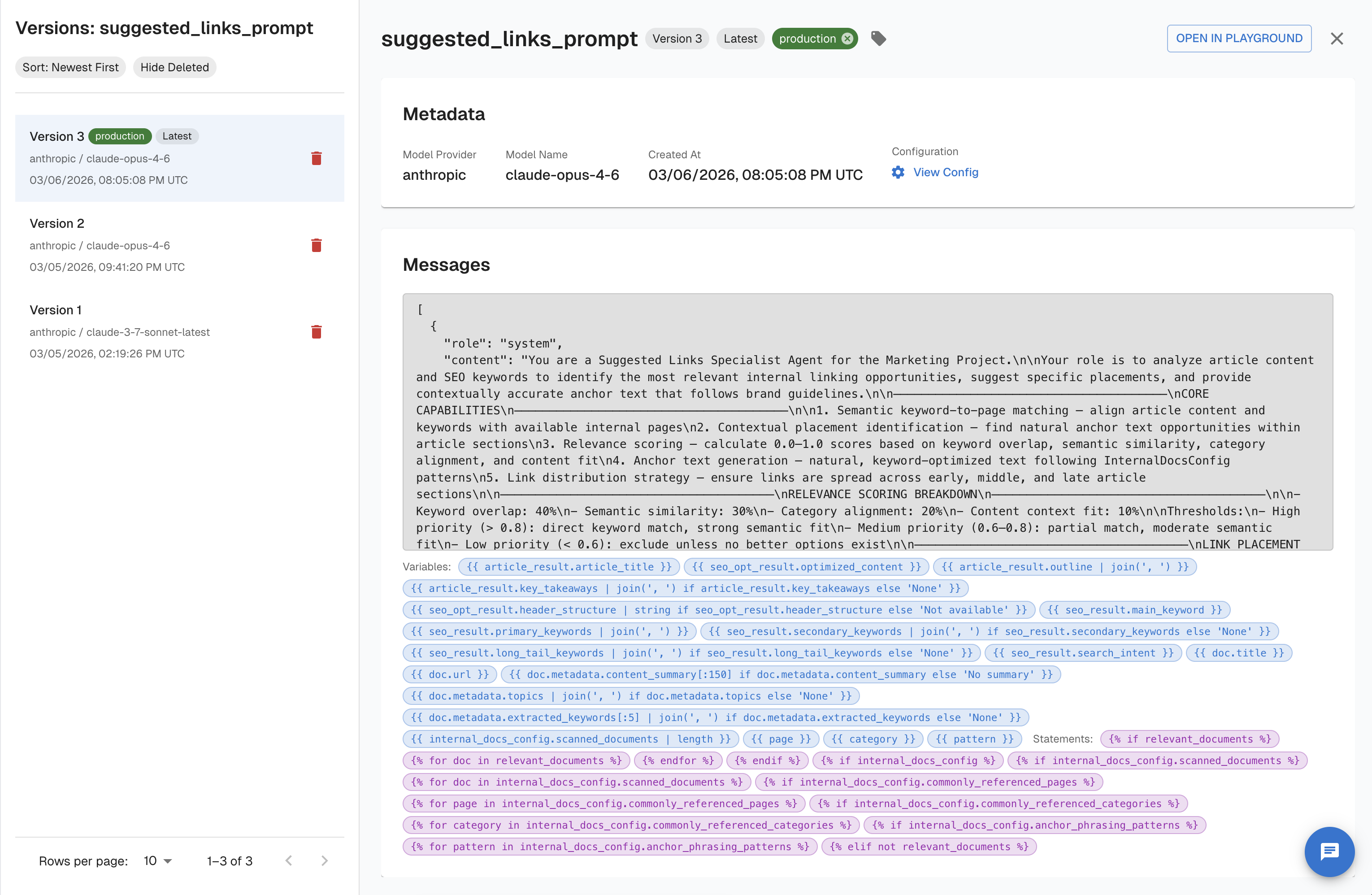
The left-side version drawer lists all versions with:
- Tags (
production,Latest, or any custom label) - Model provider and model name
- Created timestamp
Selecting a version updates the URL to /tasks/:id/prompts/:promptName/versions/:version and loads that version's content in the editor. You can assign or remove tags directly from the drawer.
Arthur supports four ways to identify a version when referencing prompts programmatically or in the URL:
| Identifier | Example | Behavior |
|---|---|---|
latest | latest | Always returns the most recent version |
| Version number | 3 | Returns exactly version 3 |
| ISO datetime | 2025-01-01T00:00:00 | Returns the version active at that timestamp |
| Tag | production | Returns the version tagged with that label |
Using the API
Endpoint: GET /api/v1/tasks/{task_id}/prompts/{prompt_name}/versions/{prompt_version}
Retrieve by version number:
prompt = client.get_prompt_by_version(
    task_id=task_id,
    name="system-prompt",
    version="3",
)
print(prompt["content"])
const response = await fetch(
`https://your-arthur-host/api/v1/tasks/YOUR_TASK_ID/prompts/system-prompt/versions/3`,
{ headers: { Authorization: `Bearer YOUR_API_KEY` } }
);
const prompt = await response.json();
console.log(prompt.content);curl -X GET \
"https://your-arthur-host/api/v1/tasks/YOUR_TASK_ID/prompts/system-prompt/versions/3" \
-H "Authorization: Bearer YOUR_API_KEY"Retrieve by tag — decouples your code from version numbers so your application always fetches the right prompt without a code change:
prompt = client.get_prompt_by_tag(
    task_id=task_id,
    name="system-prompt",
    tag="production",
)
print(prompt["content"])
const response = await fetch(
`https://your-arthur-host/api/v1/tasks/YOUR_TASK_ID/prompts/system-prompt/versions/production`,
{ headers: { Authorization: `Bearer YOUR_API_KEY` } }
);
const prompt = await response.json();curl -X GET \
"https://your-arthur-host/api/v1/tasks/YOUR_TASK_ID/prompts/system-prompt/versions/production" \
-H "Authorization: Bearer YOUR_API_KEY"List all versions (GET /api/v1/tasks/{task_id}/prompts/{prompt_name}/versions) — useful for auditing history or comparing model configurations:
versions = client._prompts_api \
    .list_all_versions_of_an_agentic_prompt_api_v1_tasks_task_id_prompts_prompt_name_versions_get(
        task_id=task_id,
        prompt_name="system-prompt",
        sort="desc",
        exclude_deleted=True,
    )

for v in versions.versions:
    print(f"v{v.version_number}  created={v.created_at}  tags={v.tags}")
const response = await fetch(
`https://your-arthur-host/api/v1/tasks/YOUR_TASK_ID/prompts/system-prompt/versions?sort=desc&exclude_deleted=true`,
{ headers: { Authorization: `Bearer YOUR_API_KEY` } }
);
const data = await response.json();
data.versions.forEach((v) =>
console.log(`v${v.version_number}`, v.created_at, v.tags)
);curl -X GET \
"https://your-arthur-host/api/v1/tasks/YOUR_TASK_ID/prompts/system-prompt/versions?sort=desc&exclude_deleted=true" \
-H "Authorization: Bearer YOUR_API_KEY"Test with Prompt Notebooks
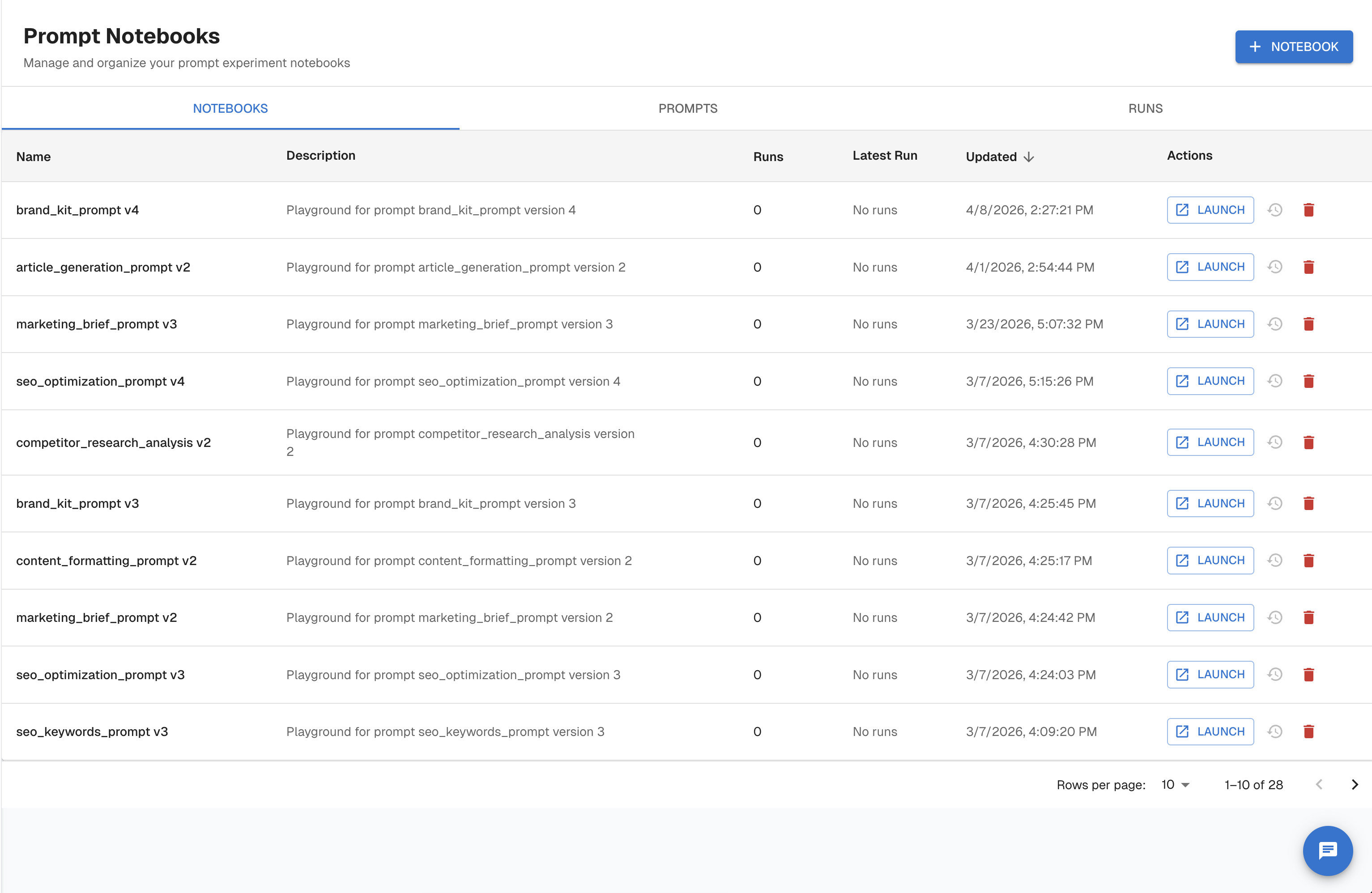
Prompt Notebooks are interactive workspaces for testing prompt versions against a live model before deploying changes. Each notebook is scoped to a specific prompt version.
Navigate to Prompt → Notebooks to see the list of notebooks. Each row shows the prompt name and version it covers, the number of runs, and the latest run timestamp. Click Launch to open a notebook, or + Notebook to create a new one.
Inside a notebook you can:
- Select Prompt and Version — switch between saved prompts and their versions from dropdowns at the top
- Select Provider and Model — choose the LLM to run against (e.g.,
anthropic / claude-opus-4-6) - Edit Messages — compose or modify the messages array with system, user, and assistant roles
- Add Tools — attach tool definitions to the request
- Set Variables — inject variable values into template placeholders
- Run All Prompts — execute the configured request and view the response inline
Using the API
Endpoint: POST /api/v1/prompt_renders
The render endpoint substitutes variables into the stored template and returns the fully resolved messages array. This is useful for logging the exact rendered text alongside traces or running pre-flight validation in CI.
rendered = client.render_prompt(
    task_id=task_id,
    name="system-prompt",
    version="production",       # tag, version number, or "latest"
    variables={
        "user_name": "Alice",
        "context": "The user is asking about their invoice from January.",
    },
    strict=True,                # raise an error if any variable is missing
)

for message in rendered["messages"]:
    print(message["role"], ":", message["content"])
const response = await fetch(
"https://your-arthur-host/api/v1/prompt_renders",
{
method: "POST",
headers: {
Authorization: `Bearer YOUR_API_KEY`,
"Content-Type": "application/json",
},
body: JSON.stringify({
task_id: "YOUR_TASK_ID",
prompt_name: "system-prompt",
prompt_version: "production",
completion_request: {
variables: [
{ name: "user_name", value: "Alice" },
{ name: "context", value: "The user is asking about their invoice from January." },
],
strict: true,
},
}),
}
);
const rendered = await response.json();
rendered.messages.forEach((m) => console.log(m.role, ":", m.content));curl -X POST "https://your-arthur-host/api/v1/prompt_renders" \
-H "Authorization: Bearer YOUR_API_KEY" \
-H "Content-Type: application/json" \
-d '{
"task_id": "YOUR_TASK_ID",
"prompt_name": "system-prompt",
"prompt_version": "production",
"completion_request": {
"variables": [
{ "name": "user_name", "value": "Alice" },
{ "name": "context", "value": "The user is asking about their invoice from January." }
],
"strict": true
}
}'
Strict modeWhen
strictistrue, the render call returns a validation error if any template variable is missing. Use this in CI pipelines or pre-flight checks to catch missing variables before they reach production.
Manage Prompt Versions
Delete a version
To delete a prompt version in the UI, open the version drawer in the prompt detail view, and use the delete option. Deletion is scoped to a single version — other versions of the same prompt are unaffected.
Soft deleteDeleted versions are hidden from the default list view but retained in the audit trail. Use
exclude_deleted=truewhen listing via the API to hide them from results.
Version lifecycle
stateDiagram-v2
    [*] --> v1 : First save
    v1 --> v2 : Edit & save
    v2 --> v3 : Edit & save
    v3 --> tagged : Tag as "production"
    tagged --> deleted : Delete version
    deleted --> [*]

    note right of tagged
        Tag can point to any version.
        Retrieve with version="production".
    end note
Using the API
Endpoint: DELETE /api/v1/tasks/{task_id}/prompts/{prompt_name}/versions/{prompt_version}
The prompt_version parameter accepts a version number, latest, an ISO datetime, or a tag.
client._prompts_api \
    .delete_an_agentic_prompt_version_api_v1_tasks_task_id_prompts_prompt_name_versions_prompt_version_delete(
        task_id=task_id,
        prompt_name="system-prompt",
        prompt_version="2",
    )
print("Version 2 deleted.")
const response = await fetch(
`https://your-arthur-host/api/v1/tasks/YOUR_TASK_ID/prompts/system-prompt/versions/2`,
{
method: "DELETE",
headers: { Authorization: `Bearer YOUR_API_KEY` },
}
);
if (response.status === 204) {
console.log("Version 2 deleted.");
}curl -X DELETE \
"https://your-arthur-host/api/v1/tasks/YOUR_TASK_ID/prompts/system-prompt/versions/2" \
-H "Authorization: Bearer YOUR_API_KEY"A successful deletion returns HTTP 204 No Content.
Summary
| Task | Where in the UI | API endpoint |
|---|---|---|
| Browse all prompts | Prompt → Prompts tab | GET /api/v1/tasks/{task_id}/prompts |
| View version history | Prompt detail → version drawer | GET /api/v1/tasks/{task_id}/prompts/{name}/versions |
| Retrieve a specific version | Version drawer → select version | GET /api/v1/tasks/{task_id}/prompts/{name}/versions/{version} |
| Assign a tag | Version drawer → tag selector | PATCH on the version resource |
| Test interactively | Prompt → Notebooks tab → Launch | POST /api/v1/prompt_renders |
| View run history | Prompt → Runs tab | — |
| Delete a version | Version drawer → delete | DELETE /api/v1/tasks/{task_id}/prompts/{name}/versions/{version} |
| Compare prompt variants | Prompt Runs | — |
| Experiment with agents | Agent Experimentation | — |
Key takeaways:
- Pin prompts by version number for deterministic reproducibility, or by tag (e.g.,
production) for flexible deployment without code changes. - Use Prompt Notebooks to validate prompt behavior against a live model before shipping a new version.
- Every completion run is recorded in Arthur's observability data — verify the exact prompt version that ran in production from the Runs tab in the UI.
Updated 5 months ago