
Guardrails Overview
Real-time validation of LLM prompts and responses with the Arthur GenAI Engine
Guardrails are the Arthur GenAI Engine's real-time validation layer for LLM applications. Your application sends a prompt to the engine before it reaches the model and sends the generated response to the engine before it reaches the user. The engine runs the rules you have configured and returns a result for each one. Your application decides what to do with those results.
Formerly Arthur ShieldGuardrails were previously offered as a standalone product called Arthur Shield. Shield has been folded into the GenAI Engine, and the Shield documentation site has been retired. Everything from those guides now lives in this section. The GenAI Engine is open source as part of Arthur Engine.
What guardrails detect
The GenAI Engine ships with rules for the following risk areas:
- Hallucination: responses that contradict or go beyond the context provided to the model
- Prompt Injection: attempts to override the model's instructions or leak its system prompt
- Toxicity: hate speech, profanity, and harmful or illegal requests
- Sensitive Data Leakage: use-case-specific confidential information, defined by examples you provide
- PII Leakage: personally identifiable information such as SSNs, credit card numbers, and email addresses
- Custom Rules: deterministic keyword and regex matching for patterns specific to your organization
Each rule page explains how detection works, what inputs the rule needs, and, for the model-based rules, how detection has been benchmarked.
How guardrails fit into your application
The GenAI Engine is API-first. Your application calls it before and after the LLM call, which breaks the request flow into four steps:
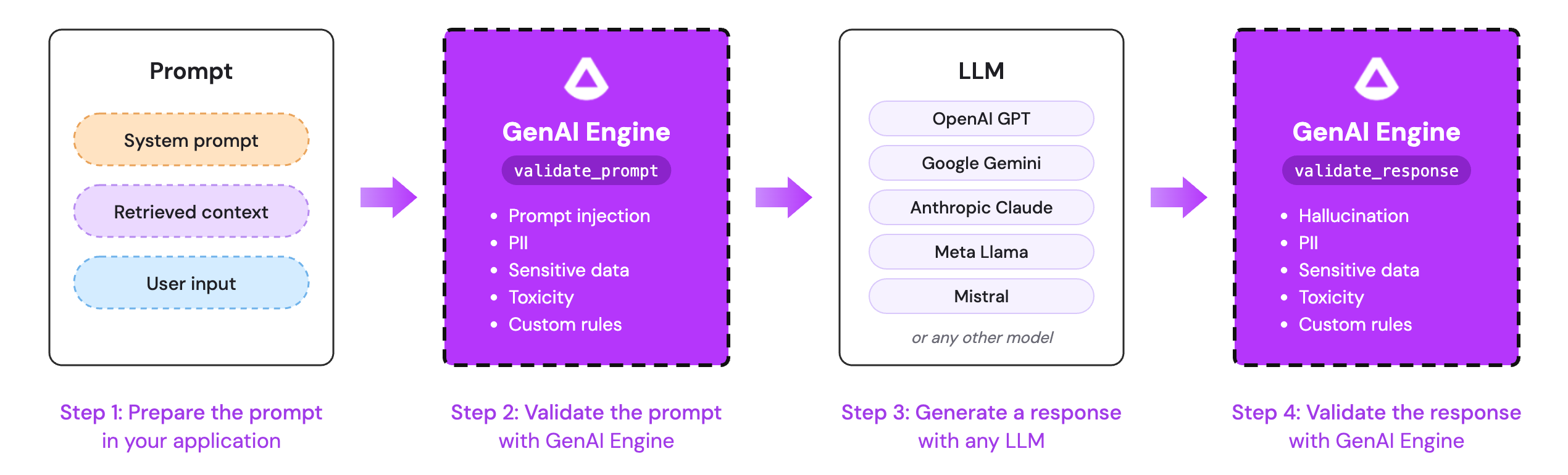
- Prepare the prompt. Assemble the fixed instructions, the user input, and any retrieved context.
- Validate the prompt. Call
validate_promptwith the user input. The engine runs every prompt-side rule enabled for the task. - Generate a response. Send the prompt to your LLM, whether that is a public endpoint or a model hosted in your own environment.
- Validate the response. Call
validate_responsewith the generated text and the context it was grounded on. The engine runs every response-side rule enabled for the task.
The Guardrails Quickstart walks through each step with request and response examples.
The engine does not block anything on its ownValidation endpoints return rule results. They do not modify the prompt, intercept the LLM call, or change what your user sees. Your application must read the results and decide whether to proceed, return a fallback message, or log the event and continue.
Where rules run
There are two places in the request flow where rules are checked.
Validate prompt
Treat prompt validation as the first line of defense. Inputs influence outputs, so catching toxic language, PII, or an injection attempt before the model sees it prevents a whole class of bad responses. Blocking at this stage also saves the LLM call entirely: when a prompt-side rule fails, respond to the user directly instead of calling the model.
Validate response
Response validation catches what the model produces. Hosted LLMs keep improving their general behavior, but production applications usually have narrower requirements than any general-purpose model enforces. The most widely used response-side rules are the use-case-specific ones, where teams configure hallucination, sensitive data, and custom rules for their particular domain.
Required inputs by rule
Depending on which rules are enabled, different fields need to be passed to the validation endpoints.
| Rule | Prompt | Response | Context needed? |
|---|---|---|---|
| Prompt Injection | ✅ | ||
| Sensitive Data | ✅ | ✅ | |
| Hallucination | ✅ | ✅ | |
| PII | ✅ | ✅ | |
| Custom (Regex, Keyword) | ✅ | ✅ | |
| Toxicity | ✅ | ✅ |
If a hallucination rule is enabled and no context is passed to validate_response, the rule returns a Skipped result rather than failing the request.
Required rule configuration
Some rules work out of the box. Others need configuration when the rule is created.
| Rule | What the rule needs when it is created |
|---|---|
| Hallucination | Nothing |
| Prompt Injection | Nothing |
| PII | Nothing (optionally, entities to disable and an allow list) |
| Sensitive Data | Examples of text that should and should not be flagged, plus an optional hint |
| Custom Rules | Regex patterns or a keyword list |
| Toxicity | Nothing (optionally, a threshold between 0 and 1; defaults to 0.5) |
The Rule Configuration Guide has the full request body for every rule type.
Guardrails and tracing
Every call to a validation endpoint emits a guardrail span. If your application is instrumented with OpenTelemetry and sends a W3C traceparent header, the span joins your existing trace under the calling span. If no header is sent, the engine derives a trace from the inference ID so the prompt and response validations still land together. The span carries a blocked flag, a blocked_reason summarizing any failed rules, and the same rule_results payload the API returns, so guardrail outcomes show up alongside your LLM spans in Traces.
Access and permissions
Validation and rule management are permission-gated. The roles that matter for guardrails are:
| Action | Roles |
|---|---|
| Create or archive default rules | ORG-ADMIN, DEFAULT-RULE-ADMIN |
| Create tasks and task rules, toggle rules | ORG-ADMIN, TASK-ADMIN, TENANT-USER |
| Call validation endpoints | ORG-ADMIN, TASK-ADMIN, VALIDATION-USER, TENANT-USER |
An admin key (GENAI_ENGINE_ADMIN_KEY) can call every endpoint. See Authentication, API Keys Management, and Evals Engine Roles for details.
In multi-tenant deployments, tasks belong to exactly one organization and tenant API keys are scoped to that organization. Default rules apply across every task the key can reach.
Where to go next
- Guardrails Quickstart: integrate validation into an existing application
- Rule Configuration Guide: configure default and task rules through the API
- Managing Multiple Applications with Tasks: isolate rule sets per use case
- Deployment Guide for Arthur GenAI Engine: run the engine locally or in your own environment
- Configure Model Provider: the hallucination and sensitive data rules call an LLM and need a provider configured
Updated 21 days ago